







Question: Design, write and test a program that performs a sort by using a binary search tree. The program should be able to sort lists of
Design, write and test a program that performs a sort by using a binary search tree. The program should be able to sort lists of integers or lists of fractions in either ascending or descending order. One set of radio buttons should be used to determine whether the lists contain integers or fractions and a second set should be used to specify the sort order. The main class P3GUI should create the Swing based GUI shown below. The GUI must be generated by code that you write. You may not use a drag-and-drop GUI generator.
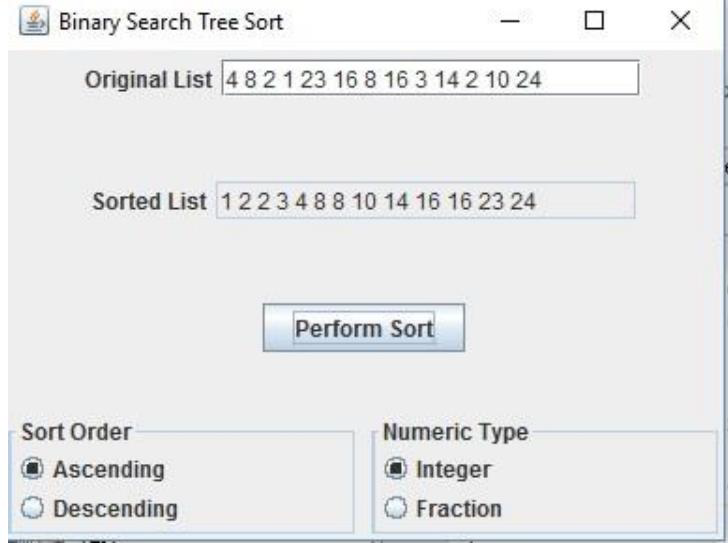
Pressing the Perform Sort button should cause all the numbers in the original list to be added to a binary search tree. Then an inorder traversal of the tree should be performed to generate the list in sorted order and that list should then be displayed in the sorted list text field. In addition to the main class that defines the GUI, you should have a generic class for the binary search tree. That class needs a method to initialize the tree, one that allows a new value to be inserted in the tree and one that performs an inorder tree traversal that generates and returns a string that contains the tree elements in sorted order. The insert method does not need to rebalance the tree if it becomes unbalanced. It should allow duplicate entries and it must be written using recursion.
The third class required for this project is one that defines fractions. It should have a constructor that accepts a string representation of a fraction and a toString method. It must implement the Comparable interface, which means a compareTo method is also required.
A second example of a run of this program is shown below that sorts fractions in descending order:
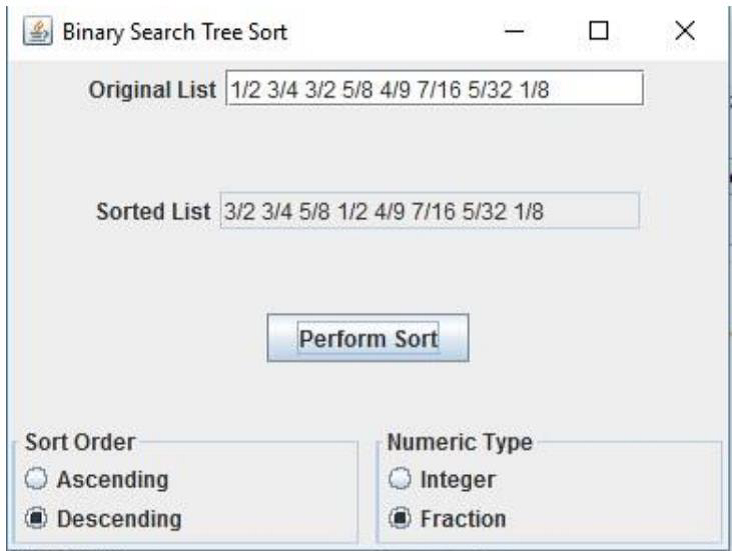
Note that fractions are to be written with a slash separating the numerator and denominator with no spaces on either side of the slash. Spaces should be used to separate the fractions.
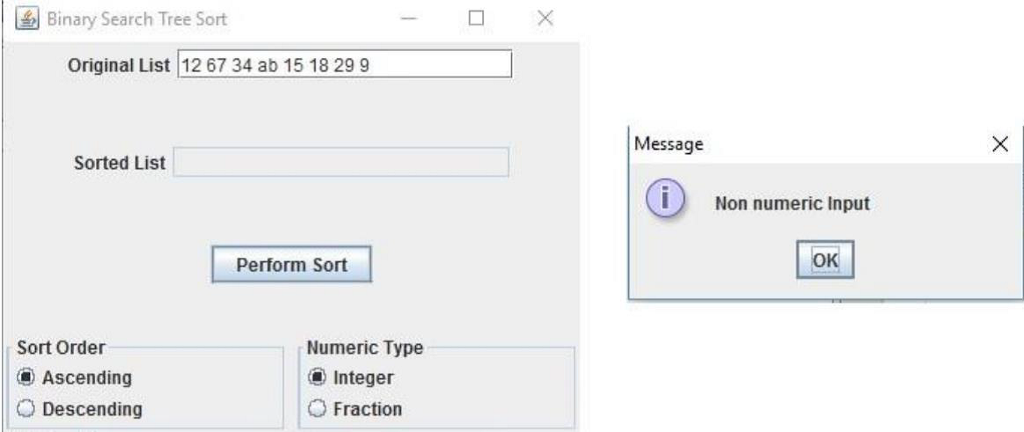
The only error checking required of this program is to check for nonnumeric input which includes improperly formatted fractions such as 3/4/8. Such malformed fractions should cause a NumberFormatExpression to be thrown. The main class must catch these exceptions and display an appropriate error message as shown below:
Your program should compile without errors.
The Google recommended Java style guide (https://google.github.io/styleguide/javaguide.html) should be used to format and document your code. Specifically, the following style guide attributes should be addressed: header comments include filename, author, date and brief purpose of the program; In-line comments used to describe major functionality of the code; meaningful variable names and prompts applied; class names are written in UpperCamelCase; variable names are written in lowerCamelCase; constant names are in written in All Capitals; braces use K&R style.
In addition the following design constraints should be followed: declare all instance variables private; avoid the duplication of code.
2)
The solution description document P3SolutionDescription (.pdf or .doc / .docx) containing the following: (1) Assumptions, main design decisions, error handling; (2) A UML class diagram that includes all classes you wrote. Do not include predefined classes. You need only include the class name for each individual class, not the variables or methods; (3) A table of test cases including the test cases that you have created to test the program. The table has 5 columns indicating (i) what aspect is tested, (ii) the input values, (iii) expected output, (iv) actual output and (v) if the test case passed or failed. Each test case will be defined in a table row.
(4) Two relevant screenshots of program execution; (5) Lessons learned from the project;
Binary Search Tree Sort original List 48 21 23 16 8 16 314 2 10 24 Sorted List 1 2 2 3 4 88 10 14 16 16 23 24 Perform sort Numeric Type Sort Order Integer Ascending Descending Fraction Binary Search Tree Sort original List 48 21 23 16 8 16 314 2 10 24 Sorted List 1 2 2 3 4 88 10 14 16 16 23 24 Perform sort Numeric Type Sort Order Integer Ascending Descending Fraction
Step by Step Solution
There are 3 Steps involved in it

Get step-by-step solutions from verified subject matter experts
 Study Help