





Question: Detailed coding instructions: The ORDER FORM Review the source code for this page, and then complete the following tasks. 1. You are required to add
 Detailed coding instructions: The ORDER FORM Review the source code for

this page, and then complete the following tasks. 1. You are required

to add your name to two (2) locations in the document. (2)
Detailed coding instructions: The ORDER FORM Review the source code for this page, and then complete the following tasks. 1. You are required to add your name to two (2) locations in the document. (2) In the

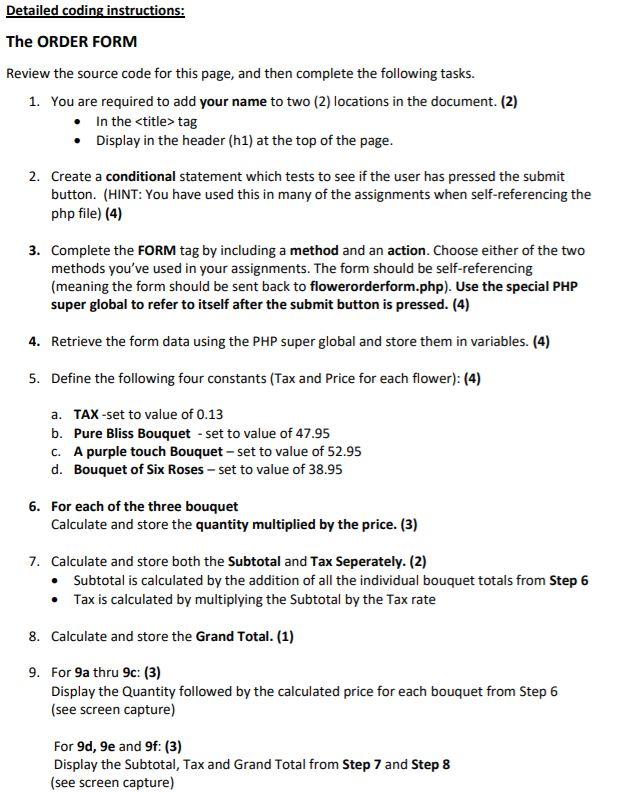
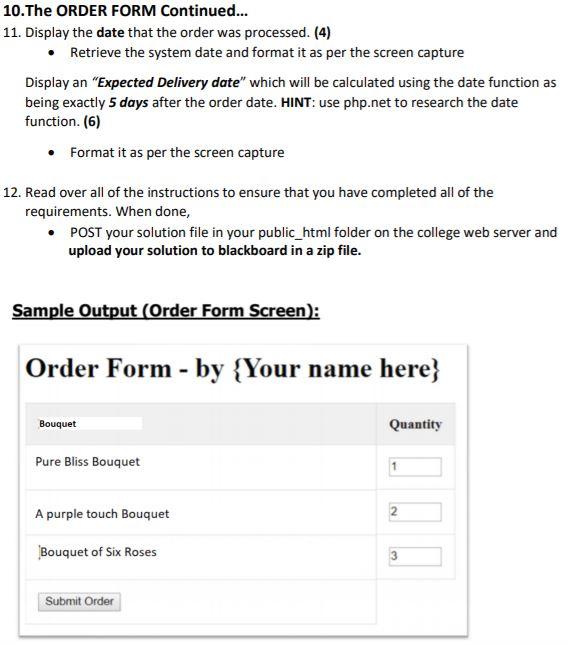
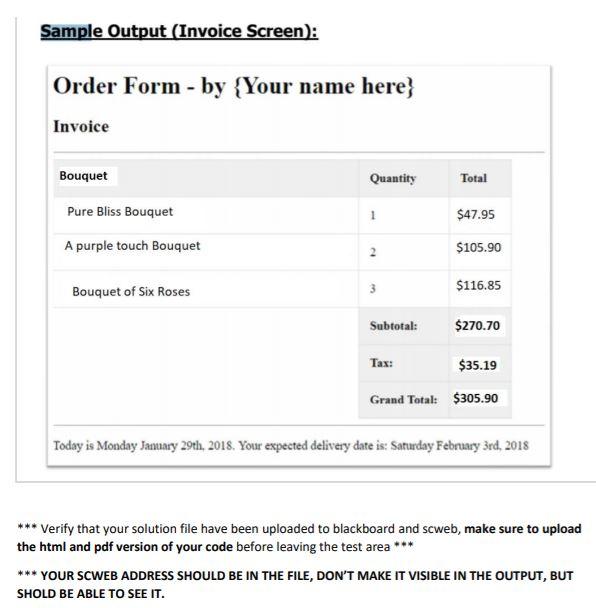
tag Display in the header (hl) at the top of the page. 2. Create a conditional statement which tests to see if the user has pressed the submit button. (HINT: You have used this in many of the assignments when self-referencing the php file) (4) 3. Complete the FORM tag by including a method and an action. Choose either of the two methods you've used in your assignments. The form should be self-referencing (meaning the form should be sent back to flowerorderform.php). Use the special PHP super global to refer to itself after the submit button is pressed. (4) 4. Retrieve the form data using the PHP super global and store them in variables. (4) 5. Define the following four constants (Tax and Price for each flower): (4) a. TAX-set to value of 0.13 b. Pure Bliss Bouquet - set to value of 47.95 c. A purple touch Bouquet - set to value of 52.95 d. Bouquet of Six Roses - set to value of 38.95 6. For each of the three bouquet Calculate and store the quantity multiplied by the price. (3) 7. Calculate and store both the Subtotal and Tax Seperately. (2) Subtotal is calculated by the addition of all the individual bouquet totals from Step 6 Tax is calculated by multiplying the Subtotal by the Tax rate 8. Calculate and store the Grand Total. (1) 9. For 9a thru 9c: (3) Display the Quantity followed by the calculated price for each bouquet from Step 6 (see screen capture) For 90, 9e and 9f: (3) Display the Subtotal, Tax and Grand Total from Step 7 and Step 8 (see screen capture) 10.The ORDER FORM Continued... 11. Display the date that the order was processed. (4) Retrieve the system date and format it as per the screen capture Display an "Expected Delivery date" which will be calculated using the date function as being exactly 5 days after the order date. HINT: use php.net to research the date function. (6) Format it as per the screen capture 12. Read over all of the instructions to ensure that you have completed all of the requirements. When done, POST your solution file in your public_html folder on the college web server and upload your solution to blackboard in a zip file. Sample Output (Order Form Screen): Order Form - by {Your name here) Bouquet Quantity Pure Bliss Bouquet 1 A purple touch Bouquet N Bouquet of Six Roses 3 Submit Order Sample Output (Invoice Screen): Order Form - by {Your name here} Invoice Bouquet Quantity Total Pure Bliss Bouquet 1 $47.95 A purple touch Bouquet 2 $105.90 Bouquet of Six Roses 3 $116.85 Subtotal: $270.70 Tax: $35.19 Grand Total: $305.90 Today is Monday January 29th, 2018. Your expected delivery date is: Saturday February 3rd, 2018 *** Verify that your solution file have been uploaded to blackboard and scweb, make sure to upload the html and pdf version of your code before leaving the test area *** *** YOUR SCWEB ADDRESS SHOULD BE IN THE FILE, DON'T MAKE IT VISIBLE IN THE OUTPUT, BUT SHOLD BE ABLE TO SEE IT

Step by Step Solution

There are 3 Steps involved in it

1 Expert Approved Answer
Step: 1 Unlock blur-text-image

Question Has Been Solved by an Expert!

Get step-by-step solutions from verified subject matter experts

Step: 2 Unlock
Step: 3 Unlock

Students Have Also Explored These Related Databases Questions!