







Question: DETAILED INSTRUCTIONS In this lab, you will create a simple game, described in parts one and two below. It is based on previous MATLAB assignments,
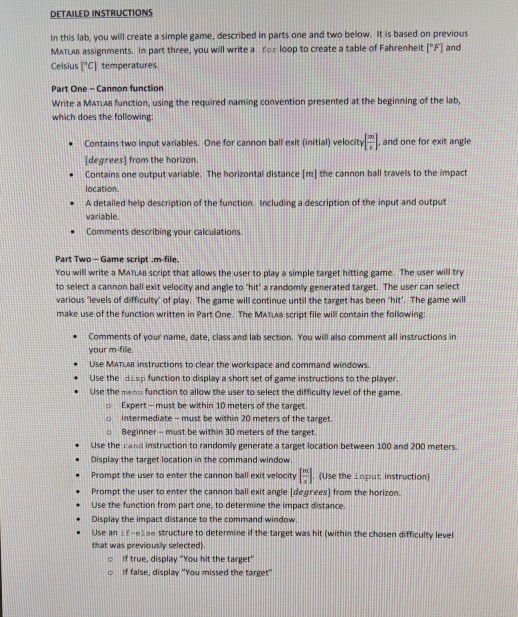
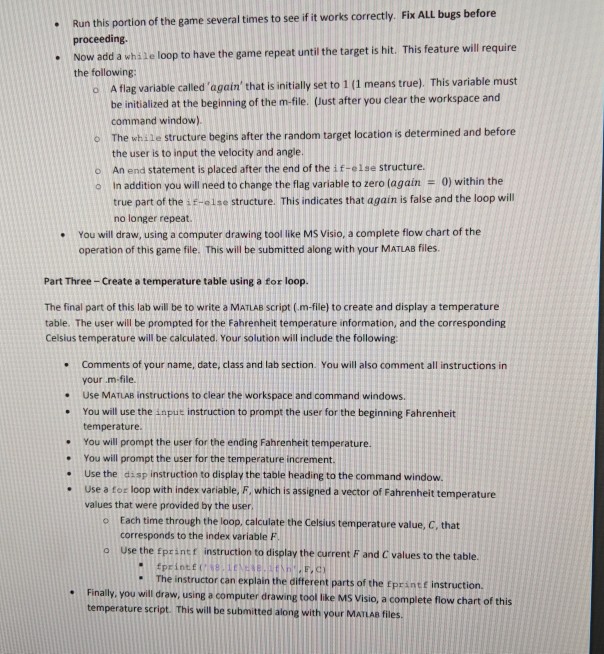
DETAILED INSTRUCTIONS In this lab, you will create a simple game, described in parts one and two below. It is based on previous MATLAB assignments, in part three, you will write a for loop to create a table of Fahrenheit [F1 and Celsius IC] temperatures Part One Cannon function Write a MATIAB function, using the required naming convention presented at the beginning of the lab, which does the following and one for exit angle Contains two input variables. One for cannon ball exit (initial) velocity [degrees] from the horizon. Contains one output variable. The horizontal distance Iml the cannon ball travels to the impact location A detailed help description of the function, including a description of the input and output ariable. Comments describing your calculations - Part Two- Game script .m-file. You will write a MATLABa soript that allows the userto play a simple target hitting game. The user will try to select a cannon ball exit velocity and angle to hit a randomly generated target. The user can select various levels of difficulty of play. The game will continue until the target has been 'hit. The game will make use of the function written in Part One. The MATIAS Script file will contain the following: Comments of your name, date, class and lab section. You will also comment all instructions in your m-file. Use MATLAB instructions to clear the workspace and command windows Use the diap function to display a short set of game instructions to the plaver Use the menu function to allow the user to select the difficulty level of the game. . . o Expert- must be within 10 meters of the target o Intermediate - o Beginner must be within 30 meters of the target must be within 20 meters of the target e Use the rand instruction to randomly generate a target location between 100 and 200 meters .Display the target location in the command window - Prompt the user to enter the cannon ball exit velccity gil Use the input instruction) Prompt the user to enter the cannon ball exit angle Idegrees) from the horizon. Display the impact distance to the command window that was previously selected) . Use the function from part one, to determine the impact distance - Use an if ese structure to determine if the target was hit (within the chosen difficulty level o If true, display "You hit the target o If false, display You missed the target
Step by Step Solution
There are 3 Steps involved in it

Get step-by-step solutions from verified subject matter experts
 Study Help