







Question: Detect File Types Write C++ or Python Code to detect file type. You read the file as a binary file and compare the first few
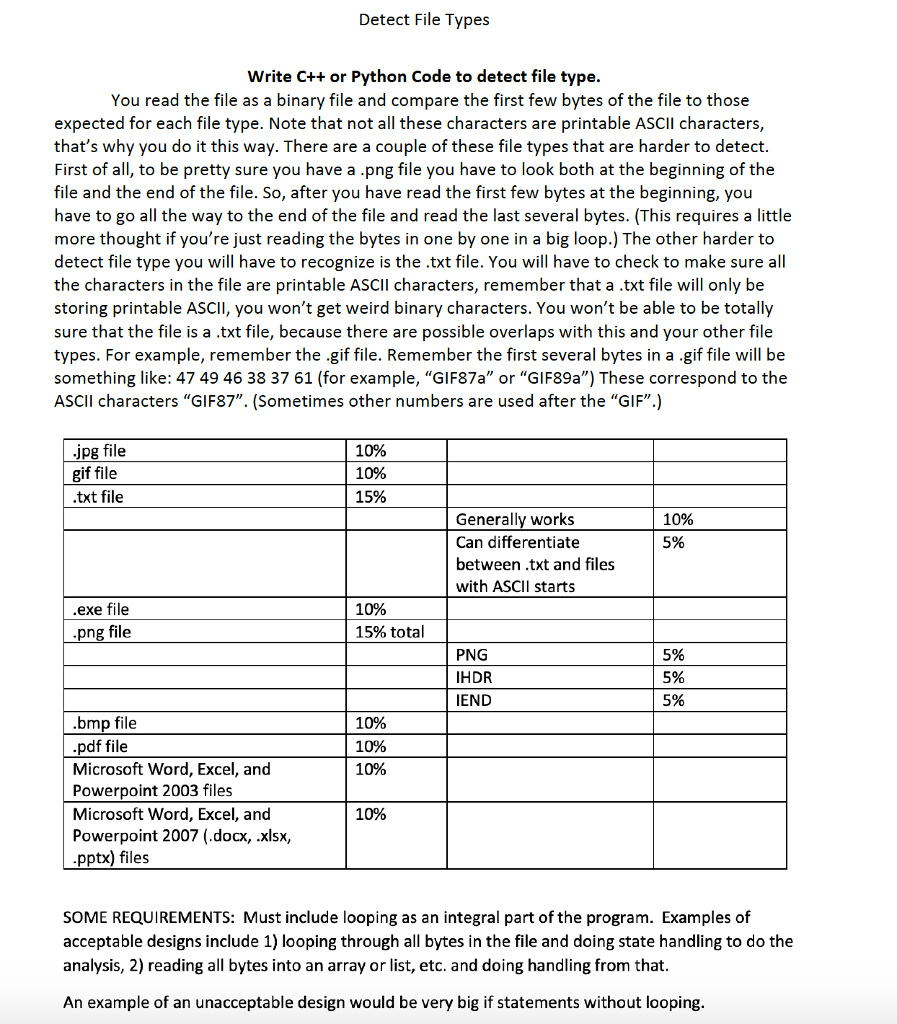
Detect File Types Write C++ or Python Code to detect file type. You read the file as a binary file and compare the first few bytes of the file to those expected for each file type. Note that not all these characters are printable ASCII characters, that's why you do it this way. There are a couple of these file types that are harder to detect First of all, to be pretty sure you have a .png file you have to look both at the beginning of the file and the end of the file. So, after you have read the first few bytes at the beginning, you have to go all the way to the end of the file and read the last several bytes. (This requires a little more thought if you're just reading the bytes in one by one in a big loop.) The other harder to detect file type you will have to recognize is the .txt file. You will have to check to make sure all the characters in the file are printable ASCII characters, remember that a .txt file will only be storing printable ASCII, you won't get weird binary characters. You won't be able to be totally sure that the file is a.txt file, because there are possible overlaps with this and your other file types. For example, remember the .gif file. Remember the first several bytes in a .gif file will be something like: 47 49 46 38 37 61 (for example, "GIF87a" or "GIF89a") These correspond to the ASCIl characters "GIF87". (Sometimes other numbers are used after the "GIF".) jpg file gif file txt file 10% 10% 15% Generally works Can differentiate between .txt and files with ASCII starts 10% 5% exe file png file 10% 15% total PNG HDR IEND 5% 5% 5% bmp file pdf file Microsoft Word, Excel, and Powerpoint 2003 files Microsoft Word, Excel, and Powerpoint 2007 (.docx, .xlsx, pptx) files 10% 10% 10% 10% SOME REQUIREMENTS: Must include looping as an integral part of the program. Examples of acceptable designs include 1) looping through all bytes in the file and doing state handling to do the analysis, 2) reading all bytes into an array or list, etc. and doing handling from that An example of an unacceptable design would be very big if statements without looping Detect File Types Write C++ or Python Code to detect file type. You read the file as a binary file and compare the first few bytes of the file to those expected for each file type. Note that not all these characters are printable ASCII characters, that's why you do it this way. There are a couple of these file types that are harder to detect First of all, to be pretty sure you have a .png file you have to look both at the beginning of the file and the end of the file. So, after you have read the first few bytes at the beginning, you have to go all the way to the end of the file and read the last several bytes. (This requires a little more thought if you're just reading the bytes in one by one in a big loop.) The other harder to detect file type you will have to recognize is the .txt file. You will have to check to make sure all the characters in the file are printable ASCII characters, remember that a .txt file will only be storing printable ASCII, you won't get weird binary characters. You won't be able to be totally sure that the file is a.txt file, because there are possible overlaps with this and your other file types. For example, remember the .gif file. Remember the first several bytes in a .gif file will be something like: 47 49 46 38 37 61 (for example, "GIF87a" or "GIF89a") These correspond to the ASCIl characters "GIF87". (Sometimes other numbers are used after the "GIF".) jpg file gif file txt file 10% 10% 15% Generally works Can differentiate between .txt and files with ASCII starts 10% 5% exe file png file 10% 15% total PNG HDR IEND 5% 5% 5% bmp file pdf file Microsoft Word, Excel, and Powerpoint 2003 files Microsoft Word, Excel, and Powerpoint 2007 (.docx, .xlsx, pptx) files 10% 10% 10% 10% SOME REQUIREMENTS: Must include looping as an integral part of the program. Examples of acceptable designs include 1) looping through all bytes in the file and doing state handling to do the analysis, 2) reading all bytes into an array or list, etc. and doing handling from that An example of an unacceptable design would be very big if statements without looping
Step by Step Solution
There are 3 Steps involved in it

Get step-by-step solutions from verified subject matter experts
 Study Help