





Question: Develop a resource schedule using as your template the loading chart below. Use the parallel method and heuristics given. Be sure to update each period
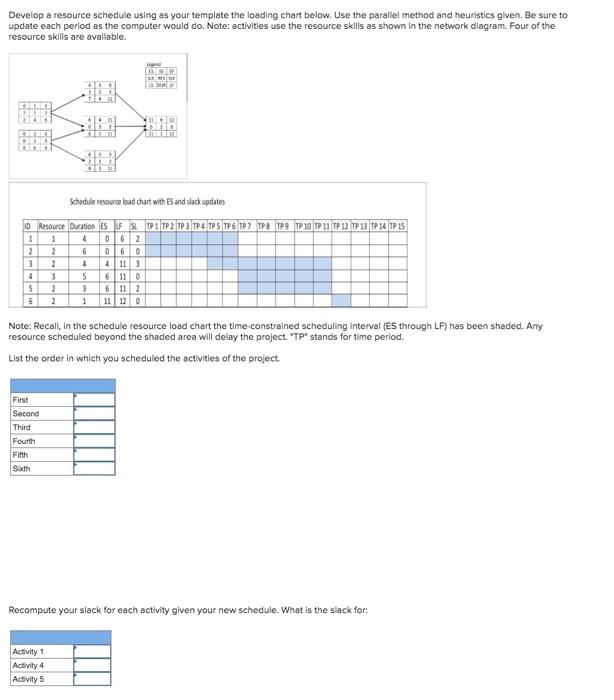
Develop a resource schedule using as your
Develop a resource schedule using as your template the loading chart below. Use the parallel method and heuristics given. Be sure to update each period as the computer would do. Note: activities use the resource skills as shown in the network diagram. Four of the resource skills are available. DO Schedule resource load chart with ES and slack updates Resource Duration SLTP 1 TP 2 1P3 TP 4 TPS 1P 6 TP7 P8 TP9 TP 10 T 11 TP 12 TP 13 T 14 TP 15 3 1 2 3 4 5 6 1 2 2 3 2 2 4 0162 6 060 4 4 11 3 5 6 11 0 3 6112 1 11 12 0 Note: Recall, in the schedule resource load chart the time-constrained scheduling interval (ES through LF) has been shaded. Any resource scheduled beyond the shaded area will delay the project. "TP" stands for time period. List the order in which you scheduled the activities of the project. First Second Third Fourth Fifth Sixth Recompute your slack for each activity given your new schedule. What is the slack for: Activity 1 Activity 4 Activity 5 Develop a resource schedule using as your template the loading chart below. Use the parallel method and heuristics given. Be sure to update each period as the computer would do. Note: activities use the resource skills as shown in the network diagram. Four of the resource skills are available. DO Schedule resource load chart with ES and slack updates Resource Duration SLTP 1 TP 2 1P3 TP 4 TPS 1P 6 TP7 P8 TP9 TP 10 T 11 TP 12 TP 13 T 14 TP 15 3 1 2 3 4 5 6 1 2 2 3 2 2 4 0162 6 060 4 4 11 3 5 6 11 0 3 6112 1 11 12 0 Note: Recall, in the schedule resource load chart the time-constrained scheduling interval (ES through LF) has been shaded. Any resource scheduled beyond the shaded area will delay the project. "TP" stands for time period. List the order in which you scheduled the activities of the project. First Second Third Fourth Fifth Sixth Recompute your slack for each activity given your new schedule. What is the slack for: Activity 1 Activity 4 Activity 5

Step by Step Solution

There are 3 Steps involved in it

1 Expert Approved Answer
Step: 1 Unlock blur-text-image

Question Has Been Solved by an Expert!

Get step-by-step solutions from verified subject matter experts

Step: 2 Unlock
Step: 3 Unlock

Students Have Also Explored These Related General Management Questions!