







Question: . . . Develop a Windows Forms app to analyze, search, and shift the content of strings. Strings to be evaluated are to be either
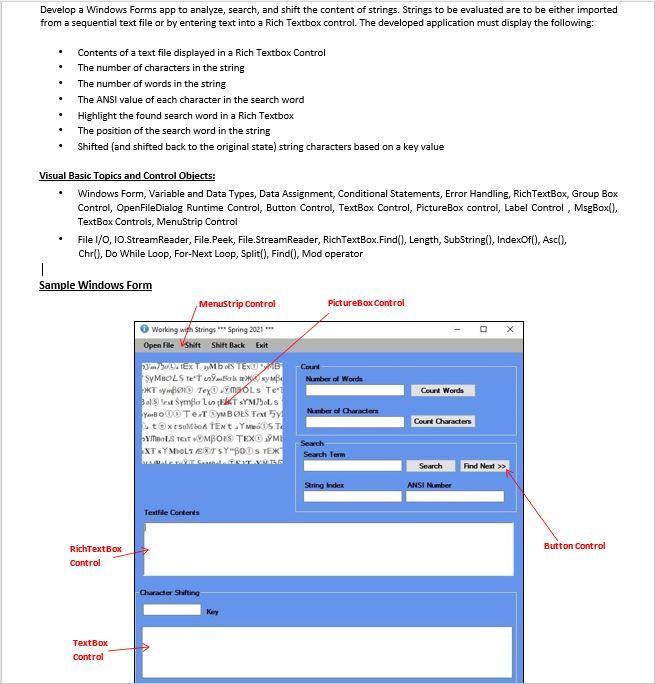
. . . Develop a Windows Forms app to analyze, search, and shift the content of strings. Strings to be evaluated are to be either imported from a sequential text file or by entering text into a Rich Textbox control. The developed application must display the following: Contents of a text file displayed in a Rich Textbox Control The number of characters in the string The number of words in the string The ANSI value of each character in the search word Highlight the found search word in a Rich Textbox The position of the search word in the string Shifted (and shifted back to the original state) string characters based on a key value Visual Basic Topics and Control Objects: Windows Form, Variable and Data Types, Data Assignment, Conditional Statements, Error Handling, RichTextBox, Group Box Control, OpenFileDialog Runtime Control, Button Control, TextBox Control, PictureBox control, Label Control , MsgBox(), TextBox Controls, MenuStrip Control File I/O, 10.StreamReader, File.Peek, File.StreamReader, RichTextBox.Find(), Length, SubString(), IndexOf(), Ascl), Chr(), Do While Loop, For-Next Loop, Split(), Find(), Mod operator PictureBox Control Sample Windows Form MenuStrip Control Working with Strings Spring 2021 Open Ple Shift Shift Back Exit WTEXT MOSTEKO SYMBOLS Tetborste symbo Bolt Symbol T SYM0LS Text 5. txtSMA TENtYKDS TO YMOLS TCIT VMBOLS TEXT ME XTY MOLTEX SYBOS TEX Court Number of Words Count Words Number of Character Court Character Search Search Term Search Find Next >> Sering Index ANSI Number Textile Contents Button Control RichTextBox Control Character Skilting Key TextBox Control
Step by Step Solution
There are 3 Steps involved in it

Get step-by-step solutions from verified subject matter experts
 Study Help