







Question: Develop and execute an SQL script file in Microsoft SQL Server to create the database tables from the above ERD. Using SQL Server, develop and
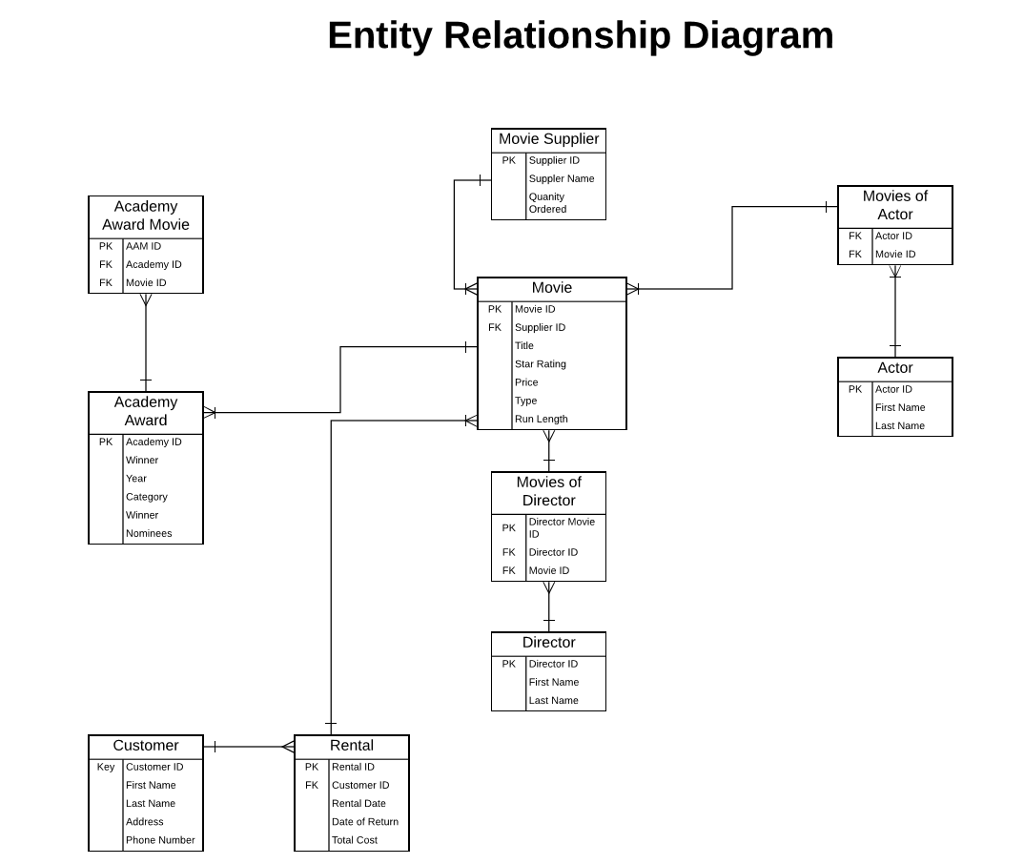
- Develop and execute an SQL script file in Microsoft SQL Server to create the database tables from the above ERD.
- Using SQL Server, develop and execute an SQL script file of DML SQL INSERT statements to populate the tables using SQL INSERT statements for at least 5 rows of data per table.
- Using SQL Server, develop and execute an SQL script file to:
- Show the contents of each of your tables, one at a time
- Retrieve all of the customers' names, account numbers, and addresses (street and zip code only), sorted by account number
- Retrieve all of the DVDs rented in the last 30 days and sort in chronological rental date order
- Update a customer name to change their maiden names to married names. You can choose which row to update. Make sure that you use the primary key column in your WHERE clause to affect only a specific row.
- Delete a specific customer from the database. You can choose which row to delete. Make sure that you use the primary key column in your WHERE clause to affect only a specific row.
Entity Relationship Diagram Movie Supplier PK Supplier ID Suppler Name Quanity Movies of Academy Award Movie PK AAM ID FK Academy ID FK Movie ID Actor FK Actor ID FK Movie ID Movie PK Movie ID FK Supplier ID Title Star Rating Price Type Run Length Actor PK Actor ID Academy Award First Name Last Name PK Academy ID Winner Year Category Winner Movies of Director Director Movie ID PK FK Director ID FK Movie ID Director PK Director ID First Name Last Name Customer Rental Key Customer ID PK Rental ID First Name Last Name Address Phone Number FK Customer ID Rental Date Date of Return Total Cost
Step by Step Solution
There are 3 Steps involved in it
1 Expert Approved Answer
Step: 1 Unlock

Question Has Been Solved by an Expert!
Get step-by-step solutions from verified subject matter experts
Step: 2 Unlock
Step: 3 Unlock
 Study Help