







Question: Develop the Calendar application In this exercise, youll create an application that displays a calendar for the current month: Note: To build this calendar, youre
Develop the Calendar application
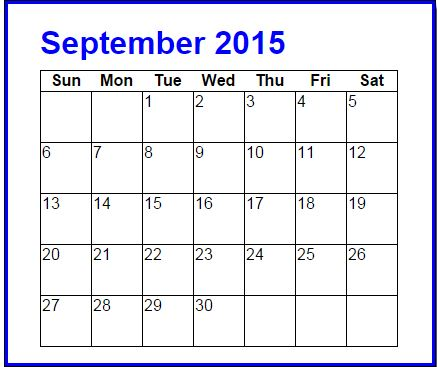
In this exercise, youll create an application that displays a calendar for the current month:
Note: To build this calendar, youre going to need the getDay method of a Date object. This method returns the number of the day of the week (0 for Sunday, 1 for Monday, etc.).
Open the HTML, CSS, and JavaScript files from: calendar.zip
In the HTML file, note the span element within the h1 element that will display the month name and year. Note also the table element that contains one row. To build the calendar, you need to add rows to this table after the row that it already contains.
In the CSS file, note the rule set for the td elements of the table. The rules in this set will format the calendar as shown above.
In the JavaScript file, note that four functions are supplied. The $ function. A getMonthText function that accepts the number for a month and returns the month name in text. The start of a getLastDayofMonth function. And the start of the onload event handler.
Write the code for the getLastDayofMonth function. It should use the number passed in the currentMonth parameter to calculate and return the last day of the current month.
In the onload event handler, write the code that gets and displays the name of the current month and the current year above the month table.
In the onload event handler, write the code that loops through the days of the month to create the rows for the calendar. Remember to deal with the blank dates that can occur at the beginning of the first week and the end of the last week of the month. Use a tr element for each new row and td elements within the rows for the days of the months. To display the rows, add them to the innerHTML property of the calendar table, but remember that the new rows have to go after the row thats in the HTML.
Calendar.js
var $ = function (id) { return document.getElementById(id); };
var getMonthText = function(currentMonth) {
if (currentMonth === 0) { return "January"; }
else if (currentMonth === 1) { return "February"; }
else if (currentMonth === 2) { return "March"; }
else if (currentMonth === 3) { return "April"; }
else if (currentMonth === 4) { return "May"; }
else if (currentMonth === 5) { return "June"; }
else if (currentMonth === 6) { return "July"; }
else if (currentMonth === 7) { return "August"; }
else if (currentMonth === 8) { return "September"; }
else if (currentMonth === 9) { return "October"; }
else if (currentMonth === 10) { return "November"; }
else if (currentMonth === 11) { return "December"; }
};
var getLastDayofMonth = function(currentMonth) {
};
window.onload = function () {
};
Inden.html
| Sun | Mon | Tue | Wed | Thu | Fri | Sat |
|---|
Calendar.css
body {
font-family: Arial, Helvetica, sans-serif;
background-color: white;
margin: 0 auto;
width: 360px;
border: 3px solid blue;
padding: 0 2em 1em;
}
h1 {
color: blue;
margin-bottom: .25em;
}
table {
border-collapse: collapse;
border: 1px solid black;
}
td {
width: 3em;
height: 3em;
vertical-align: top;
padding: 0.5 0 0 0.5;
border: 1px solid black;
}
September 2015 Sun Mon Tue Wed Thu Fri Sat 6 10 11 12 13 14 15 16 17 18 19 20 21 22 23 242526 27 28 29 30 September 2015 Sun Mon Tue Wed Thu Fri Sat 6 10 11 12 13 14 15 16 17 18 19 20 21 22 23 242526 27 28 29 30
Step by Step Solution
There are 3 Steps involved in it

Get step-by-step solutions from verified subject matter experts
 Study Help