







Question: Develope a python(3.6) program to analyse the data GDP txt link: https://www.cse.msu.edu/~cse231/Online/Projects/Project03/GDP.txt Video to help the project:https://www.youtube.com/watch?v=tOlzPag97JI&feature=youtu.be Assignment Specifications The lines of interest in the
Develope a python(3.6) program to analyse the data

GDP txt link: https://www.cse.msu.edu/~cse231/Online/Projects/Project03/GDP.txt
Video to help the project:https://www.youtube.com/watch?v=tOlzPag97JI&feature=youtu.be
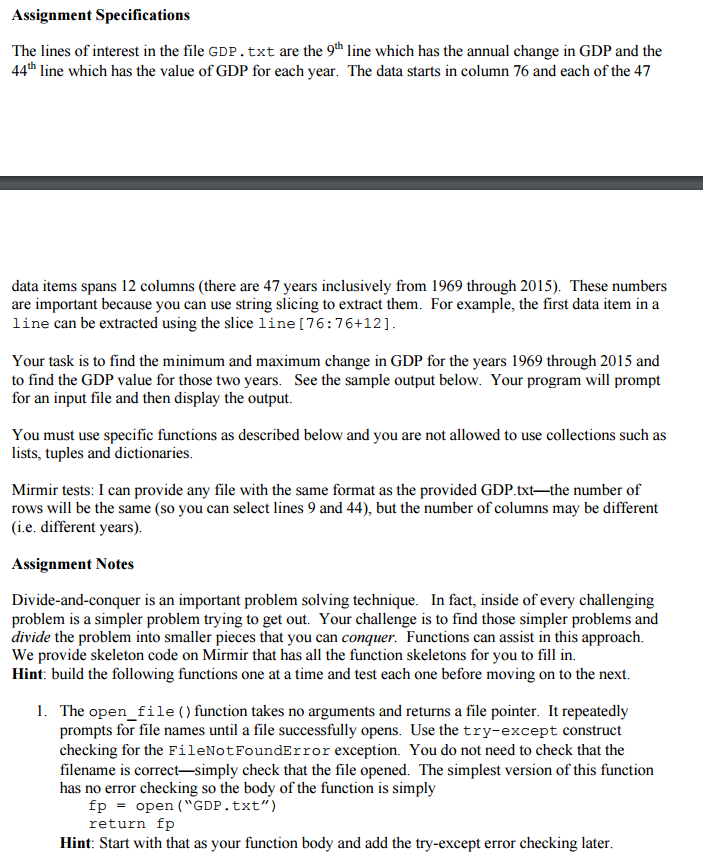
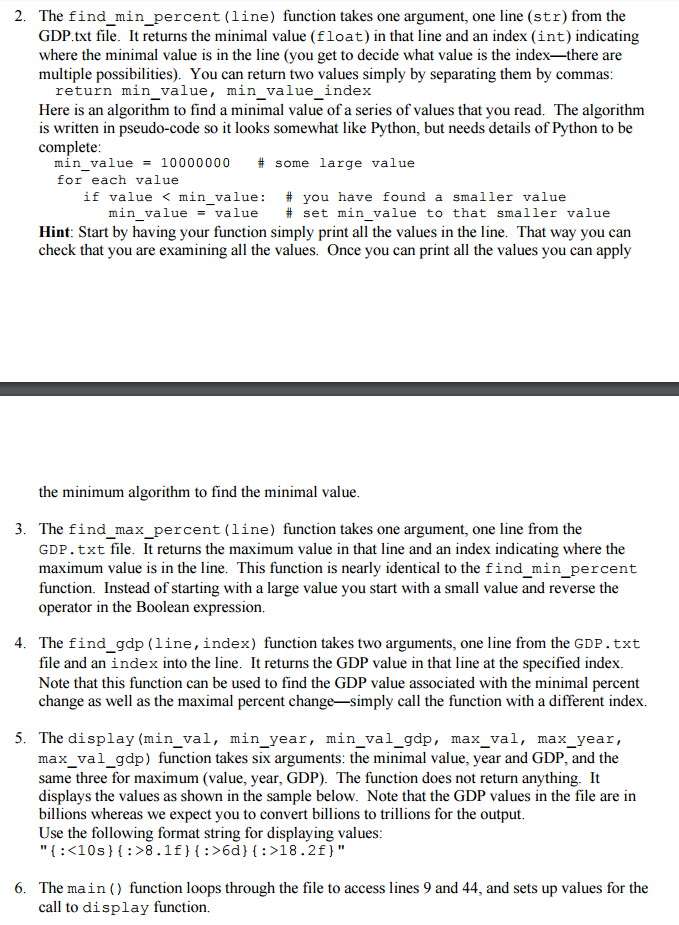
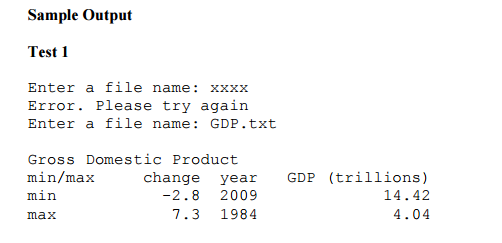
Assignment Specifications The lines of interest in the file GDP. txt are the 9h line which has the annual change in GDP and the 44th line which has the value of GDP for each year. The data starts in column 76 and each of the 47 data items spans 12 columns (there are 47 years inclusively from 1969 through 2015). These numbers are important because you can use string slicing to extract them. For example, the first data item in a line can be extracted using the slice line [76:76+12] Your task is to find the minimum and maximum change in GDP for the years 1969 through 2015 and to find the GDP value for those two years. See the sample output below. Your program will prompt for an input file and then display the output. You must use specific functions as described below and you are not allowed to use collections such as lists tuples and dictionaries. Mirmir tests: I can provide any file with the same format as the provided GDP.txt-the number of rows will be the same (so you can select lines 9 and 44), but the number of columns may be different (i.e. different years) Assignment Notes Divide-and-conquer is an important problem solving technique. In fact, inside of every challenging problem is a simpler problem trying to get out. Your challenge is to find those simpler problems and divide the problem into smaller pieces that you can conquer. Functions can assist in this approach. We provide skeleton code on Mirmir that has all the function skeletons for you to fill in Hint: build the following functions one at a time and test each one before moving on to the next. 1. The open file function takes no arguments and returns a file pointer. It repeatedly prompts for file names until a file successfully opens. Use the try-except construct checking for the FileNotFoundError exception. You do not need to check that the filename is correct-simply check that the file opened. The simplest version of this function has no error checking so the body of the function is simply fp open ("GDP txt") return fp Hint: Start with that as your function body and add the try-except error checking later
Step by Step Solution
There are 3 Steps involved in it

Get step-by-step solutions from verified subject matter experts
 Study Help