







Question: Developing Android applications that include multiple activities and fragments. Write an Android Application that demonstrates the activity life cycle and fragments lifecycle. The main activity
Developing Android applications that include multiple activities and fragments.
Write an Android Application that demonstrates the activity life cycle and fragments lifecycle. The main activity should have two fragments. The top fragment contains a list view control whose items are the names of two other activities, AIActivity and VRActivity. The bottom fragment uses a text view control to display the list of life cycle methods that take place when the main activity starts.
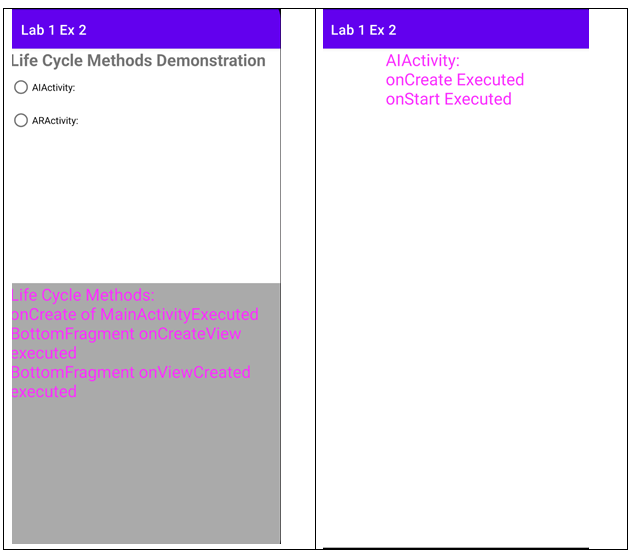
Use Toast class methods to display a quick message in fragments onCreateView and onStart methods.
Alternatively, use Bundle to pass information from the main activity to the bottom fragment:
//use Bundle to pass data to the fragment val args = Bundle() args.putString("onCreate", "onCreate of MainActivityExecuted") //create a fragment reference
val displayFragment = supportFragmentManager.findFragmentById( R.id.fragment_container_view_bottom) as BottomFragment displayFragment.arguments =args
Then, in onCreateView of the bottom fragment, you can use the following code to get the information from Bundle:
// get the data from Bundle val info = arguments?.getString("onCreate")
The AIActivity and ARActivity should each have a TextView control to display messages when onCreate, onStart, onStop, and onDestroy are executed.
Declare the String resources in strings.xml file.
Life Cycle Methods Demonstration AlActivity. ARActivity
Step by Step Solution
There are 3 Steps involved in it

Get step-by-step solutions from verified subject matter experts
 Study Help