







Question: DFD Diagrams MGMT 3112 Systems Analysis and Design In-Class DFD Exercise In this exercise, you will develop data flow diagrams for a small portion of
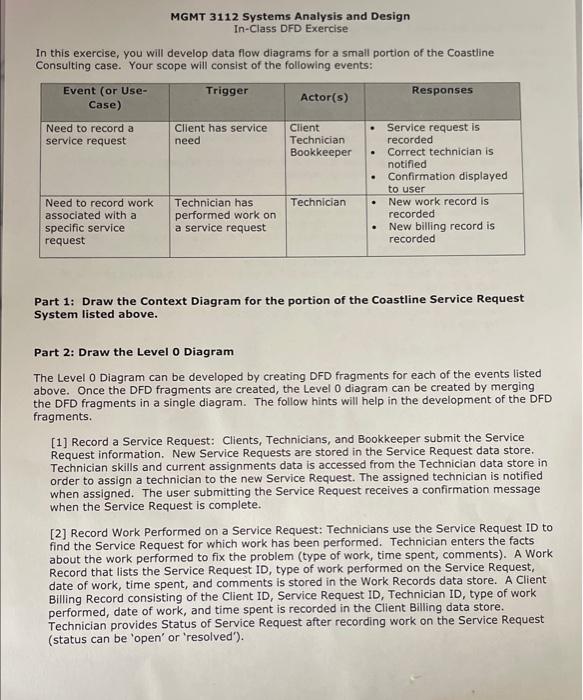
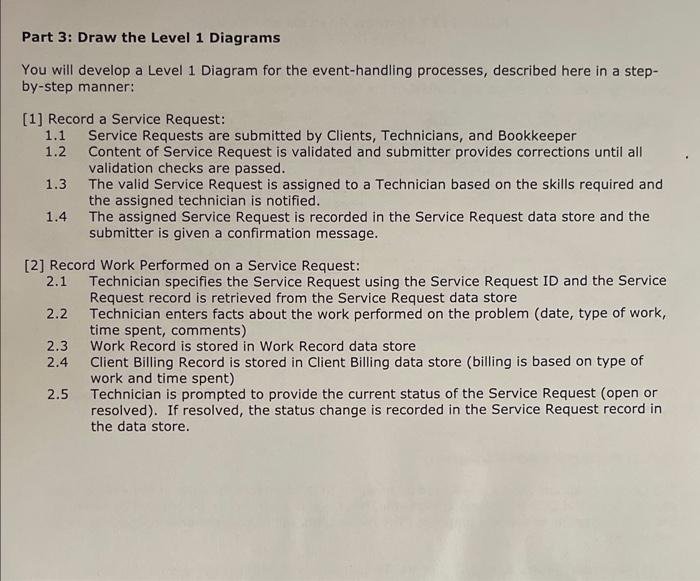
MGMT 3112 Systems Analysis and Design In-Class DFD Exercise In this exercise, you will develop data flow diagrams for a small portion of the Coastline Consulting case. Your scope will consist of the following events: Part 1: Draw the Context Diagram for the portion of the Coastline Service Request System listed above. Part 2: Draw the Level O Diagram The Level 0 Diagram can be developed by creating DFD fragments for each of the events listed above. Once the DFD fragments are created, the Level 0 diagram can be created by merging the DFD fragments in a single diagram. The follow hints will help in the development of the DFD fragments. [1] Record a Service Request: Clients, Technicians, and Bookkeeper submit the Service Request information. New Service Requests are stored in the Service Request data store. Technician skills and current assignments data is accessed from the Technician data store in order to assign a technician to the new Service Request. The assigned technician is notified when assigned. The user submitting the Service Request receives a confirmation message when the Service Request is complete. [2] Record Work Performed on a Service Request: Technicians use the Service Request ID to find the Service Request for which work has been performed. Technician enters the facts about the work performed to fix the problem (type of work, time spent, comments). A Work Record that lists the Service Request ID, type of work performed on the Service Request, date of work, time spent, and comments is stored in the Work Records data store. A Client Billing Record consisting of the Client ID, Service Request ID, Technician ID, type of work performed, date of work, and time spent is recorded in the Client Billing data store. Technician provides Status of Service Request after recording work on the Service Request (status can be 'open' or 'resolved'). You will develop a Level 1 Diagram for the event-handling processes, described here in a stepby-step manner: [1] Record a Service Request: 1.1 Service Requests are submitted by Clients, Technicians, and Bookkeeper 1.2 Content of Service Request is validated and submitter provides corrections until all validation checks are passed. 1.3 The valid Service Request is assigned to a Technician based on the skills required and the assigned technician is notified. 1.4 The assigned Service Request is recorded in the Service Request data store and the submitter is given a confirmation message. [2] Record Work Performed on a Service Request: 2.1 Technician specifies the Service Request using the Service Request ID and the Service Request record is retrieved from the Service Request data store 2.2 Technician enters facts about the work performed on the problem (date, type of work, time spent, comments) 2.3 Work Record is stored in Work Record data store 2.4 Client Billing Record is stored in Client Billing data store (billing is based on type of work and time spent) 2.5 Technician is prompted to provide the current status of the Service Request (open or resolved). If resolved, the status change is recorded in the Service Request record in the data store. MGMT 3112 Systems Analysis and Design In-Class DFD Exercise In this exercise, you will develop data flow diagrams for a small portion of the Coastline Consulting case. Your scope will consist of the following events: Part 1: Draw the Context Diagram for the portion of the Coastline Service Request System listed above. Part 2: Draw the Level O Diagram The Level 0 Diagram can be developed by creating DFD fragments for each of the events listed above. Once the DFD fragments are created, the Level 0 diagram can be created by merging the DFD fragments in a single diagram. The follow hints will help in the development of the DFD fragments. [1] Record a Service Request: Clients, Technicians, and Bookkeeper submit the Service Request information. New Service Requests are stored in the Service Request data store. Technician skills and current assignments data is accessed from the Technician data store in order to assign a technician to the new Service Request. The assigned technician is notified when assigned. The user submitting the Service Request receives a confirmation message when the Service Request is complete. [2] Record Work Performed on a Service Request: Technicians use the Service Request ID to find the Service Request for which work has been performed. Technician enters the facts about the work performed to fix the problem (type of work, time spent, comments). A Work Record that lists the Service Request ID, type of work performed on the Service Request, date of work, time spent, and comments is stored in the Work Records data store. A Client Billing Record consisting of the Client ID, Service Request ID, Technician ID, type of work performed, date of work, and time spent is recorded in the Client Billing data store. Technician provides Status of Service Request after recording work on the Service Request (status can be 'open' or 'resolved'). You will develop a Level 1 Diagram for the event-handling processes, described here in a stepby-step manner: [1] Record a Service Request: 1.1 Service Requests are submitted by Clients, Technicians, and Bookkeeper 1.2 Content of Service Request is validated and submitter provides corrections until all validation checks are passed. 1.3 The valid Service Request is assigned to a Technician based on the skills required and the assigned technician is notified. 1.4 The assigned Service Request is recorded in the Service Request data store and the submitter is given a confirmation message. [2] Record Work Performed on a Service Request: 2.1 Technician specifies the Service Request using the Service Request ID and the Service Request record is retrieved from the Service Request data store 2.2 Technician enters facts about the work performed on the problem (date, type of work, time spent, comments) 2.3 Work Record is stored in Work Record data store 2.4 Client Billing Record is stored in Client Billing data store (billing is based on type of work and time spent) 2.5 Technician is prompted to provide the current status of the Service Request (open or resolved). If resolved, the status change is recorded in the Service Request record in the data store
Step by Step Solution
There are 3 Steps involved in it

Get step-by-step solutions from verified subject matter experts
 Study Help