







Question: dictionaries - Coding Problem 4.5.2 (External resource) (3.0 points possible) French.py Submit Run Grades Reset #Do not change the line of code below. It's at
 dictionaries
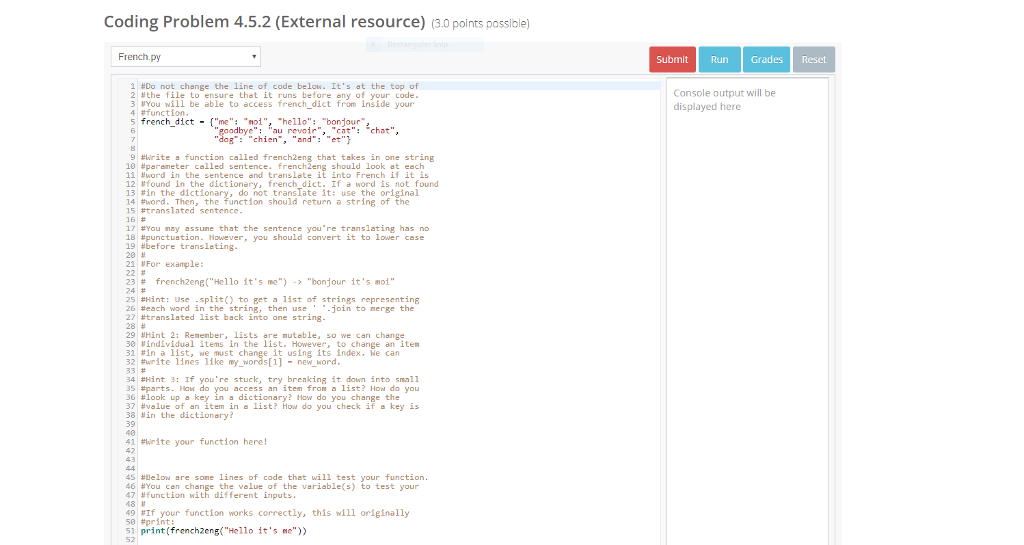
- Coding Problem 4.5.2 (External resource) (3.0 points possible) French.py Submit Run Grades Reset #Do not change the line of code below. It's at the top of 2 #the file to ensure that it runs before any of your code Console output will be displayed here 3:You will be able to access french dict from inside your 4 #function 5 french dict -"me" "noi", "hello":"bonjour, yeauvoir ": "chat", "chien "and": 9#write a function called french2eng that takes in one string 10 #parameter called sentence. french 2eng should look at each 11 #word in the sentence and translate it into French if it is 12?found in the dictionary, french dict. If a word is not found 13 #in the dicti 14 #word. Then, the function should return a string of the al 6 #translatedsentencection should return ausering ori 17 #You may assure that the sentence you're translating has no 18 #punctuation. However, you should convert it to lower case 19 #before translating 20 21 For example: 23 # 24 # french2eng("Hello it's ne")-> "bonjour It's moi" 25 Hint: Use split) to get a list of strings representing 26 #each word in the string, then use join to nerge the 27 #tran slated list back into one string. 28 # 29 #Hint 2: Remember ,.lists are mutable, so we can change 30 #individual items in the list. However, to change anitem 31#in a list, we must cha it using its index. We can 32 #write lines like my-wo ds[1] " new word 33 # 34 #Hint 3: If you're stuck, try breaking it dawn into small 35 #parts. How do you access an item from a list? How do you 36 #look up a key in a 7value of an item in a list? How do you check if a key is 36 #in the dictionary? 39 40 41 #write your function here! 42 y? How do you change the your function 45 # elow are some lines of code that will test 46 #You can change the value of the variable(s) to test your 47 #function with different inputs 49#If your function works correctly, this will originally 50 #print 51 print (rencheg("Hello it's ne")
Step by Step Solution
There are 3 Steps involved in it

Get step-by-step solutions from verified subject matter experts
 Study Help