



Question: Directions For this assignment and all future assignments, you can use either IDLE, Mu or an editor of your choice. To create a new file:
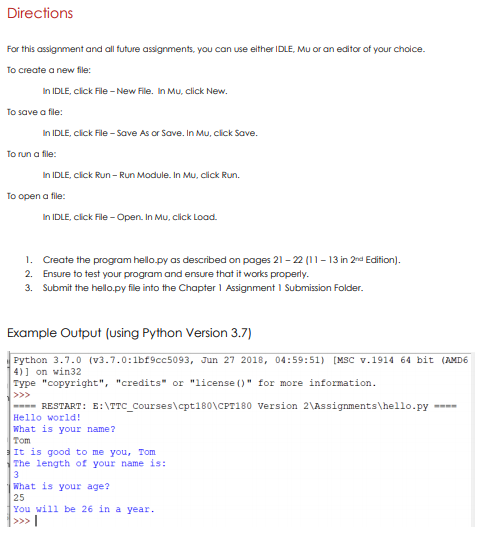
Directions For this assignment and all future assignments, you can use either IDLE, Mu or an editor of your choice. To create a new file: In IDLE, click File - New Fille. In Mu, click New. To save a file: In IDLE, click File - Save As or Save. In Mu, click Save. To run a file: In IDLE, click Run-Run Module. In Mu.click Run. To open a file: In IDLE, click File-Open. In Mu, click Load. 1. Create the program hello.py as described on pages 21-22(11-13 in 2nd Edition). 2. Ensure to test your program and ensure that it works properly. 3. Submit the hello.py file into the Chapter 1 Assignment 1 Submission Folder. Example Output (using Python Version 3.7) Python 3.7.0 (V3.7.0:1bf9cc5093, Jun 27 2018, 04:59:51) [MSC v.1914 64 bit (AMD6 4)] on win32 Type "copyright", "credits" or "license()" for more information. ---RESTART: E:\TTC_Courses\cpt1B0\CPT180 version 2\Assignments\hello.py Hello world! What is your name? Tom It is good to me you, Tom The length of your name is: 3 What is your age? 25 You will be 26 in a year. >>>|
Step by Step Solution
There are 3 Steps involved in it

Get step-by-step solutions from verified subject matter experts