







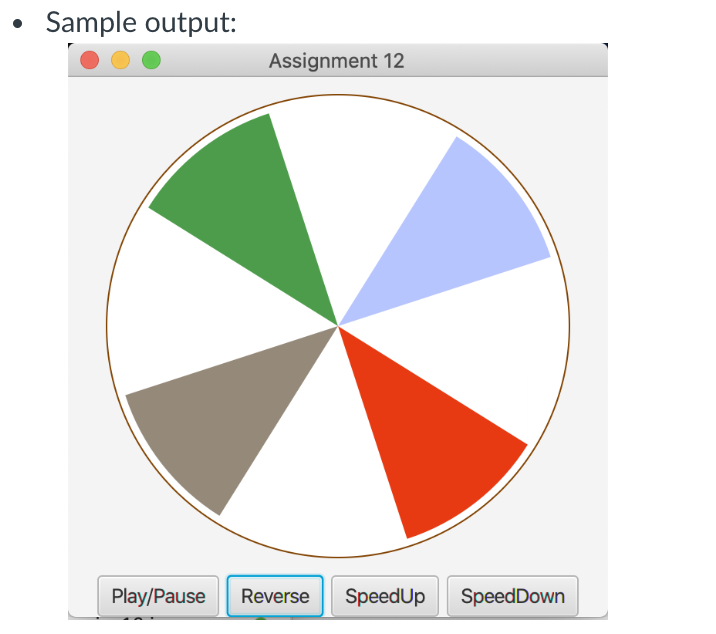
Question: ( Display a running fan ) Write a program that displays a running fan, as shown in below. Use the Pause, Reverse, SpeedUp and SpeedDown
Display a running fan
Write a program that displays a running fan, as shown in below. Use the Pause, Reverse, SpeedUp and SpeedDown buttons to pause, reverse, speed up and speed down the running fan.
Suggested Working Steps
Create a Timeline animation create a keyFrame with a duration and an event Handler
The Event Handler Increment the startAngle for each Arc object in the fan
Start the animation the fan should be running after the program starts For example,
Create a handler for changing the startAngle for each Arc
EventHandler eventHandler e
fan.setStartAnglefangetStartAngle increment;
;
Register Event Handler for each button
btPlayPause check the animation status. If it is running, pause the animation.
btReverse change the sign of the increment of the startAngle for each arc in the fan.
btSpeedUp increase the speed of the running fan.
btSpeedDown decrease the speed of the running fan.
For example
Register handlers on buttons
btPlayPause.setOnActione
if animationgetStatus Animation.Status.RUNNING
animation.pause;
else
animation.play;
;
btReverse.setOnActione
increment ;
;
Submit your source codes Assignmentjava and screenshots at Assignment in Canvas.Sample output:
Step by Step Solution
There are 3 Steps involved in it
1 Expert Approved Answer
Step: 1 Unlock

Question Has Been Solved by an Expert!
Get step-by-step solutions from verified subject matter experts
Step: 2 Unlock
Step: 3 Unlock
 Study Help