







Question: Do in Java. You should draw on an imagebuffer and then repaint the imagebuffer to the JPanel. As of now there are three classes needed
Do in Java.
You should draw on an imagebuffer and then repaint the imagebuffer to the JPanel.
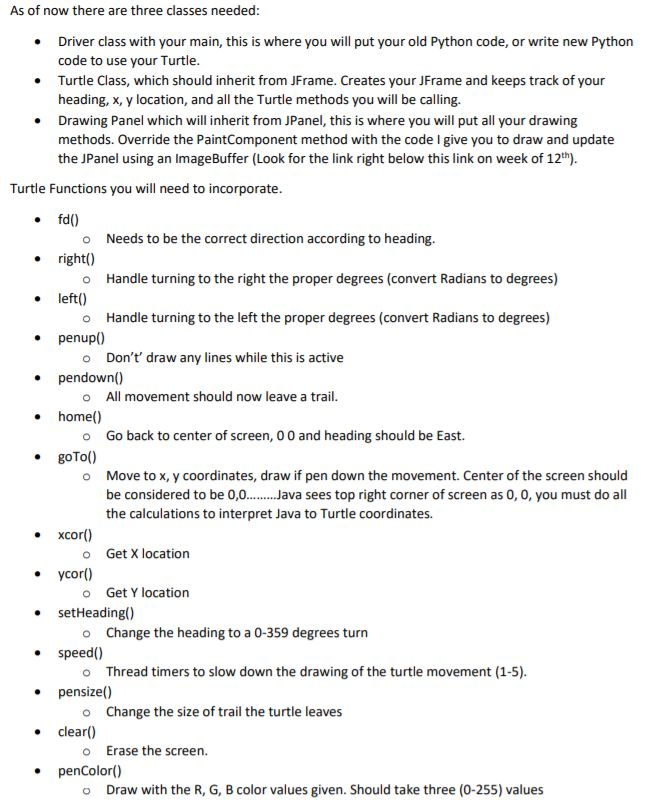
As of now there are three classes needed . Driver class with your main, this is where you will put your old Python code, or write new Python code to use your Turtle Turtle Class, which should inherit from JFrame. Creates your JFrame and keeps track of your heading, x, y location, and all the Turtle methods you will be calling. . Drawing Panel which will inherit from JPanel, this is where you will put all your drawing methods. Override the PaintComponent method with the code I give you to draw and update the JPanel using an ImageBuffer (Look for the link right below this link on week of 12th). Turtle Functions you will need to incorporate o Needs to be the correct direction according to heading. o Handle turning to the right the proper degrees (convert Radians to degrees) o Handle turning to the left the proper degrees (convert Radians to degrees) . right . left() . penup) o Don't draw any lines while this is active * pendown) home() goTo( o All movement should now leave a trail o Go back to center of screen, 0 0 and heading should be East. o Move to x, y coordinates, draw if pen down the movement. Center of the screen should be considered to be 0,0ava sees top right corner of screen as 0, 0, you must do all the calculations to interpret Java to Turtle coordinates. *xcort o Get X location eycor) o Get Y location setHeading() o Change the heading to a 0-359 degrees turn o Thread timers to slow down the drawing of the turtle movement (1-5) o Change the size of trail the turtle leaves o Erase the screen. * speedO pensize) . clear( penColor() o Draw with the R, G, B color values given. Should take three (0-255) values As of now there are three classes needed . Driver class with your main, this is where you will put your old Python code, or write new Python code to use your Turtle Turtle Class, which should inherit from JFrame. Creates your JFrame and keeps track of your heading, x, y location, and all the Turtle methods you will be calling. . Drawing Panel which will inherit from JPanel, this is where you will put all your drawing methods. Override the PaintComponent method with the code I give you to draw and update the JPanel using an ImageBuffer (Look for the link right below this link on week of 12th). Turtle Functions you will need to incorporate o Needs to be the correct direction according to heading. o Handle turning to the right the proper degrees (convert Radians to degrees) o Handle turning to the left the proper degrees (convert Radians to degrees) . right . left() . penup) o Don't draw any lines while this is active * pendown) home() goTo( o All movement should now leave a trail o Go back to center of screen, 0 0 and heading should be East. o Move to x, y coordinates, draw if pen down the movement. Center of the screen should be considered to be 0,0ava sees top right corner of screen as 0, 0, you must do all the calculations to interpret Java to Turtle coordinates. *xcort o Get X location eycor) o Get Y location setHeading() o Change the heading to a 0-359 degrees turn o Thread timers to slow down the drawing of the turtle movement (1-5) o Change the size of trail the turtle leaves o Erase the screen. * speedO pensize) . clear( penColor() o Draw with the R, G, B color values given. Should take three (0-255) values
Step by Step Solution
There are 3 Steps involved in it

Get step-by-step solutions from verified subject matter experts
 Study Help