



Question: Do NOT use any libraries like JavaFX or any others. ONLY use the `Draw` class for drawing a square. The Interface for `Draw` class for
Do NOT use any libraries like JavaFX or any others. ONLY use the `Draw` class for drawing a square. The Interface for `Draw` class for drawing square is as follows:
class: Draw
Methods for drawing shapes:
/* To draw a point, point function is called with proper parameters:
* point(x_coordinate_of_point, y_coordinate_of_point)
*/
Draw.point(X_Coordinate_Of_Point, Y_Coordinate_Of_Point);
* To change the color of the pen, setPenColor is used with three numbers that are in [0, 255] range.
* All the colors can be made as a combination of red, green and blue.
* The parameters show the richness of red, green and blue of a color.
* For example setPenColor(new Color(0, 0, 0) sets the color of the pen
* to black and setPenColor(new Color(255, 255, 255) sets the color to
* white.
*/
Draw.setPenColor(new Color(R_VALUE, G_VALUE, B_VALUE))
/* To draw a line, line function is called
* with proper parameters:
* line(x_coordinate_of_center, y_coordinate_center, sides_half_length)
*/
Draw.line(X_Coordinate_Of_Circle, Y_Coordinate_Circle, Sides_Half_Length);
`Point` class interface:
Constructor: Point(X_VALUE, Y_VALUE);
@param point_one Is one end of the line
@param point_two other end of the line.
Returns mid point of type/object `Point`
Static member: Point midpoint(Point point_one, Point point_two); // Returns the mid point of a line whose two ends are given
HERE Is the starter code:
/**
* This method specifies which coordinates should be drilled. It also draw the
* horizontal line of each triangle. No duplicate point should be added to the output.
* @param p1 is one of the vertex of the triangle
* @param p2 is the second vertex of the triangle
* @param p3 is the third vertex of the triangle
* @param order is the number of times a nested triangle should be drawn.
* order >= 0 , however if it is zero, nothing should be drawn
* @param page is the canvas on which this method draws.
* @param array is the list of the points that should be drilled. To add to this list point.toString() must be added.
* @return an array that contains all the points that should be drilled. this method should not have any duplicate points in it.
*/
public static ArrayList
// your code goes here. Task 3
return new ArrayList
}
PLEASE ONLY USE RECURSION, DO NOT USE ITERATION TO SOLVE THE PROBLEM.
DO NOT DECLARE ANOTHER HELPER METHOD TO SOLVE THE PROBLEM, SOLVE THE PROBLEM ONLY WITHIN `squares` method.
If you have any questions/clarifications, Please leave them in the comment.
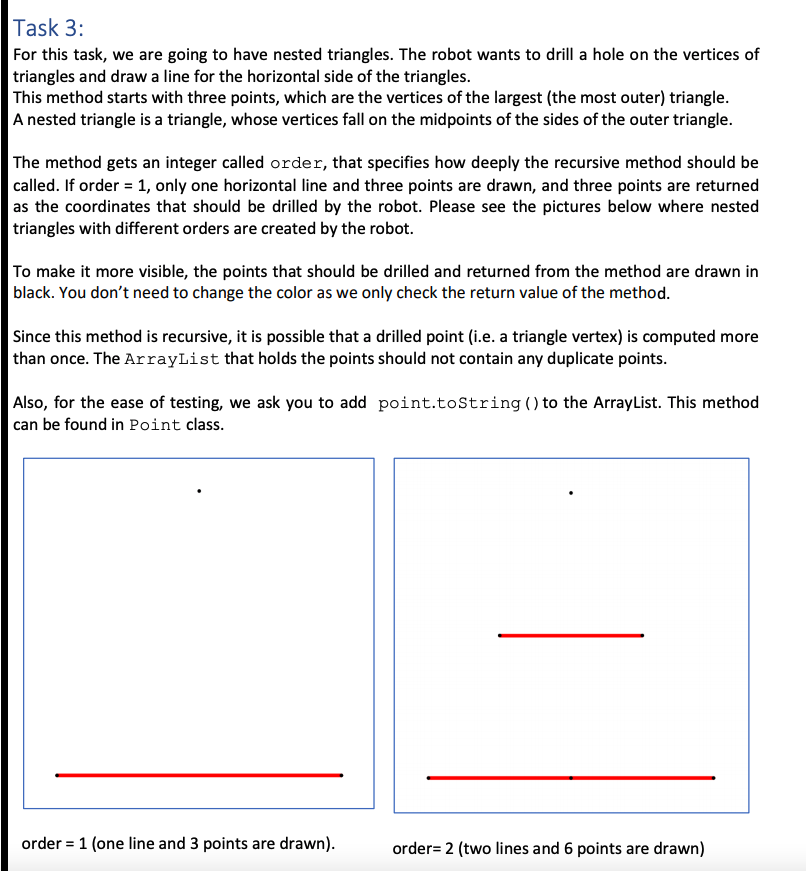
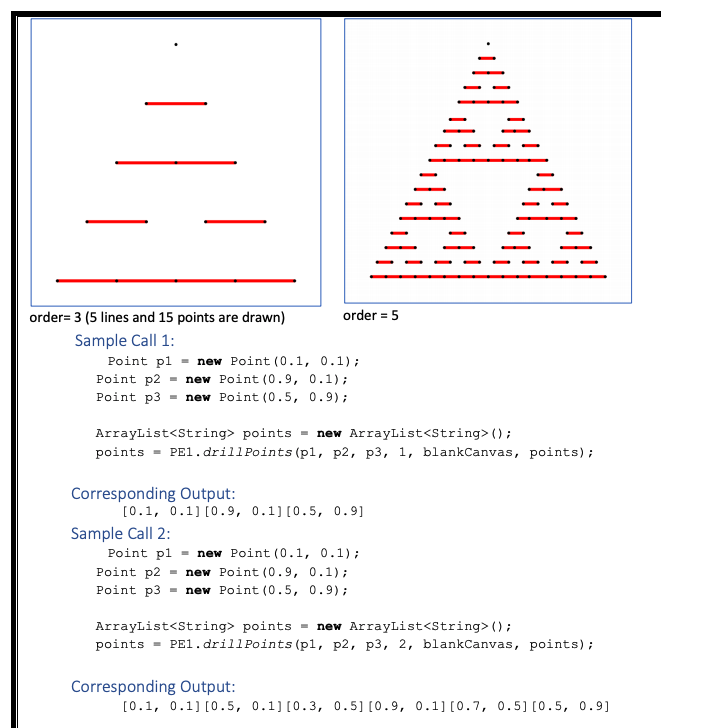
Task 3: For this task, we are going to have nested triangles. The robot wants to drill a hole on the vertices of triangles and draw a line for the horizontal side of the triangles. This method starts with three points, which are the vertices of the largest (the most outer) triangle. A nested triangle is a triangle, whose vertices fall on the midpoints of the sides of the outer triangle. The method gets an integer called order, that specifies how deeply the recursive method should be called. If order = 1, only one horizontal line and three points are drawn, and three points are returned as the coordinates that should be drilled by the robot. Please see the pictures below where nested triangles with different orders are created by the robot. To make it more visible, the points that should be drilled and returned from the method are drawn in black. You don't need to change the color as we only check the return value of the method. Since this method is recursive, it is possible that a drilled point (i.e. a triangle vertex) is computed more than once. The ArrayList that holds the points should not contain any duplicate points. Also, for the ease of testing, we ask you to add point.toString() to the ArrayList. This method can be found in Point class. order = 1 (one line and 3 points are drawn). order= 2 (two lines and 6 points are drawn) order= 3 (5 lines and 15 points are drawn) order = 5 Sample Call 1: Point pl = new Point(0.1, 0.1); Point p2 = new Point(0.9, 0.1); Point p3 = new Point(0.5, 0.9); ArrayList
Step by Step Solution
There are 3 Steps involved in it

Get step-by-step solutions from verified subject matter experts