







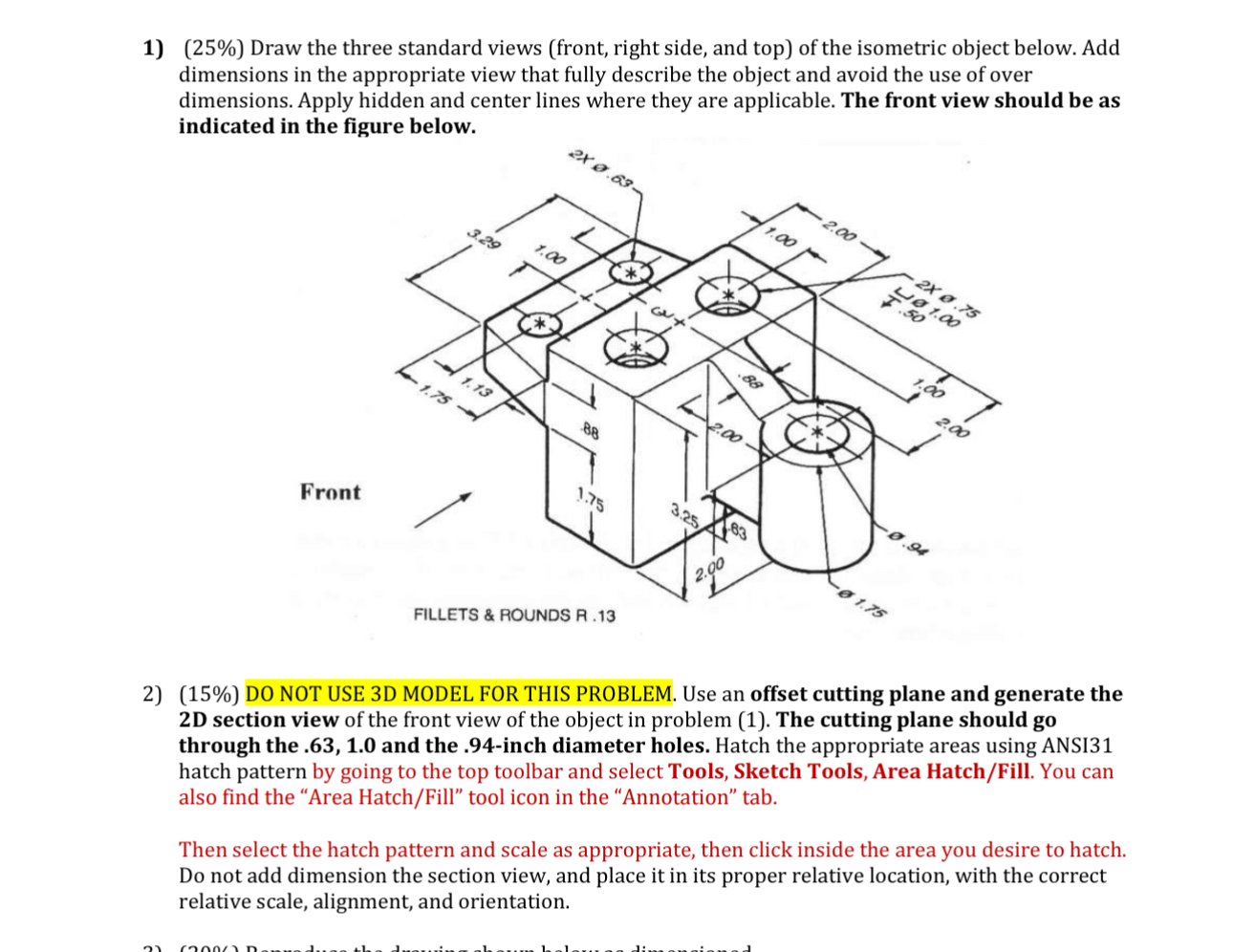
Question: DO NUMBER 2 . I WILL UPVOTE BUT Do number 2 IN SOLIDWORKS. ASAP. s ( front , right side, and top ) of the
DO NUMBER I WILL
UPVOTE BUT Do number IN SOLIDWORKS. ASAP. s front right side, and top of the isometricdimensions. Abe as indicate
DO NOT USE D MODEL FOR THIS PROBLEM. Use an offset cutting plane and generate the D section view of the front view of the object in problem The cutting plane should go through the and the. inch diameter holes. Hatch the appropriate areas using ANSI hatch pattern by going to the top toolbar and select Tools, Sketch Tools, Area HatchFill You can also find the "Area HatchFill tool icon in the "Annotation" tab.
Then select the hatch pattern and scale as appropriate, then click inside the area you desire to hatch. Do not add dimension the section view, and place it in its proper relative location, with the correct relative scale, alignment, and orientation.
Step by Step Solution
There are 3 Steps involved in it
1 Expert Approved Answer
Step: 1 Unlock

Question Has Been Solved by an Expert!
Get step-by-step solutions from verified subject matter experts
Step: 2 Unlock
Step: 3 Unlock
 Study Help