







Question: do on excel Module 2 Excel Exercise 1 1. Open a blank worksheet in Excel. Enter the First name, Last Name, Gender, Department, and Yearly
do on excel
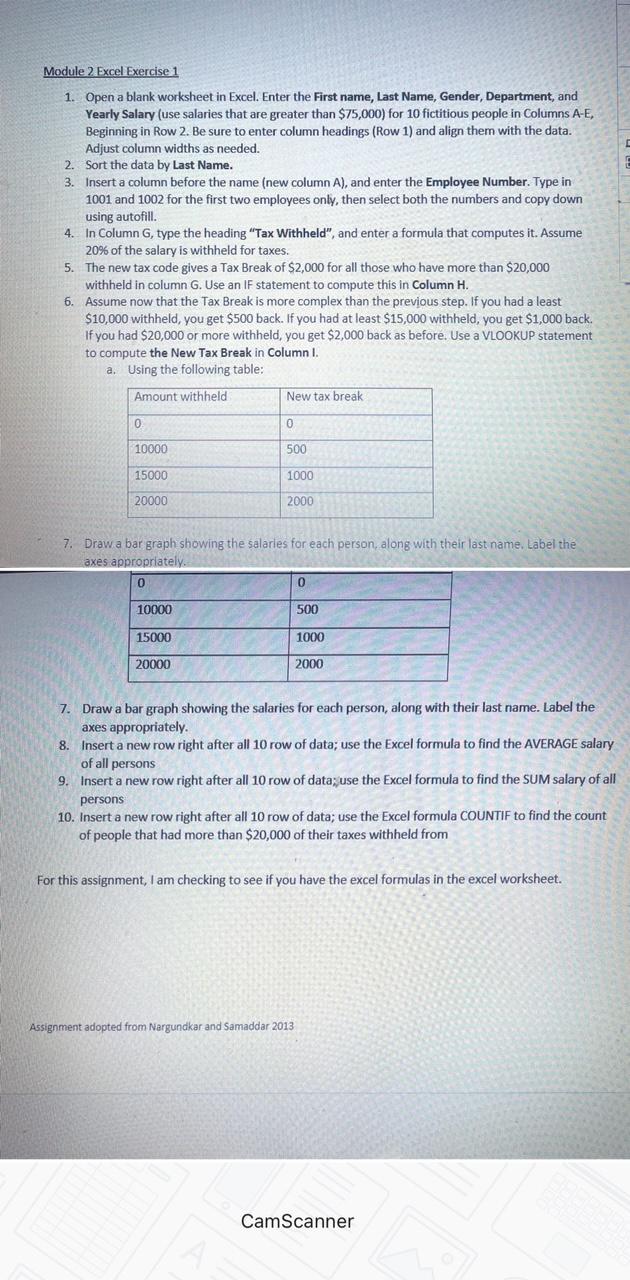
Module 2 Excel Exercise 1 1. Open a blank worksheet in Excel. Enter the First name, Last Name, Gender, Department, and Yearly Salary (use salaries that are greater than $75,000) for 10 fictitious people in Columns A-E, Beginning in Row 2. Be sure to enter column headings (Row 1) and align them with the data. Adjust column widths as needed. 2. Sort the data by Last Name. 3. Insert a column before the name (new column A), and enter the Employee Number. Type in 1001 and 1002 for the first two employees only, then select both the numbers and copy down using autofill. 4. In Column G, type the heading "Tax Withheld", and enter a formula that computes it. Assume 20% of the salary is withheld for taxes. 5. The new tax code gives a Tax Break of $2,000 for all those who have more than $20,000 withheld in column G. Use an IF statement to compute this in Column H. 6. Assume now that the Tax Break is more complex than the previous step. If you had a least $10,000 withheld, you get $500 back. If you had at least $15,000 withheld, you get $1,000 back. If you had $20,000 or more withheld, you get $2,000 back as before. Use a VLOOKUP statement to compute the New Tax Break in Column I. a. Using the following table: Amount withheld New tax break 0 0 10000 500 15000 1000 20000 2000 7. Draw a bar graph showing the salaries for each person, along with their last name. Label the axes appropriately. 0 0 10000 500 15000 1000 20000 2000 7. Draw a bar graph showing the salaries for each person, along with their last name. Label the axes appropriately 8. Insert a new row right after all 10 row of data; use the Excel formula to find the AVERAGE salary of all persons 9. Insert a new row right after all 10 row of data; use the Excel formula to find the SUM salary of all persons 10. Insert a new row right after all 10 row of data; use the Excel formula COUNTIF to find the count of people that had more than $20,000 of their taxes withheld from For this assignment, I am checking to see if you have the excel formulas in the excel worksheet. Assignment adopted from Nargundkar and Samaddar 2013 CamScanner
Step by Step Solution
There are 3 Steps involved in it

Get step-by-step solutions from verified subject matter experts
 Study Help