







Question: Do Programming Exercise from Chapter 4, but add a decision to handle the case where the line does not intersect the circle. Chapter 4, Exercise
Do Programming Exercise from Chapter 4, but add a decision to handle the case where the line does not intersect the circle.
Chapter 4, Exercise 7:
Write a program that computes the intersection of a circle with a horizontal line and displays the information textually and graphically.
Input: Radius of the circle and the y-intercept of the line. Prompt the user for these values.
Output: Draw a circle centered at (0,0) with the given radius in a window with coordinates running from (10,10) to (10,10).
Draw a horizontal line across the window with the given y-intercept.
Draw the two points of intersection in red.
Print out the x values of the points of intersection in the upper left-hand corner of the window.
Formula for the intersection values of x:
+ and - square root of r squared - y squared
where r is the radius and y is the y-intercept.
When the user clicks anywhere on the window, it should close.
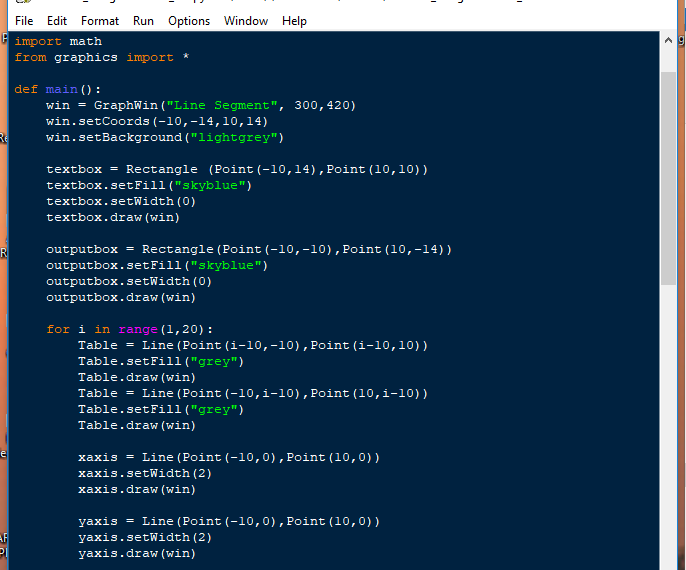
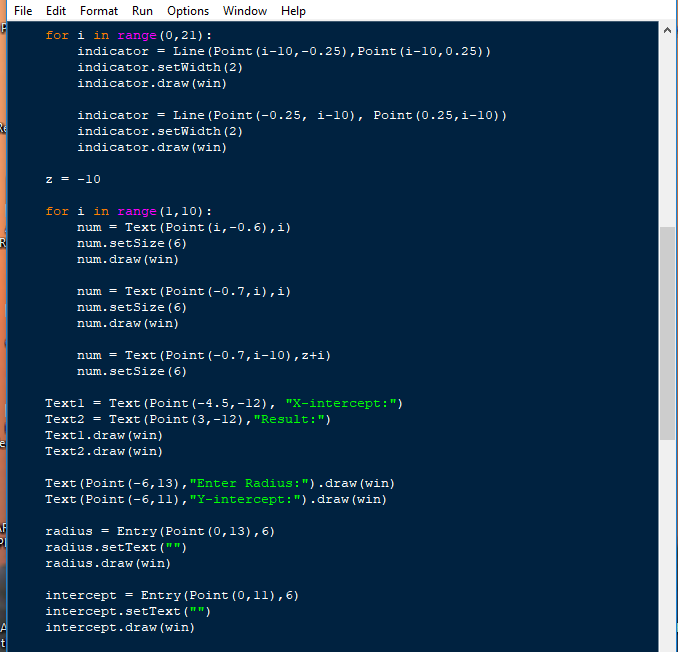
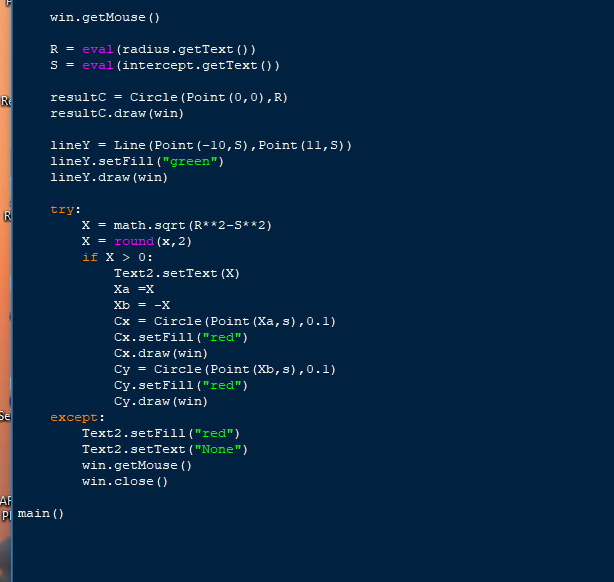
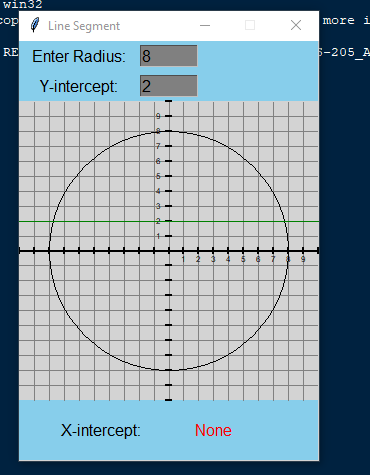
I think the problem is somewhere in the "try" statement. I can not get the red dots to show along with the X intercept message when the line does interesect the circle. It still says "None" under X-intercept. Please help.
File Edit Format Run Options Window Help import math from graphics import * def main ): win - GraphWin ("Line Segment", 300,420) win.setCoords (-10,-14,10,14) win.setBackground ("lightgrey") textboxRectangle (Point (-10,14), Point (10,10)) textbox.setFill("skyblue") textbox.setWidth (O) textbox.draw (win) outputboxRectangle (Point (-10,-10), Point (10,-14)) outputbox.setFill ("skyblue") outputbox.setWidth (0) outputbox.draw (win) for i in range (1,20) Table -Line (Point (i-10,-10), Point (i-10,10)) Table.setFill ("grey") Table.draw (win) Table = Line (Point (-10, 1-10) , Point ( 10, 1-10) ) Table.setFill ("grey") Table.draw (win) xaxis = Line (Point (-10, 0) , Point (10,0)) xaxis.setWidth (2) xaxis.draw (win) yaxis = Line (Point (-10, 0) , Point (10,0)) yaxis.setWidth (2) yaxis.draw (win) File Edit Format Run Options Window Help import math from graphics import * def main ): win - GraphWin ("Line Segment", 300,420) win.setCoords (-10,-14,10,14) win.setBackground ("lightgrey") textboxRectangle (Point (-10,14), Point (10,10)) textbox.setFill("skyblue") textbox.setWidth (O) textbox.draw (win) outputboxRectangle (Point (-10,-10), Point (10,-14)) outputbox.setFill ("skyblue") outputbox.setWidth (0) outputbox.draw (win) for i in range (1,20) Table -Line (Point (i-10,-10), Point (i-10,10)) Table.setFill ("grey") Table.draw (win) Table = Line (Point (-10, 1-10) , Point ( 10, 1-10) ) Table.setFill ("grey") Table.draw (win) xaxis = Line (Point (-10, 0) , Point (10,0)) xaxis.setWidth (2) xaxis.draw (win) yaxis = Line (Point (-10, 0) , Point (10,0)) yaxis.setWidth (2) yaxis.draw (win)
Step by Step Solution
There are 3 Steps involved in it

Get step-by-step solutions from verified subject matter experts
 Study Help