







Question: Do project in excel VBE and in excel workbook: 1. GENERAL FORMULATION: Design an algorithm and write a code to calculate the value of f(x)dx
Do project in excel VBE and in excel workbook:
1. GENERAL FORMULATION: Design an algorithm and write a code
to calculate the value of  f(x)dx
with accuracy 0.001 by using random number generator and the region under the graph of f (x) inscribed in a rectangle [a, b] [c, d] where c = 0 and d fmax. Notation: fmax is the maximum value of f(x) on interval [a, b].
2. YOUR FUNCTION and interval [a,b]: function f(x)  arcsin
3. IDEA. Use the fact that the ratio of randomly generated points below the graph of f(x) to the total number of points is the same as the ratio between the respective areas.
4. VARIABLES. Every single variable used in the code MUST be declared and assigned initial value at the very beginning.
5. RANDOM POINTS. As in project P1, use the formulas
x = a+(ba)RND() and y = c + (d c)RND()
to generate a random point (x, y) in the rectangle [a, b] [c, d] for any interval [a, b] on X -axis, and any interval [c, d] on Y -axis.
6. ACCURACY. The first total number of generated random points is Ntotal=10,000. The first approximation of integral is S1. Then incre- ment: Ntotal = Ntotal +5000; calculate next approximation S2. Continue sequential increment of Ntotal to obtain approximations S3, S4, S5, .... You stop calculation when the difference between two consecutive ap- proximations becomes less than 0.001.
7. LOOPING: Use DO WHILE loop to stop calculations when |Sn Sn+1|
8. ALGORITHM: Design and describe an algorithm in words step by step for yourself.
9. STRUCTURE: your code must contain two SUBS: Sub main(), and Sub integral(N). Sub main() performs iterations and calls Sub inte- gral(N). Sub integral(N) calculates integral by generating N random points.
10. MAINIDEA; use iteration algorithm represented by the FLOWCHART FOR ITERATIONS, see Figure 1.
11. FLOWCHART: Draw the whole flowchart of your algorithm in full details for your records. It will help you to write logically correct code and find logical errors.
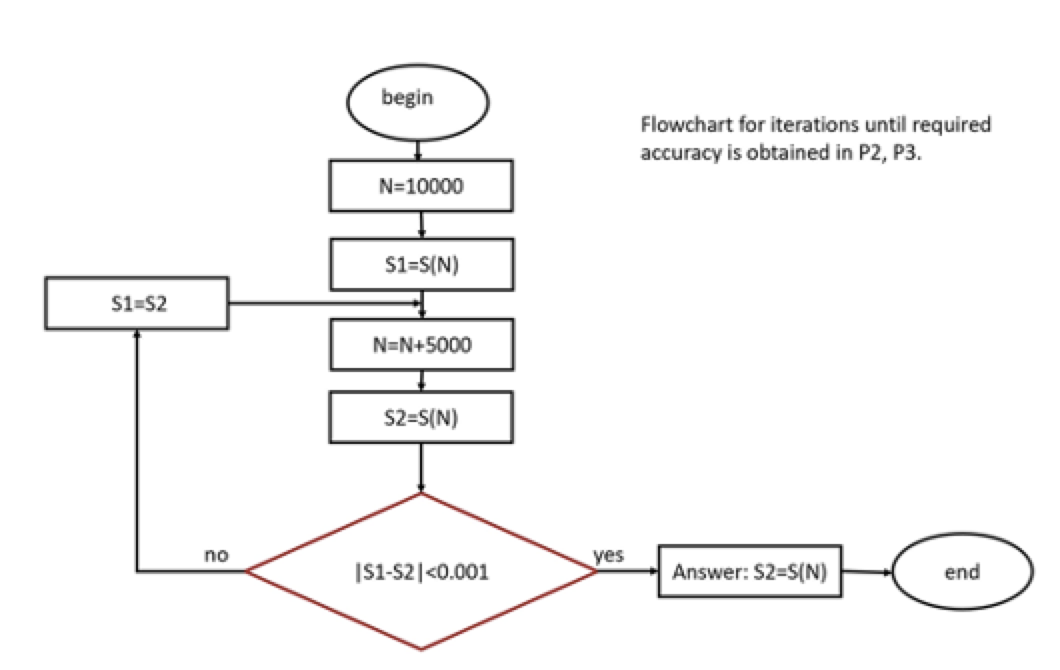
-
MATHEMATICAL FUNCTIONS: When writing your code, use com- mands from the following Sub for your specific function:
Sub p1_help() Dim x As Double x = Application.WorksheetFunction.Pi() / 6 MsgBox"Ifx="&x&" then:" MsgBox "square root of x =" & Sqr(x) MsgBox "exponent of x =" & Exp(x) MsgBox "sin(x)=" & Sin(x) MsgBox "cos(x)=" & Cos(x) MsgBox "tan(x)=" & Tan(x) MsgBox "sec(x)=" & 1 / Cos(x) MsgBox "arcsin(x)=" & Application.WorksheetFunction.Asin(x) MsgBox "17 mod 3=" & 17 Mod 3 End Sub
begin Flowchart for iterations until required accuracy is obtained in P2, P3. N=10000 S1=S(N) $1=S2 N=N+5000 S2=S(N) no yes 151-52|
Step by Step Solution
There are 3 Steps involved in it

Get step-by-step solutions from verified subject matter experts
 Study Help