



Question: do the onces that have x in it 20. Update the Departmental Budget Comparison 2021-2025 combo chart in the range A15:G36 as follows: a. Change
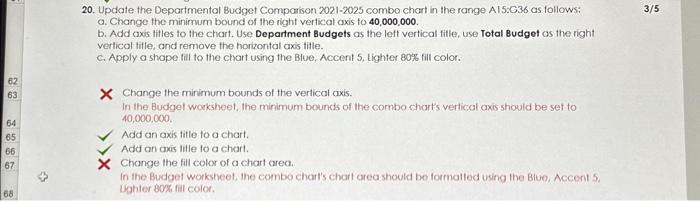
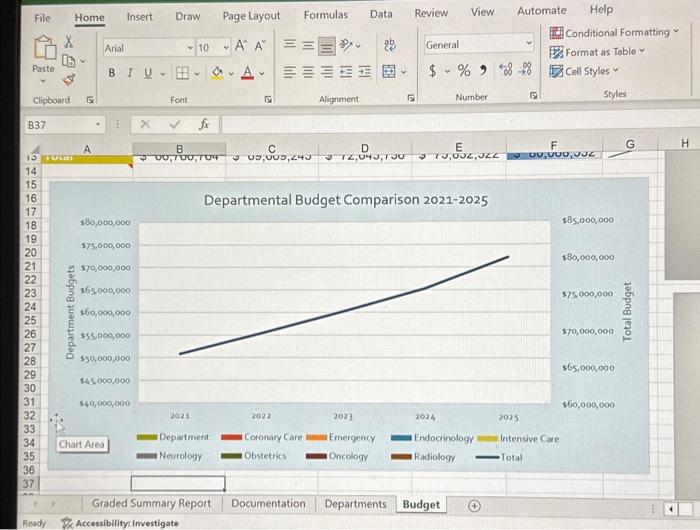
20. Update the Departmental Budget Comparison 2021-2025 combo chart in the range A15:G36 as follows: a. Change the minimum bound of the right vertical axis to 40,000,000. b. Add axis titles to the chart. Use Department Budgets as the left vertical fille, use Total Budget os the right vertical title, and remove the horizontal axis title. c. Apply a shope fill to the chart using the Blve, Accent 5, tighter 80% fill color. X Change the minimum bounds of the verticat axis. In the Budgel worksheet, the mirimum bounds of the combo chart's vertical axis should be set to 40,000,000. Add an axis title to a chart. Add on axis title to a chart. Change the fill color of a chart area. In the Budget worksheet, the combo chart's chart area should be formalled using the Blue, Accent 5. Ughter 80\%, fil color. 20. Update the Departmental Budget Comparison 2021-2025 combo chart in the range A15:G36 as follows: a. Change the minimum bound of the right vertical axis to 40,000,000. b. Add axis titles to the chart. Use Department Budgets as the left vertical fille, use Total Budget os the right vertical title, and remove the horizontal axis title. c. Apply a shope fill to the chart using the Blve, Accent 5, tighter 80% fill color. X Change the minimum bounds of the verticat axis. In the Budgel worksheet, the mirimum bounds of the combo chart's vertical axis should be set to 40,000,000. Add an axis title to a chart. Add on axis title to a chart. Change the fill color of a chart area. In the Budget worksheet, the combo chart's chart area should be formalled using the Blue, Accent 5. Ughter 80\%, fil color
Step by Step Solution
There are 3 Steps involved in it

Get step-by-step solutions from verified subject matter experts