







Question: Do you know why I am getting this error message? I can't find any typos. Thanks! I am using this script: CREATE TABLE acctmanager (amid
Do you know why I am getting this error message? I can't find any typos. Thanks! I am using this script:
CREATE TABLE acctmanager (amid CHAR(4), amfirst VARCHAR2(12) NOT NULL, amlast VARCHAR2(12) NOT NULL, amedate DATE DEFAULT SYSDATE, amsal NUMBER(8,2), amcomm NUMBER(7,2) DEFAULT 0, region CHAR(2), CONSTRAINT acctmanager_amid_pk PRIMARY KEY (amid), CONSTRAINT acctmanager_region_ck CHECK (region IN ('N', 'NW', 'NE', 'S', 'SE', 'SW', 'W', 'E')));

Command copied from book:
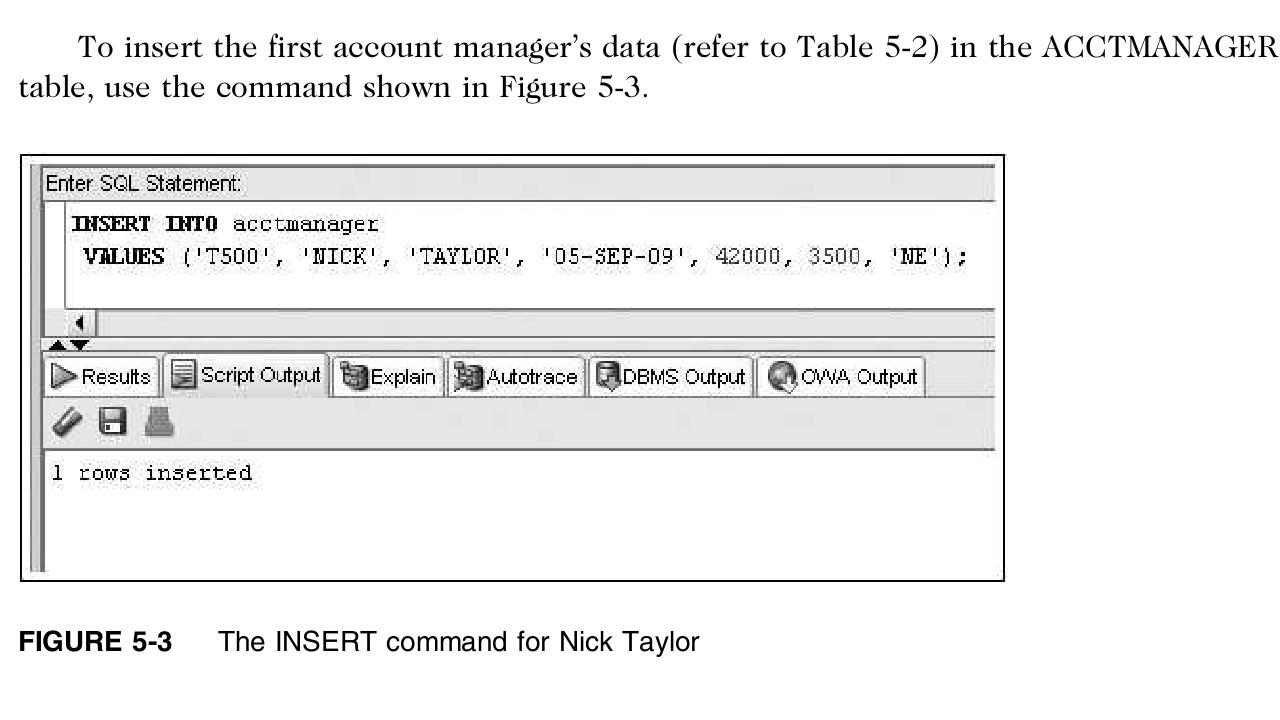
SQL> INSERT INTO acctmanager VALUES ('1500', 'NICK', 'TAYLOR', '05-SEPT-09', 42000, 3500, 'NE'); INSERT INTO acctmanager VALUES ('1500', 'NICK', 'TAYLOR', '05-SEPT-09', 42000, 3500, 'NE') ERROR at line 1: ORA-01861: literal does not match format string SQL> To insert the first account manager's data (refer to Table 5-2) in the ACCTMANAGER table, use the command shown in Figure 5-3. Enter SQL Statement: TITSERT INTO acctmanager VALUES ('T500', NICK' s TAYLOR' 05-SEP-09', 42000, 3500, 'NE'); Results Script Output Explain Autotrace DBMS Output OVA Output 1 rows inserted FIGURE 5-3 The INSERT command for Nick Taylor
Step by Step Solution
There are 3 Steps involved in it

Get step-by-step solutions from verified subject matter experts
 Study Help