Question: Does anyone know how to use Excel? Open the links below. Activities and Guide is on the Links Activity 7.4 https://docs.google.com/spreadsheets/d/1tlNfdIP7F-DT-SaUK43UEF2PrWpLXZxD/edit?usp=drivesdk&ouid=114551149909494381973&rtpof=true&sd=true Activity 7.5 https://docs.google.com/spreadsheets/d/1tosjiGiAWYr7mL4eHPhM3FOYW6CYd5UR/edit?usp=drivesdk&ouid=114551149909494381973&rtpof=true&sd=true Guide
Does anyone know how to use Excel?
Open the links below. Activities and Guide is on the Links
Activity 7.4
https://docs.google.com/spreadsheets/d/1tlNfdIP7F-DT-SaUK43UEF2PrWpLXZxD/edit?usp=drivesdk&ouid=114551149909494381973&rtpof=true&sd=true
Activity 7.5
https://docs.google.com/spreadsheets/d/1tosjiGiAWYr7mL4eHPhM3FOYW6CYd5UR/edit?usp=drivesdk&ouid=114551149909494381973&rtpof=true&sd=true
Guide
Guide me/Answer Excels:
Data Processing Guide
https://drive.google.com/file/d/1tafXu-nw0fOWEeaXkdZoftNy1AFkHbAe/view?usp=drivesdk
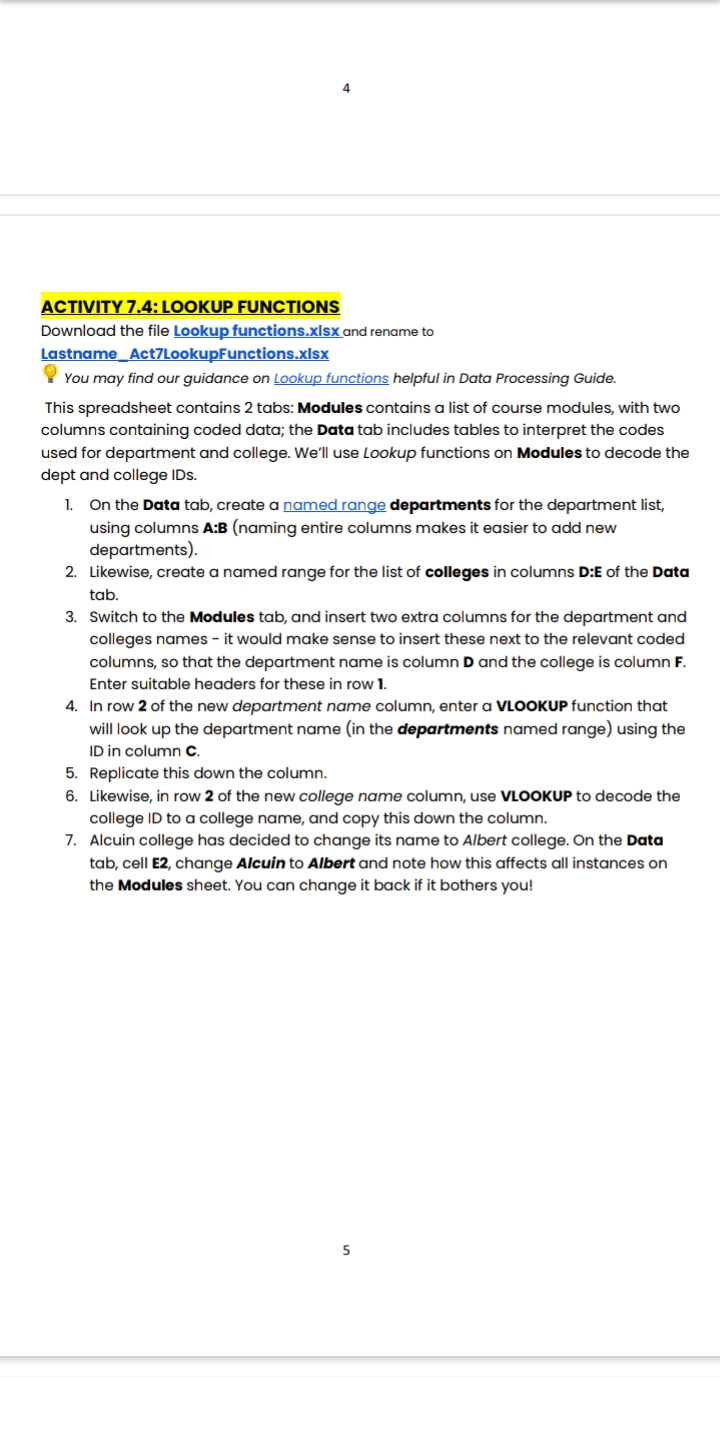
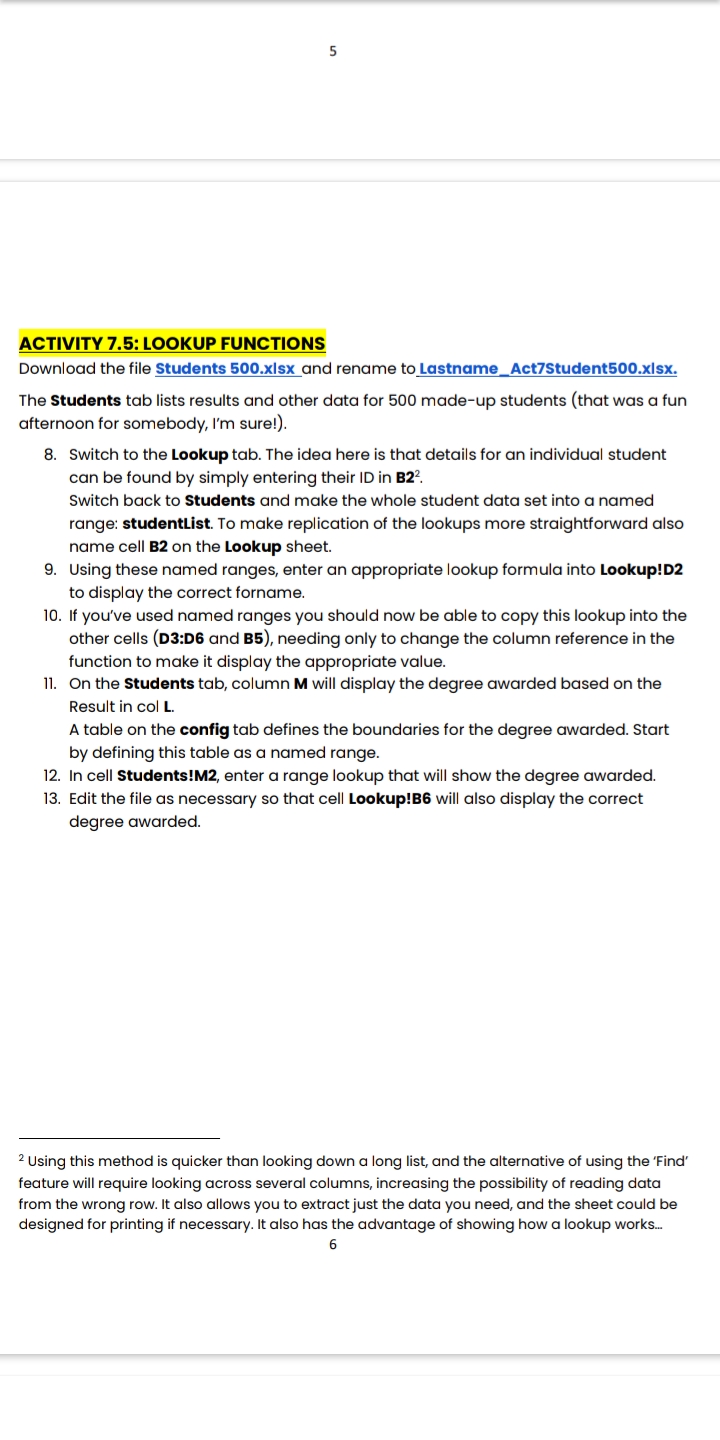
4 ACTIVITY 7.4: LOOKUP FUNCTIONS Download the file Lookup functions.xisx and rename to Lastname_Act7LookupFunctions.xIsx You may find our guidance on Lookup functions helpful in Data Processing Guide. This spreadsheet contains 2 tabs: Modules contains a list of course modules, with two columns containing coded data; the Data tab includes tables to interpret the codes used for department and college. We'll use Lookup functions on Modules to decode the dept and college IDs. 1. On the Data tab, create a named range departments for the department list, using columns A:B (naming entire columns makes it easier to add new departments). 2. Likewise, create a named range for the list of colleges in columns D:E of the Data tab. 3. Switch to the Modules tab, and insert two extra columns for the department and colleges names - it would make sense to insert these next to the relevant coded columns, so that the department name is column D and the college is column F. Enter suitable headers for these in row 1. 4. In row 2 of the new department name column, enter a VLOOKUP function that will look up the department name (in the departments named range) using the ID in column C. 5. Replicate this down the column. 6. Likewise, in row 2 of the new college name column, use VLOOKUP to decode the college ID to a college name, and copy this down the column. 7. Alcuin college has decided to change its name to Albert college. On the Data tab, cell E2, change Alcuin to Albert and note how this affects all instances on the Modules sheet. You can change it back if it bothers you! unACTIVITY 7.5: lOOKUP FUHOONS Download the file students 500.xlsx and rename to Lastnamo_Act75tudont500.xlsx. The Students tab lists results and other data for 500 made-up students (that was a fun afternoon for somebody, I'm sure!]. 8. IO. ii. l2. 13. Switch to the Lookuptab. The idea here is that details for an individual student can be found by simply entering their ID in 322. Switch back to students and make the whole student data set into a named range: studentljst. To make replication of the lookups more straightforward also name cell 32 on the Lookup sheet. Using these named ranges, enter an appropriate lookup formula into Lookuplnz to display the correct forname. If you've used named ranges you should now be able to copy this lookup into the other cells {D336 and BB), needing only to change the column reference in the function to make it display the appropriate value. On the Students tab, column M will display the degree awarded based on the Result in col l. A table on the cong tab defines the boundaries for the degree awarded. Start by defining this table as a named range. In cell studentsml'z. enter a range lookup that will show the degree awarded. Edit the file as necessary so that cell Lookuplls will also display the correct degree awarded. 2 Using this method is quicker than looking down a long list, and the alternative of using the 'Find' feature will require looking across several columns. increasing me possibility of reading data from the wrong row. It also allows you to extractjust the data you need, and the sheet could be designed for printing if necessary. It also has the advantage of showing how a lookup works... 5









 Study Help