



Question: Does anyone knows exactly what is going on with my Annotate ribbon? My Annotate ribbon is the picture on top. It was not always like

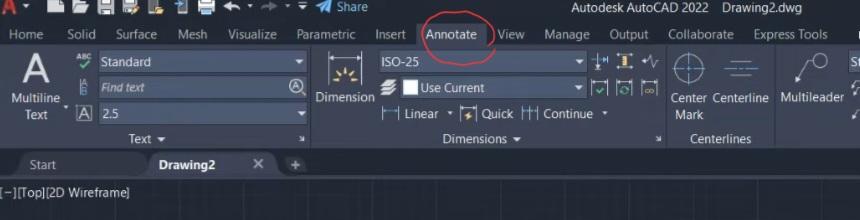
Does anyone knows exactly what is going on with my "Annotate" ribbon?
My "Annotate" ribbon is the picture on top. It was not always like that. It looked like the screenshot at the bottom. Does anyone know how to change it back?
When I look at annotation videos on Yutube, 90% of the "Annotate" ribbons looks like the bottom screenshot and the remaining 10% looks like the picture above. I have also seen the same Yutube channel having their "Annotate" ribbon looking like the picture in one video, and the screenshot in another. So Im not sure whats going on.
A couple things
1) I did not customized/modified, turned-off/hide anything. Not to my knowledge. I just opened the application the next day and the "Annotate" ribbon and it tools looked different.
2) Resetting to default didn't do anything.
3) Not sure this has anything to do with workspace/profile.
4) If you dont know, or have the answer on how I can change my "Annotate" ribbon from the picture to the screenshot thats okay. Just give the opportunity to someone else who may have the answer to respond.
Thank you.
Autodesk AutoCAD 2022 Drawing2.dwg
Step by Step Solution
There are 3 Steps involved in it

Get step-by-step solutions from verified subject matter experts