







Question: done for you as an example. Sometimes the formula is just bringing a number over to the next area, in that case type = followed
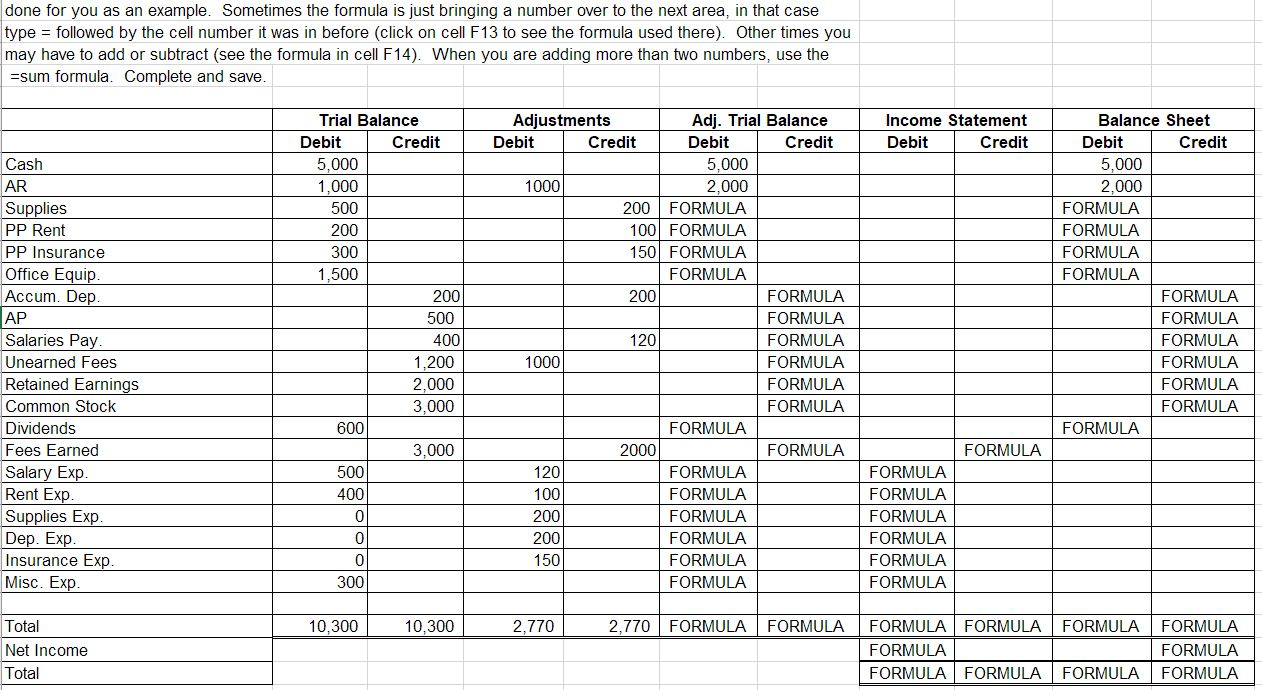
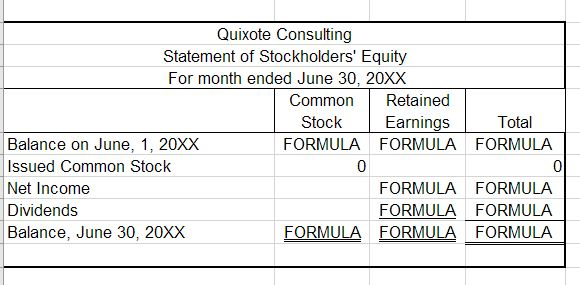
done for you as an example. Sometimes the formula is just bringing a number over to the next area, in that case type = followed by the cell number it was in before (click on cell F13 to see the formula used there). Other times you may have to add or subtract (see the formula in cell F14). When you are adding more than two numbers, use the =sum formula. Complete and save. Income Statement Debit Credit Trial Balance Debit Credit 5,000 1,000 500 200 300 1,500 Cash AR Supplies PP Rent PP Insurance Office Equip. Accum. Dep. AP Salaries Pay. Unearned Fees Retained Earnings Common Stock Dividends Fees Earned Salary Exp Rent Exp. Supplies Exp. Dep. Exp. Insurance Exp. Misc. Exp. 200 Balance Sheet Debit Credit 5,000 2,000 FORMULA FORMULA FORMULA FORMULA FORMULA FORMULA FORMULA FORMULA FORMULA FORMULA FORMULA Adjustments Adj. Trial Balance Debit Credit Debit Credit 5,000 1000 2,000 200 FORMULA 100 FORMULA 150 FORMULA FORMULA 200 FORMULA FORMULA 120 FORMULA 1000 FORMULA FORMULA FORMULA FORMULA 2000 FORMULA 120 FORMULA 100 FORMULA 200 FORMULA 200 FORMULA 150 FORMULA FORMULA 500 400 1,200 2,000 3,000 600 3,000 FORMULA 500 400 0 FORMULA FORMULA FORMULA FORMULA FORMULA FORMULA 0 0 300 10,300 10,300 2.770 2,770 FORMULA FORMULA FORMULA Total Net Income Total FORMULA FORMULA FORMULA FORMULA FORMULA FORMULA FORMULA FORMULA FORMULA Quixote Consulting Statement of Stockholders' Equity For month ended June 30, 20XX Common Retained Stock Earnings Total Balance on June, 1, 20XX FORMULA FORMULA FORMULA Issued Common Stock 0 0 Net Income FORMULA FORMULA Dividends FORMULA FORMULA Balance, June 30, 20XX FORMULA FORMULA FORMULA
Step by Step Solution
There are 3 Steps involved in it

Get step-by-step solutions from verified subject matter experts
 Study Help