







Question: dos operating system, Please help Instruction: Manually create a folder and named it as Document with the following content: Document Name w Assignment224 CSNB224Chapter 1
 dos operating system, Please help
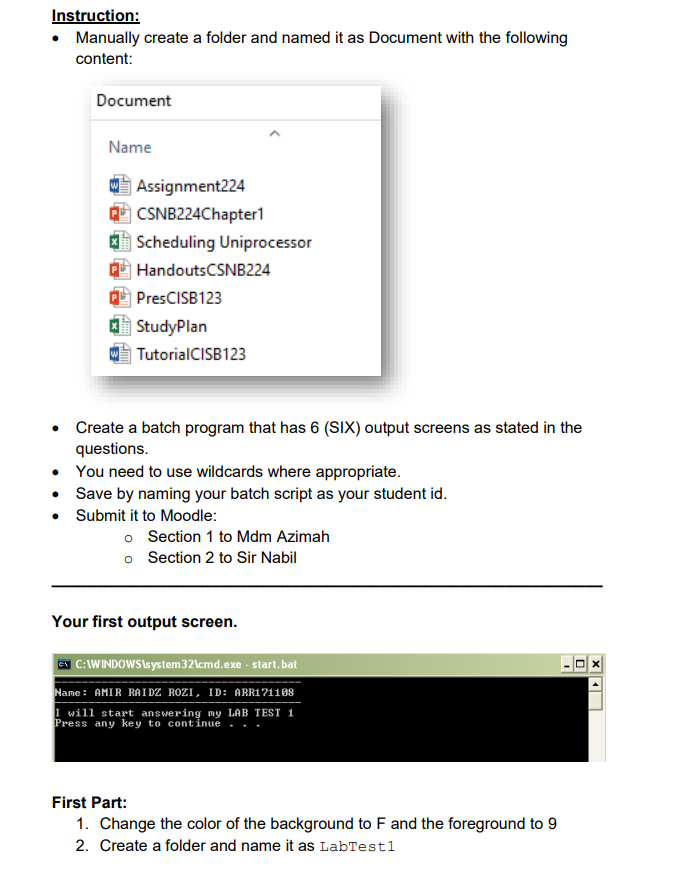
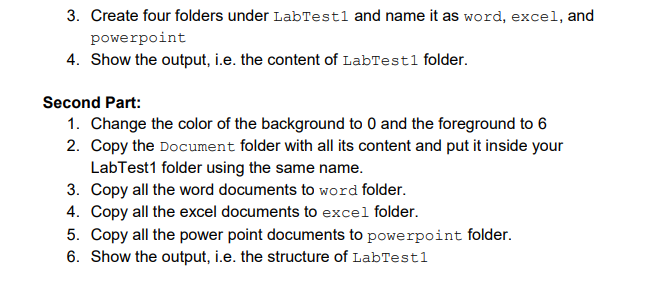
Instruction: Manually create a folder and named it as Document with the following content: Document Name w Assignment224 CSNB224Chapter 1 1 Scheduling Uniprocessor HandoutsCSNB224 PresCISB123 1 StudyPlan TutorialCISB123 A A A Create a batch program that has 6 (SIX) output screens as stated in the questions. You need to use wildcards where appropriate. Save by naming your batch script as your student id. Submit it to Moodle: o Section 1 to Mdm Azimah o Section 2 to Sir Nabil Your first output screen. C:WINDOWSsystem32\cmd.exe - start.bat Name : AMIR RAIDZ ROZI, ID: ARR171108 I will start answering my LAB TEST 1 Press any key to continue First Part: 1. Change the color of the background to F and the foreground to 9 2. Create a folder and name it as LabTesti 3. Create four folders under LabTest1 and name it as word, excel, and powerpoint 4. Show the output, i.e. the content of Labtesti folder. Second Part: 1. Change the color of the background to 0 and the foreground to 6 2. Copy the Document folder with all its content and put it inside your LabTest1 folder using the same name. 3. Copy all the word documents to word folder. 4. Copy all the excel documents to excel folder. 5. Copy all the power point documents to powerpoint folder. 6. Show the output, i.e. the structure of LabTesti Instruction: Manually create a folder and named it as Document with the following content: Document Name w Assignment224 CSNB224Chapter 1 1 Scheduling Uniprocessor HandoutsCSNB224 PresCISB123 1 StudyPlan TutorialCISB123 A A A Create a batch program that has 6 (SIX) output screens as stated in the questions. You need to use wildcards where appropriate. Save by naming your batch script as your student id. Submit it to Moodle: o Section 1 to Mdm Azimah o Section 2 to Sir Nabil Your first output screen. C:WINDOWSsystem32\cmd.exe - start.bat Name : AMIR RAIDZ ROZI, ID: ARR171108 I will start answering my LAB TEST 1 Press any key to continue First Part: 1. Change the color of the background to F and the foreground to 9 2. Create a folder and name it as LabTesti 3. Create four folders under LabTest1 and name it as word, excel, and powerpoint 4. Show the output, i.e. the content of Labtesti folder. Second Part: 1. Change the color of the background to 0 and the foreground to 6 2. Copy the Document folder with all its content and put it inside your LabTest1 folder using the same name. 3. Copy all the word documents to word folder. 4. Copy all the excel documents to excel folder. 5. Copy all the power point documents to powerpoint folder. 6. Show the output, i.e. the structure of LabTesti
Step by Step Solution
There are 3 Steps involved in it

Get step-by-step solutions from verified subject matter experts
 Study Help