







Question: Download below the macro - enabled Excel workbook file: Lastname.VBA.Conditionals.HW . xlsm . Save it using your last name. For example, Jones.VBA.Conditionals.HW . xlsm (
Download below the macroenabled Excel workbook file: Lastname.VBA.Conditionals.HWxlsm Save it using your last name. For example, Jones.VBA.Conditionals.HWxlsm using your last name rather than Jones Write your code in Module
Complete the two problems below on the same worksheet both buttons should be on Sheet and then save and submit your workbook.
Assign your code to the appropriate button on Sheet for each macro. Each macro should also receive its inputs through an inputbox prompt and display its outputs through a msgbox.
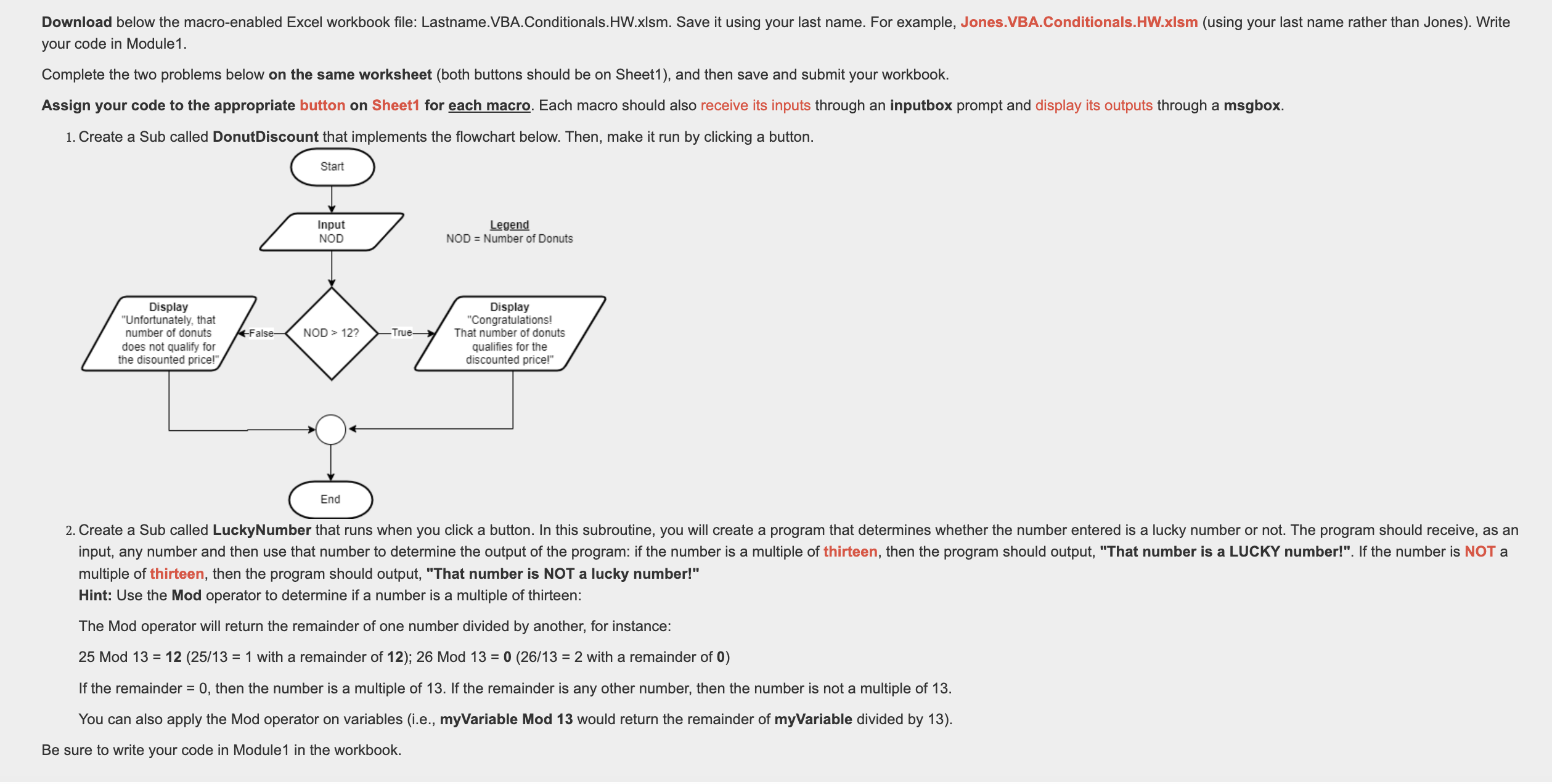
Create a Sub called DonutDiscount that implements the flowchart below. Then, make it run by clicking a button.multiple of thirteen, then the program should output, "That number is NOT a lucky number!"
Hint: Use the Mod operator to determine if a number is a multiple of thirteen:
The Mod operator will return the remainder of one number divided by another, for instance
Mod with a remainder of ; Mod with a remainder of
If the remainder then the number is a multiple of If the remainder is any other number, then the number is not a multiple of
You can also apply the Mod operator on variables ie myVariable Mod would return the remainder of myVariable divided by
Be sure to write your code in Module in the workbook.
Step by Step Solution
There are 3 Steps involved in it
1 Expert Approved Answer
Step: 1 Unlock

Question Has Been Solved by an Expert!
Get step-by-step solutions from verified subject matter experts
Step: 2 Unlock
Step: 3 Unlock
 Study Help