



Question: Download the Applying Excel form and enter formulas in all cells that contain question marks. The Chapter 3 Form worksheet is to be used to
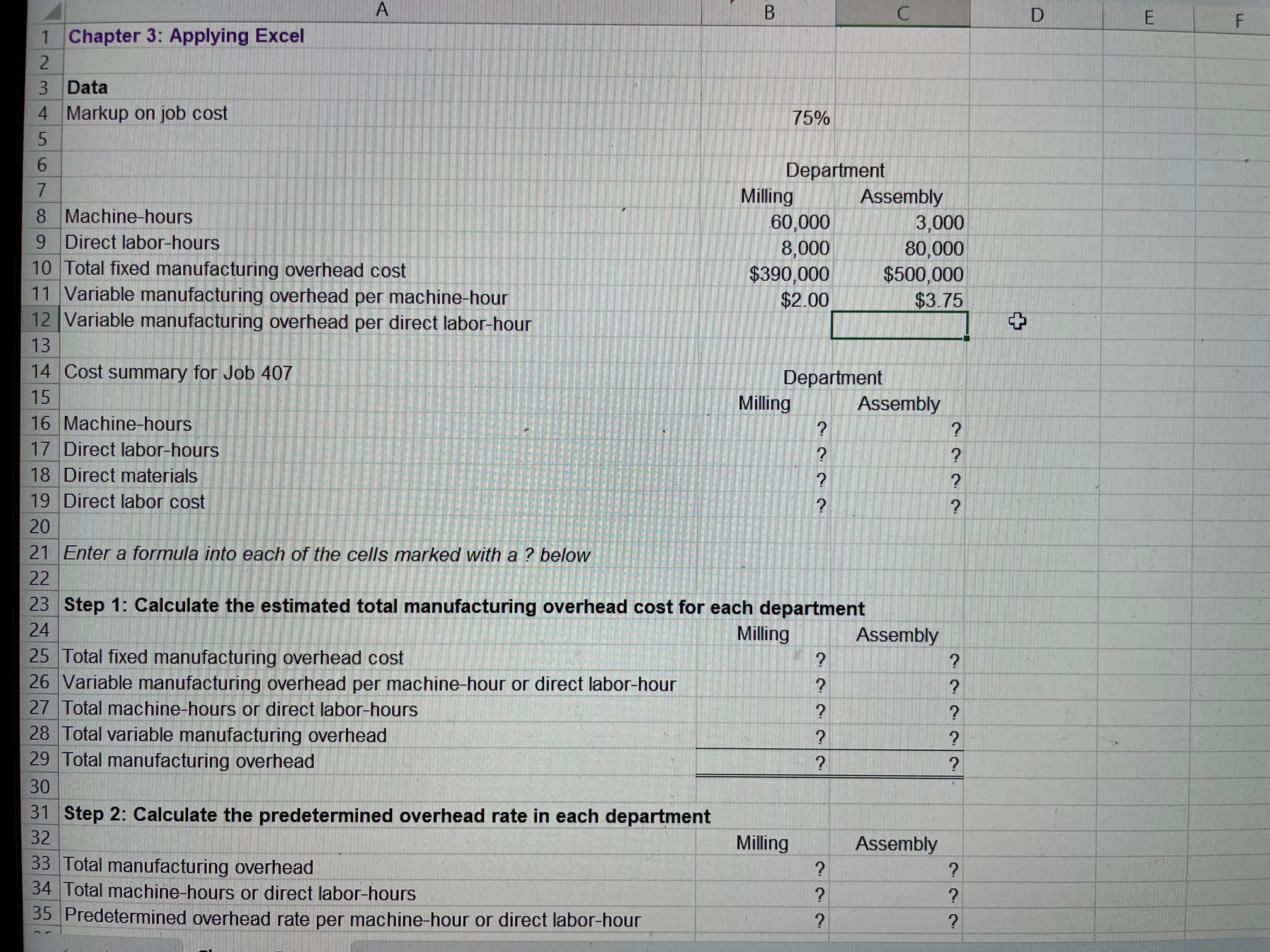
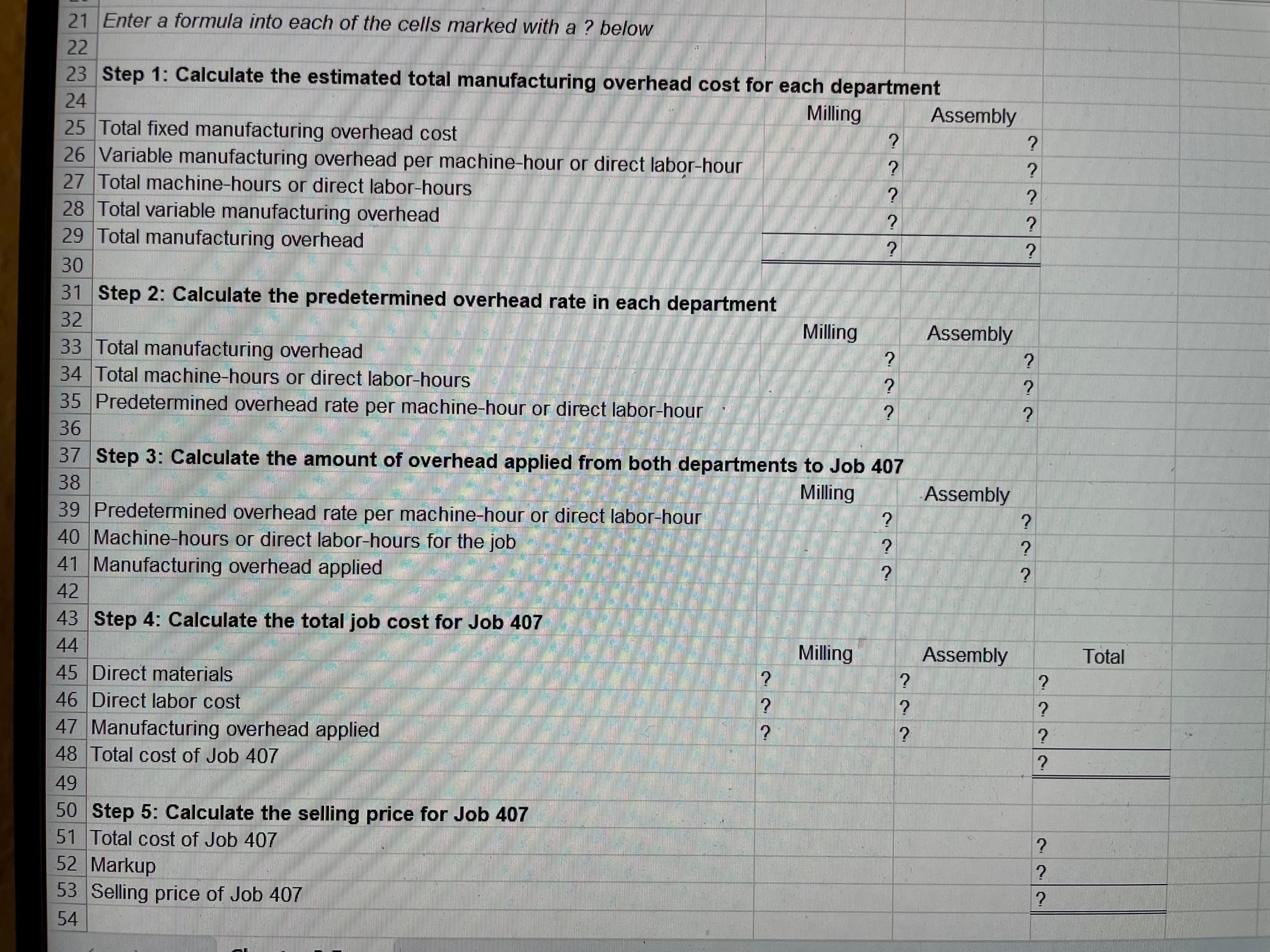
Download the Applying Excel form and enter formulas in all cells that contain question marks.
The Chapter 3 Form worksheet is to be used to create your own worksheet version of the example in the text.
Enter formulas in the cells that contain question marks. For example, in cell B25 enter the formula "=B10".
After entering formulas in all of the cells that contained question marks, verify that the amounts match the example in the text.
You should proceed to the requirements below only after completing your worksheet.
Required:
1. Check your worksheet by changing the total fixed manufacturing overhead cost for the Milling Department in the Data area to $300,000, keeping all other data the same as in the original example. If your worksheet is operating properly, the total cost of Job 407 should now be $2,350. If you do not get this answer, find the errors in your worksheet and correct them.
Use the Exhibit to answer the questions below.
EXHIBIT 3-5 Dickson Company: An Example Using Multiple Predetermined Overhead Rates
Step 1: Calculate the estimated total manufacturing overhead cost for each department.
Milling Department Overhead Cost (Y)= $390,000 + ($2.00 per MH 60,000 MHs) = $390,000 + $120,000 = $510,000
Assembly Department Overhead Cost (Y) = $500,000 + ($3.75 per DLH 80,000 DLHs) = $500,000 + $300,000 = $800,000
Step 2: Calculate the predetermined overhead rate in each department.
Milling Department Overhead Rate = $510,000/60,000 machine-hours = $8.50 per machine-hour
Assembly Department Overhead Rate = $800,000/80,000 direct labor-hours = $10.00 per direct labor-hour
Step 3: Calculate the amount of overhead applied from both departments to Job 407.
Milling Department: Overhead Applied to Job 407 = $8.50 per MH 90 MHs = $765
Assembly Department: Overhead Applied to Job 407 = $10.00 per DLH 20 DLHs = $200
Step 4: Calculate the total job cost for Job 407.
| Milling | Assembly | Total | |
|---|---|---|---|
| Direct materials | $ 800 | $ 370 | $ 1,170 |
| Direct labor | $ 70 | $ 280 | 350 |
| Manufacturing overhead applied | $ 765 | $ 200 | 965 |
| Total cost of Job 407 | $ 2,485 |
Step 5: Calculate the selling price for Job 407.
| Total cost of Job 407 | $ 2,485.00 |
|---|---|
| Markup ($2,485 75%) | 1,863.75 |
| Selling price of Job 407 | $ 4,348.75 |
Solve the Questions below using the information
Change the total fixed manufacturing overhead cost for the Milling Department in Data area back to $390,000, keeping all of the other data the same as in the original example. Consider a new job, Job 408, with the following characteristics:
In your worksheet, enter this new data in the cells for Job 407.
What is the new selling price for Job 408?
Note: Round your final answer to 2 decimal places.
Without changing the data for the job from requirement 2 above, what is the selling price for Job 408 if the total number of machine-hours in the Assembly Department increases from 3,000 machine-hours to 5,000 machine-hours?
Note: Round your final answer to 2 decimal places.
Restore the total number of machine-hours in the Assembly Department to 3,000 machine-hours. And keep the job data the same as it was in Requirement 2. What is the selling price for Job 408 if the total number of direct labor-hours in the Assembly Department decreases from 80,000 direct labor-hours to 40,000 direct labor-hours?
Note: Round your final answer to 2 decimal places.
A 1 Chapter 3: Applying Excel Data Markup on job cost 75% Department 7 8 Machine-hours 9 Direct labor-hours 10 Total fixed manufacturing overhead cost 11 Variable manufacturing overhead per machine-hour 12 Variable manufacturing overhead per direct labor-hour 13 14 Cost summary for Job 407 Department 15 Machine-hours Milling Assembly 7 Direct labor-hours 18 Direct materials 19 Direct labor cost 20 Enter a formula into each of the cells marked with a ? below 22 23 Step 1: Calculate the estimated total manufacturing overhead cost for each department Step 2: Calculate the predetermined overhead rate in each department 32 Total manufacturing overhead 34 Total machine-hours or direct labor-hours 35 Predetermined overhead rate per machine-hour or direct labor-hour Milling??????Assembly 21 Enter a formula into each of the cells marked with a ? below Step 2: Calculate the predetermined overhead rate in each department \begin{tabular}{|l|l} 32 & \\ \hline 33 & Total manufacturing overhead \\ \hline 34 & Total machine-hours or direct labor-hours \\ \hline 35 & Predeterined overis \end{tabular} Milling Assembly Predetermined overhead rate per machine-hour or direct labor-hour Step 3: Calculate the amount of overhead applied from both departments to Job 407 \begin{tabular}{|l|l|} \hline 38 & \\ \hline 40 & Predetermined overhead rate per machine-hour or \\ \hline 41 & Machine-hours or direct labor-hours for the job \\ \hline 42 & \\ \hline 43 & Step 4: Calculate the total job cost for Job 407 \\ \hline 44 & \end{tabular} Milling Assembly 44 Direct materials 46 Direct labor cost 47 Manufacturing overhead applied 48 Total cost of Job 407 49 50 Step 5: Calculate the selling price for Job 407 51 Total cost of Job 407 52 Markup 53 Selling price of Job 407 54 A 1 Chapter 3: Applying Excel Data Markup on job cost 75% Department 7 8 Machine-hours 9 Direct labor-hours 10 Total fixed manufacturing overhead cost 11 Variable manufacturing overhead per machine-hour 12 Variable manufacturing overhead per direct labor-hour 13 14 Cost summary for Job 407 Department 15 Machine-hours Milling Assembly 7 Direct labor-hours 18 Direct materials 19 Direct labor cost 20 Enter a formula into each of the cells marked with a ? below 22 23 Step 1: Calculate the estimated total manufacturing overhead cost for each department Step 2: Calculate the predetermined overhead rate in each department 32 Total manufacturing overhead 34 Total machine-hours or direct labor-hours 35 Predetermined overhead rate per machine-hour or direct labor-hour Milling??????Assembly 21 Enter a formula into each of the cells marked with a ? below Step 2: Calculate the predetermined overhead rate in each department \begin{tabular}{|l|l} 32 & \\ \hline 33 & Total manufacturing overhead \\ \hline 34 & Total machine-hours or direct labor-hours \\ \hline 35 & Predeterined overis \end{tabular} Milling Assembly Predetermined overhead rate per machine-hour or direct labor-hour Step 3: Calculate the amount of overhead applied from both departments to Job 407 \begin{tabular}{|l|l|} \hline 38 & \\ \hline 40 & Predetermined overhead rate per machine-hour or \\ \hline 41 & Machine-hours or direct labor-hours for the job \\ \hline 42 & \\ \hline 43 & Step 4: Calculate the total job cost for Job 407 \\ \hline 44 & \end{tabular} Milling Assembly 44 Direct materials 46 Direct labor cost 47 Manufacturing overhead applied 48 Total cost of Job 407 49 50 Step 5: Calculate the selling price for Job 407 51 Total cost of Job 407 52 Markup 53 Selling price of Job 407 54
Step by Step Solution
There are 3 Steps involved in it

Get step-by-step solutions from verified subject matter experts