







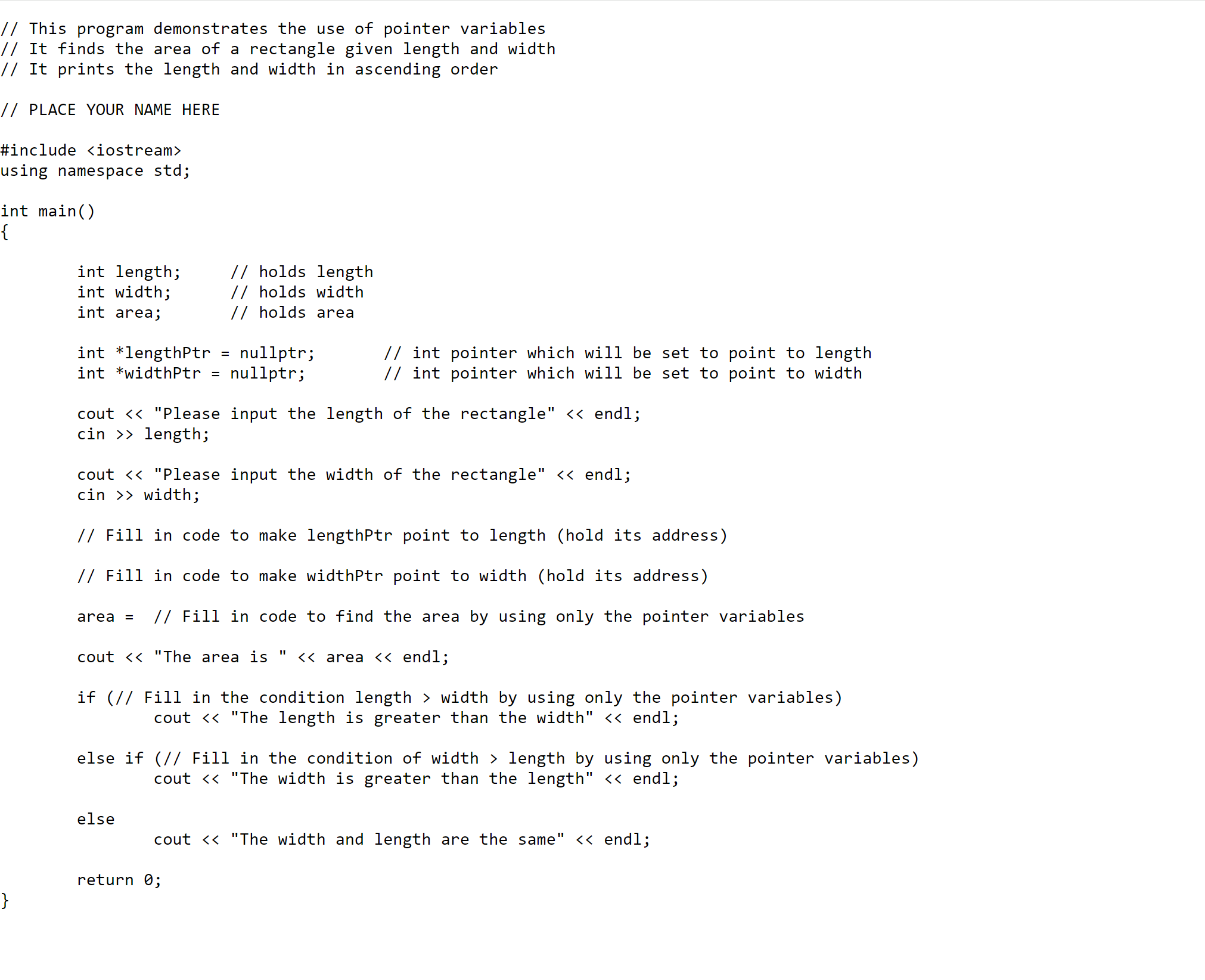
Question: Download the attached Pointer dicussion file.cpp copy and paste the code segment / s into your visual studio or any other C + + IDE
Download the attached Pointer dicussion file.cpp copy and paste the code segments into your visual studio or any other C IDE and run it You will have to implement a small intentional bug in your program and post it for other students to debug.
To be able to receive your full discussion points, you need to submit the following.
Following is your check list and rubric This program demonstrates the use of pointer variables
Attach your cpp files with an implemented bug pnts
Describe what the code does in detail pnts
Debug at least one other program and submit your cpp file pnts note what the bug was in comments
After running the debugged program, attach the screen shot of your outputpnts
Step by Step Solution
There are 3 Steps involved in it
1 Expert Approved Answer
Step: 1 Unlock

Question Has Been Solved by an Expert!
Get step-by-step solutions from verified subject matter experts
Step: 2 Unlock
Step: 3 Unlock
 Study Help