







Question: Download this utility from sysinternals. a. https://technet.microsoft.com/en-u/sysinternals/psfile.aspx b. Read what this utility does. c. Want to point out that this looks at files that are
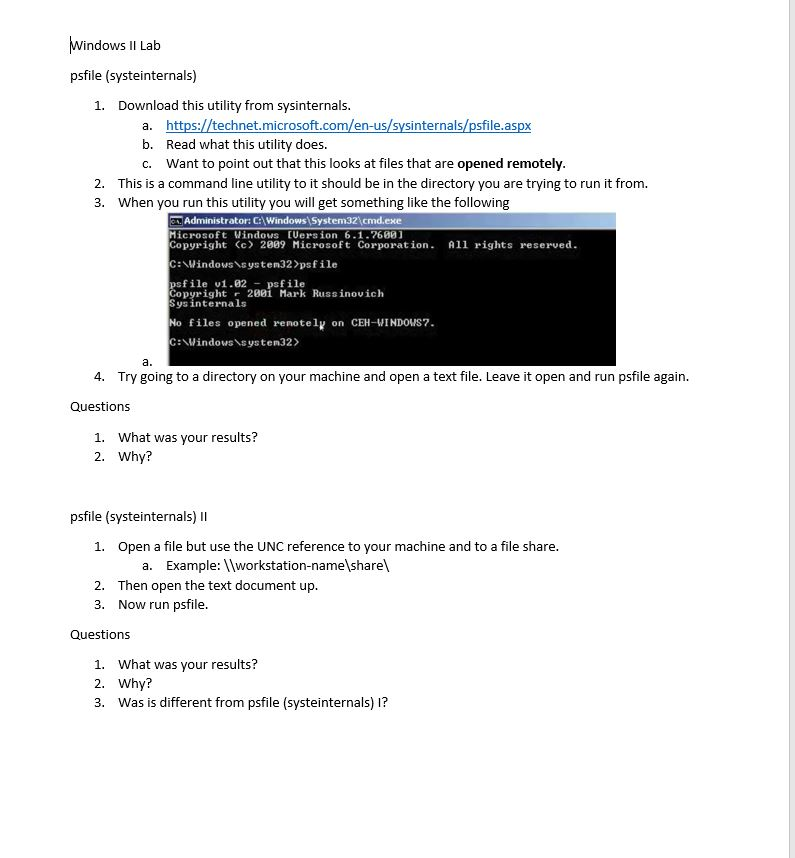
Download this utility from sysinternals. a. https://technet.microsoft.com/en-u/sysinternals/psfile.aspx b. Read what this utility does. c. Want to point out that this looks at files that are opened remotely. This is a command line utility to it should be in the directory you are trying to run it from. When you run this utility you will get something like the following Microsoft Windows [Version 6.1.7600] Copyright (c) 2009 Microsoft Corporation. All rights reserved C: \Windows\system32 > psfile psfile v1.02 psfile Copyright 2001 Mark Russinovich Sys internals No files opened remotely on CEH-WINDOWIS7. C: \Windows\system32>. Try going to a directory on your machine and open a text file. Leave it open and run psfile again. What was your results? Why? psfile (systeinternals) II Open a file but use the UNC reference to your machine and to a file share. a. Example: \\Workstation-name\share\ Then open the text document up. Now run psfile. What was your results? Download this utility from sysinternals. a. https://technet.microsoft.com/en-u/sysinternals/psfile.aspx b. Read what this utility does. c. Want to point out that this looks at files that are opened remotely. This is a command line utility to it should be in the directory you are trying to run it from. When you run this utility you will get something like the following Microsoft Windows [Version 6.1.7600] Copyright (c) 2009 Microsoft Corporation. All rights reserved C: \Windows\system32 > psfile psfile v1.02 psfile Copyright 2001 Mark Russinovich Sys internals No files opened remotely on CEH-WINDOWIS7. C: \Windows\system32>. Try going to a directory on your machine and open a text file. Leave it open and run psfile again. What was your results? Why? psfile (systeinternals) II Open a file but use the UNC reference to your machine and to a file share. a. Example: \\Workstation-name\share\ Then open the text document up. Now run psfile. What was your results
Step by Step Solution
There are 3 Steps involved in it

Get step-by-step solutions from verified subject matter experts
 Study Help