







Question: Draw a flowchart for the program below: To better see the image, right click and view image BXCOM: XDEF Start ABSENTRY Start EQU $0010;* ROM
Draw a flowchart for the program below:
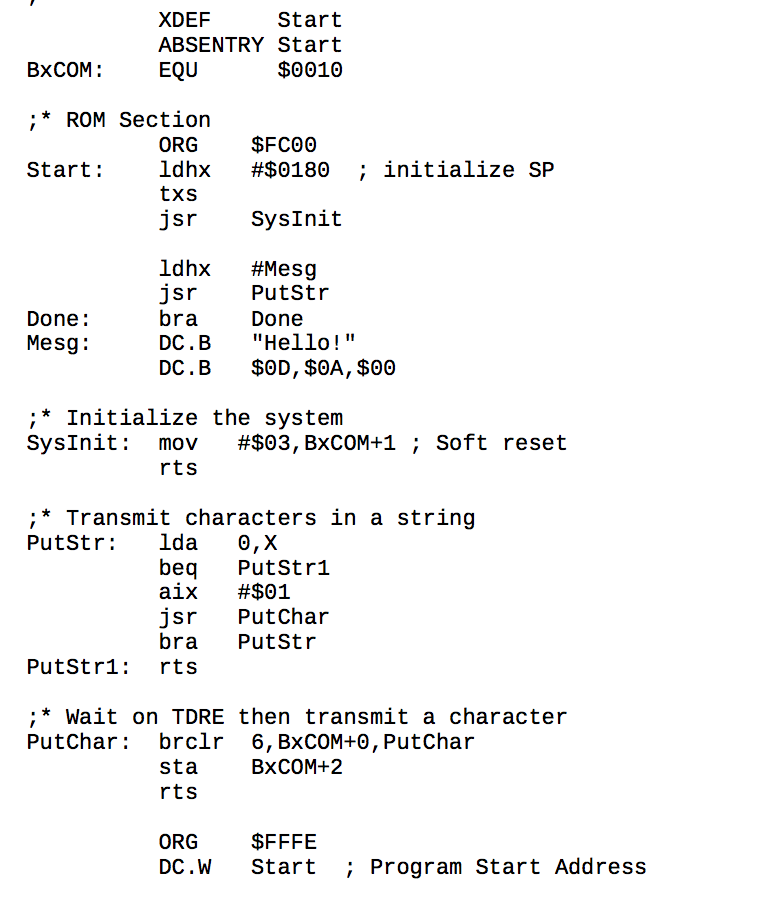
To better see the image, right click and view image
BXCOM: XDEF Start ABSENTRY Start EQU $0010;* ROM Section Start: ORC $FC00 Idhx #$0180; initialize SP txs jsr SysInit Done: Mesg: Idhx #Mesg jsr putstr bra Done DC.B "Hello!" DC.B $0D, $0A, $00;* Initialize the System SysInit: mov #$03, BxCOM+1; Soft reset rts;* Transmit characters in a string PutStr: Ida 0, X beq Putstr1 aix #$01 jsr Putchar bra putStr putStr1: rts;* Wait on TDRE then transmit a character putChar: brclr 6, BXCOM+0, putChar sta BXCOM+2 ORG $FFFE DC.W start; program Start Address BXCOM: XDEF Start ABSENTRY Start EQU $0010;* ROM Section Start: ORC $FC00 Idhx #$0180; initialize SP txs jsr SysInit Done: Mesg: Idhx #Mesg jsr putstr bra Done DC.B "Hello!" DC.B $0D, $0A, $00;* Initialize the System SysInit: mov #$03, BxCOM+1; Soft reset rts;* Transmit characters in a string PutStr: Ida 0, X beq Putstr1 aix #$01 jsr Putchar bra putStr putStr1: rts;* Wait on TDRE then transmit a character putChar: brclr 6, BXCOM+0, putChar sta BXCOM+2 ORG $FFFE DC.W start; program Start Address
Step by Step Solution
There are 3 Steps involved in it

Get step-by-step solutions from verified subject matter experts
 Study Help