







Question: Draw a shape like given example Rectangle, triangles, squares.. etc With multiple lines.. unique & creative using matlab. Draw any shape using your own code
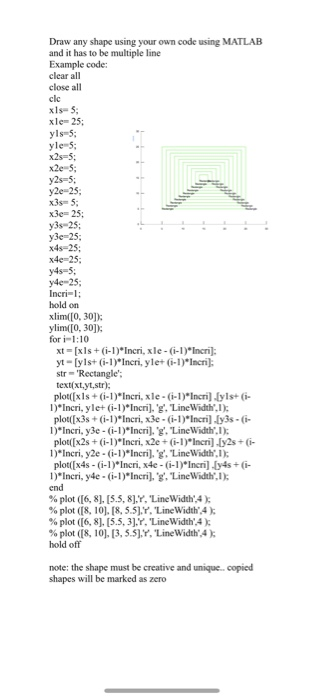
Draw any shape using your own code using MATLAE and it has to be multiple line Example code: clear all close all xls- 5 xle- 25 yls 5 yle 5 y2s-5; y2e-25 x3s- 5 x3e= 25; y3s-25; y3e 25 x4s-25; y4e-25 Incri-l hold on xlim(I0, 30D ylimTO, 30D for i-1:10 xt-[xls+(i-1) Incri, xle-(i-l)"Incri yt [ylst (-1)"Incri, ylet (G-1)"Incri]: str- 'Rectangle' text(xt.yt,str) plot((xls + (i-1 )"Incri, x1eG-1 )"Incrildyls+ (i- plotx(1)*Incri,x3e-(-1)*Incri y3s- I)*Incri, y3e () Incri."g. "LineWidth,I) 1)*Incri, y2e-1)*Incri, 'g.LineWidth,1) 1) Incri, y4e- (i-1)*Incri.'g."LineWidth,1) % plot ([6, 8], [5.5, 8],Y.Linewidth',4 ); % plot ([8, 10]. [8, 5.5],Y. 'Linewidth',4 ); % plot ([6, 81. [5.5, 3],Y. 'Linewidth',4 ); % plot ([8, 10 [3, 5.5LY,'Linewidth',4 ); hold off note: the shape must be creative and unique. shapes will be marked as zero copied Draw any shape using your own code using MATLAE and it has to be multiple line Example code: clear all close all xls- 5 xle- 25 yls 5 yle 5 y2s-5; y2e-25 x3s- 5 x3e= 25; y3s-25; y3e 25 x4s-25; y4e-25 Incri-l hold on xlim(I0, 30D ylimTO, 30D for i-1:10 xt-[xls+(i-1) Incri, xle-(i-l)"Incri yt [ylst (-1)"Incri, ylet (G-1)"Incri]: str- 'Rectangle' text(xt.yt,str) plot((xls + (i-1 )"Incri, x1eG-1 )"Incrildyls+ (i- plotx(1)*Incri,x3e-(-1)*Incri y3s- I)*Incri, y3e () Incri."g. "LineWidth,I) 1)*Incri, y2e-1)*Incri, 'g.LineWidth,1) 1) Incri, y4e- (i-1)*Incri.'g."LineWidth,1) % plot ([6, 8], [5.5, 8],Y.Linewidth',4 ); % plot ([8, 10]. [8, 5.5],Y. 'Linewidth',4 ); % plot ([6, 81. [5.5, 3],Y. 'Linewidth',4 ); % plot ([8, 10 [3, 5.5LY,'Linewidth',4 ); hold off note: the shape must be creative and unique. shapes will be marked as zero copied
Step by Step Solution
There are 3 Steps involved in it

Get step-by-step solutions from verified subject matter experts
 Study Help