







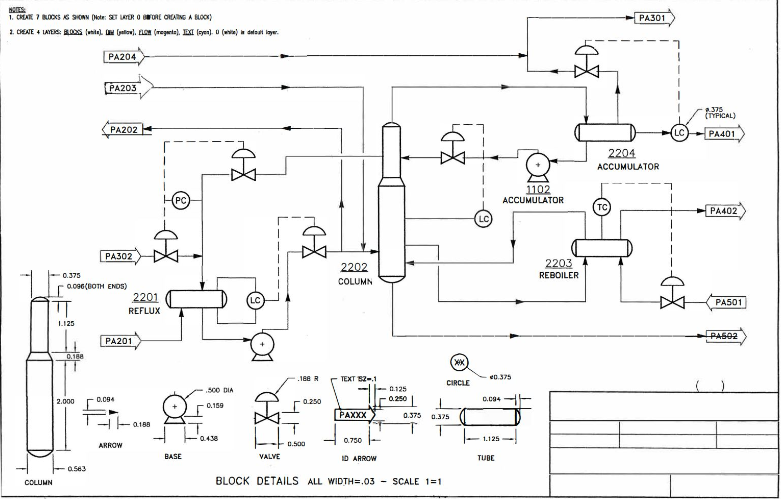
Question: Draw process flow diagram per image below using AUTOCAD. First create blocks as shown on the bottom of the drawing ( Remember: all blocks should
Draw process flow diagram per image below using AUTOCAD.
First create blocks as shown on the bottom of the drawing Remember: all blocks should be created in layer Circle and ID Arrow blocks contain text, add attributes to blocks. ID Arrow should be created twice for right and left directions.
Create separate layers for Blocks, Dimensions, Flow and Text. Place dimensions on the blocks.
Place necessary blocks on the drawing and connect them with lines Flow layer Diagram dimensions are not given. Students should create a drawing close to the image.
Step by Step Solution
There are 3 Steps involved in it
1 Expert Approved Answer
Step: 1 Unlock

Question Has Been Solved by an Expert!
Get step-by-step solutions from verified subject matter experts
Step: 2 Unlock
Step: 3 Unlock
 Study Help