







Question: drawmode _ nothing: push ra # Check if left mouse button is pressed lw t 0 , display _ mouse _ pressed and t 0
drawmodenothing:
push ra
# Check if left mouse button is pressed
lw t displaymousepressed
and t t MOUSELBUTTON # Check if bit left mouse button is set
beq tendiflnotpressed # If left mouse button is not pressed, skip drawing
endiflnotpressed:
pop ra
jr ra
# Set drawmode to MODEBRUSH
li t MODEBRUSH
sw t drawmode
# Draw a pixellong line at current mouse coordinates in current color
lw a displaymousex # Load current mouse x coordinate
lw a displaymousey # Load current mouse y coordinate
lw a displaymousex # Load current mouse x coordinate
lw a displaymousey
lw v color
jal displaydrawline
lw a displaymousex # Load current mouse x coordinate
lw a displaymousey # Load current mouse y coordinate
# Set lastx and lasty to current mouse coordinates
sw a lastx
sw a lasty
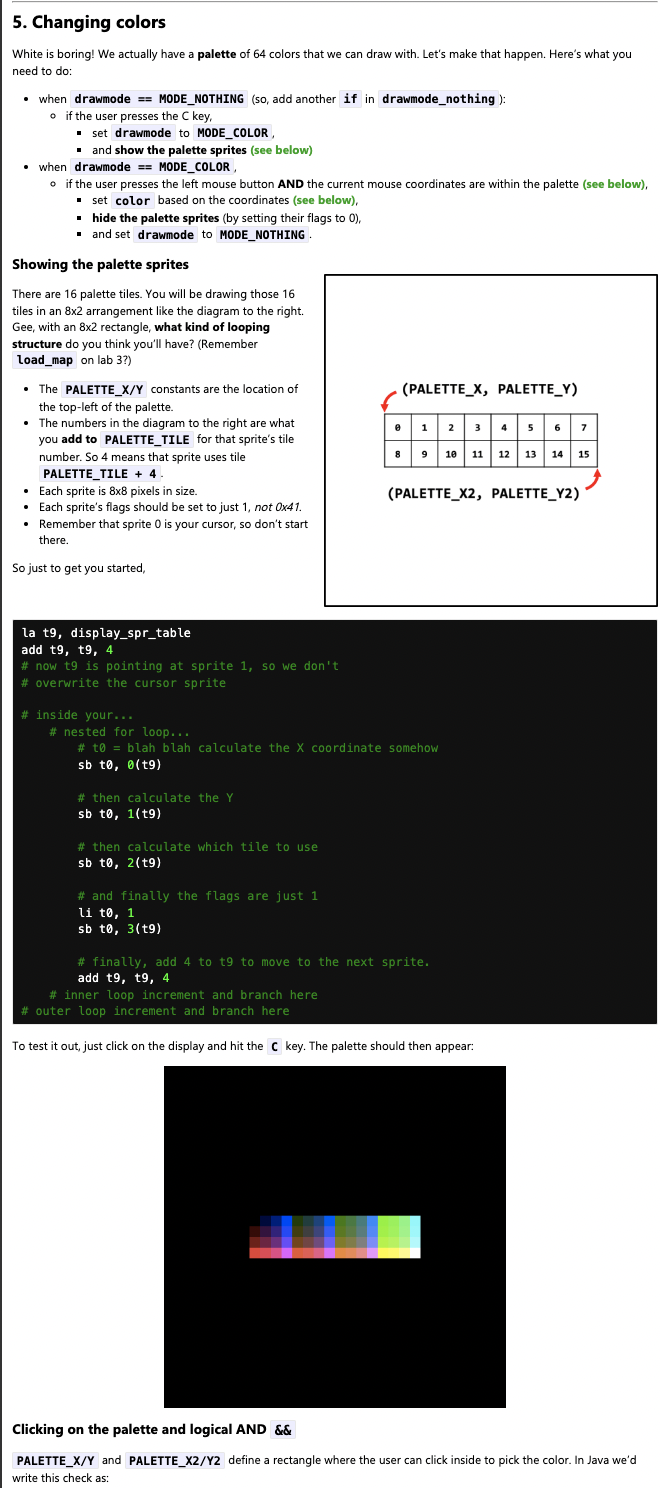
li t KEYC
sw t displaykeypressed
lw t displaykeypressed
beq t zero, return
li t MODECOLOR
sw t drawmode
la t displaysprtable
addi t t
#inside your
#initialize outer loop counter
li s
#nested for loop
outerloop:
#initialize inner loop counter
li s
innerloop:
#t calculate x cord
mul t s
add t t PALETTEX
sb tt
#calculate y cord
li t PALETTEY
mul t s
add t t PALETTEY
sb tt
#calc which tile to use
li t PALETTETILE
add t t s
sb tt
#UP TO U
sb tt
#flags are just
li t
sb tt
#finally, add to t to move to the next sprite
add t t
#inner loop increment and branch here
add s s
blt s innerloop
#outer loop increment and branch here
add s s
blt s outerloop
return: # Define the return label
pop ra
jr ra
drawmodebrush:
push ra
lw t displaymousereleased
and t t MOUSELBUTTON # Check if bit left mouse button is set
beq tendifoffscreen # If left mouse button is not released, skip drawing
lw a displaymousex # Load current mouse x coordinate
lw a displaymousey # Load current mouse y coordinate
lw a lastx # Load last mouse x coordinate
lw a lasty
lw v color
#if user is off screen
blt aendifoffscreen
blt aendifoffscreen
bge, aendifoffscreen
bge, aendifoffscreen
j currentlast
endifoffscreen:
li t MODENOTHING
sw t drawmode
j return
currentlast: # Load last mouse y coordinate
bne a adrawline # If current x does not equal last x draw line
bne a adrawline # If current y does not equal last y draw line
drawline:
#draw a line from lastxy to the current mouse coordinates in the current color
#set the lastx and lasty to the current mouse coordinates.
li t MODEBRUSH
sw t drawmode
lw a displaymousex # Load current mouse x coordinate
lw a displaymousey # Load current mouse y coordinate
lw a lastx # Load last mouse x coordinate
lw a lasty
lw v color
jal displaydrawline
lw a displaymousex # Load current mouse x coordinate
lw a displaymousey
sw a lastx
sw a lasty
return:
pop ra
jr ra
Step by Step Solution
There are 3 Steps involved in it
1 Expert Approved Answer
Step: 1 Unlock

Question Has Been Solved by an Expert!
Get step-by-step solutions from verified subject matter experts
Step: 2 Unlock
Step: 3 Unlock
 Study Help