







Question: //Driver program for Part 1: Array Based List #include using namespace std; void Insert(int data[], int item, int& length); bool isEmpty(int[], int size); bool isPresent(int
//Driver program for Part 1: Array Based List #include
void Insert(int data[], int item, int& length); bool isEmpty(int[], int size); bool isPresent(int data[], int item, int length); void Delete(int data[], int item, int& length); void printList(int data[], int length);
const int MAX_LENGTH = 10;
int main() { int a[MAX_LENGTH], size = 4;
cout
printList(a, size); cout
cout
printList(a, size);
cout
printList(a, size);
cout
printList(a, size);
system("pause"); return 0; }
void Insert(int data[], int item, int& length) { }
bool isEmpty(int[], int size) { return false; }
bool isPresent(int data[], int item, int length) { return true; }
void Delete(int data[], int item, int& length) { }
void printList(int data[], int length) { }
![std; void Insert(int data[], int item, int& length); bool isEmpty(int[], int size);](https://dsd5zvtm8ll6.cloudfront.net/si.experts.images/questions/2024/09/66f30cf926a1a_60066f30cf8cbd96.jpg)
The first part is what the problem is and what the proper output looks like. The second part is my source code and what I am currently getting as a printout.
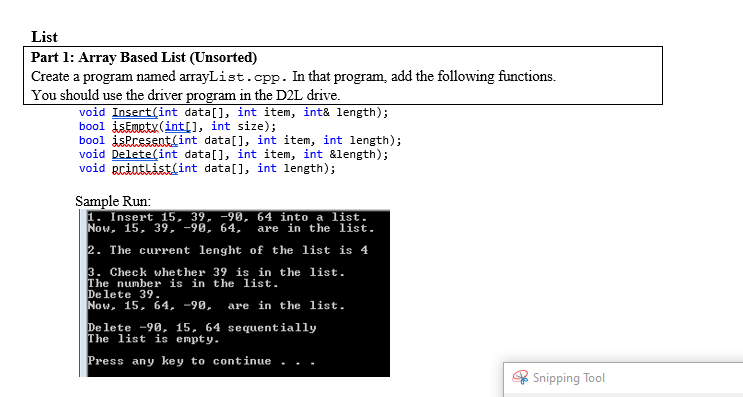
List Part 1: Array Based List (Unsorted) Create a program named arrayList.cpp. In that program, add the following functions. You should use the driver program in the D2L drive. void Insert(int data[], int item, int& length); bool isEmpty(int[], int size); bool is present(int data[], int item, int length); void Delete(int data[], int item, int &length); void pcinthist(int data[], int length); Sample Run: 1. Insert 15, 39, -90, 64 into a list. Now, 15, 39, -98, 64, are in the list. 2. The current lenght of the list is 4 3. Check whether 39 is in the list. The number is in the list. Delete 39 Now, 15, 64, -90, are in the list. De lete -90. 15, 64 sequentially The list is empty. Press any key to continue Snipping Tool 1. Insert 15, 39, -90, 64 into a list. 2. The current lenght of the list is 4 3. Check whether 39 is in the list. The number is in the list. Delete 39. Delete -90, 15, 64 sequentially Press any key to continue
Step by Step Solution
There are 3 Steps involved in it

Get step-by-step solutions from verified subject matter experts
 Study Help