







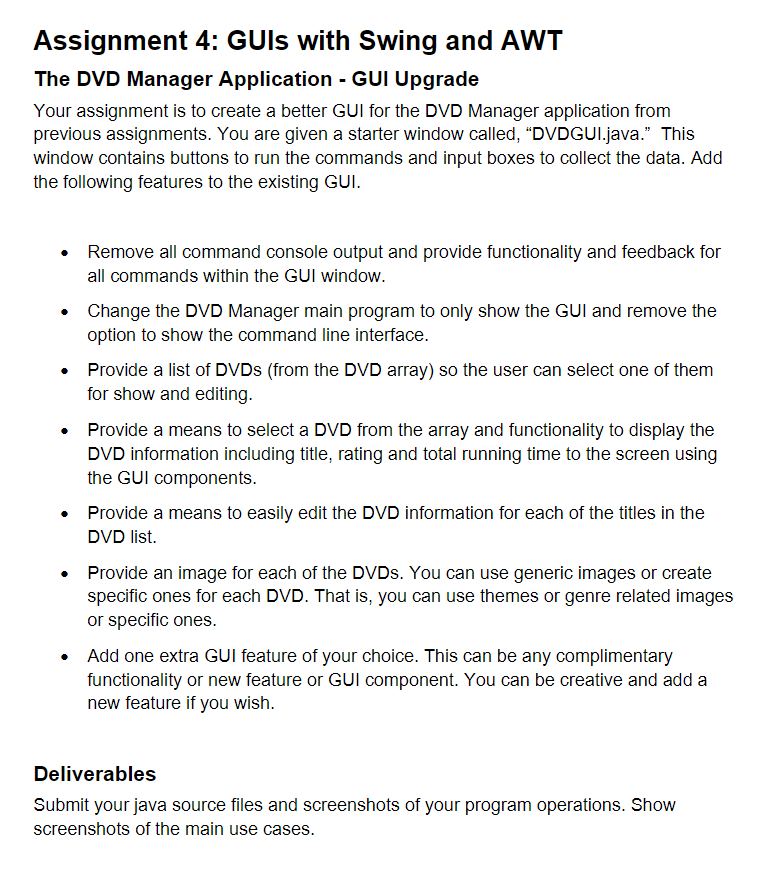
Question: DVD . java and DVDCollection.java code are screenshotted below. The other . java files are written out here. Please complete DVDGUI.java with full functionality, including
DVDjava and DVDCollection.java code are screenshotted below. The other java files are written out here. Please complete DVDGUI.java with full functionality, including showing the whole DVD collection like an organized list of the DVDs on the GUI window itself and also DVD cover movie images that go along with any added movie.
DVDConsoleUI.java:
import java.util.;
This class is an implementation of DVDUserInterface
that uses the console to display the menu of command choices
public class DVDConsoleUI implements DVDUserInterface
private DVDCollection dvdlist;
private Scanner scan;
public DVDConsoleUIDVDCollection dl
dvdlist dl;
scan new ScannerSystemin;
public void processCommands
String commands AddModify DVD
"Remove DVD
"Get DVDs By Rating",
"Get Total Running Time",
"Save and Exit";
int choice;
do
for int i ; i commands.length; i
System.out.printlnSelect i : commandsi;
try
choice scan.nextInt;
scan.nextLine;
switch choice
case : doAddOrModifyDVD; break;
case : doRemoveDVD; break;
case : doGetDVDsByRating; break;
case : doGetTotalRunningTime; break;
case : doSave; break;
default: System.out.printlnINVALID CHOICE TRY AGAIN";
catch InputMismatchException e
System.out.printlnINVALID CHOICE TRY AGAIN";
scan.nextLine;
choice ;
while choice commands.length;
private void doAddOrModifyDVD
Request the title
System.out.printlnEnter title";
String title scan.nextLine;
if titleequals
return; input was cancelled
title title.toUpperCase;
Request the rating
System.out.printlnEnter rating";
String rating scan.nextLine;
if ratingequals
return; input was cancelled
rating rating.toUpperCase;
Request the running time
System.out.printlnEnter running time";
String time scan.nextLine; NOTE: time read in as a String!
if timeequals
return; input was cancelled
Add or modify the DVD assuming the rating and time are valid
dvdlist.addOrModifyDVDtitle rating, time;
Display current collection to the console for debugging
System.out.printlnAddingModifying: title rating time;
System.out.printlndvdlist;
private void doRemoveDVD
Request the title
System.out.printlnEnter title";
String title scan.nextLine;
if titleequals
return; dialog was cancelled
title title.toUpperCase;
Remove the matching DVD if found
dvdlist.removeDVDtitle;
Display current collection to the console for debugging
System.out.printlnRemoving: title;
System.out.printlndvdlist;
private void doGetDVDsByRating
Request the rating
System.out.printlnEnter rating";
String rating scan.nextLine;
if ratingequals
return; dialog was cancelled
rating rating.toUpperCase;
String results dvdlist.getDVDsByRatingrating;
System.out.printlnDVDs with rating rating;
System.out.printlnresults;
private void doGetTotalRunningTime
int total dvdlist.getTotalRunningTime;
System.out.printlnTotal Running Time of DVDs: ;
System.out.printlntotal;
private void doSave
dvdlist.save;
DVDManager.java:
import java.util.;
Program to display and modify a simple DVD collection
public class DVDManager
public static void mainString args
DVDUserInterface dlInterface;
DVDCollection dl new DVDCollection;
Scanner scan new ScannerSystemin;
System.out.printlnEnter name of data file to load:";
String filename scan.nextLine;
dlloadDatafilename;
System.out.printlnInput interface type: CConsole, GGUI";
String interfaceType scan.nextLine;
if interfaceTypeequalsC
dlInterface new DVDConsoleUIdl;
dlInterface.processCommands;
else if interfaceTypeequalsG
dlInterface new DVDGUIdl;
dlInterface.processCommands;
else
System.out.printlnUnrecognized interface type. Program exiting.";
System.exit;
DVDUserInterface.java:
public interface DVDUserInterface
void processCommands;
Step by Step Solution
There are 3 Steps involved in it
1 Expert Approved Answer
Step: 1 Unlock

Question Has Been Solved by an Expert!
Get step-by-step solutions from verified subject matter experts
Step: 2 Unlock
Step: 3 Unlock
 Study Help