







Question: //DynamicArray.h template class DynamicArray { T* value; int cap; T dummy; public: DynamicArray(int cap = 2); ~DynamicArray(); DynamicArray(const DynamicArray & original); DynamicArray & operator=(const DynamicArray
//DynamicArray.h
template
class DynamicArray
{
T* value;
int cap;
T dummy;
public:
DynamicArray(int cap = 2);
~DynamicArray();
DynamicArray(const DynamicArray
DynamicArray
T& operator[](int index);
T operator[](int index) const;
int capacity() const { return cap; }
void capacity(int cap);
};
template
DynamicArray
{
dummy = T();
this->cap = cap;
value = new T[cap];
for (int i = 0; i
{
value[i] = T();
}
}
template
DynamicArray
{
delete[] value;
}
template
DynamicArray
{
this->cap = original.cap;
this->value = new T[cap];
for (int i = 0; i
{
value[i] = original.value[i];
}
}
template
DynamicArray
{
if (this != &original)
{
delete[] value;
this->cap = original.cap;
this->value = new T[cap];
for (int i = 0; i
{
value[i] = original.value[i];
}
}
return *this;
}
template
T& DynamicArray
{
if (index
if (index >= cap) capacity(2 * index);
return value[index];
}
template
T DynamicArray
{
if (index = cap)
{
return dummy;
}
return value[index];
}
template
void DynamicArray
{
if (cap
{
return;
}
T* temp = new T[cap];
int limit = (cap cap) ? cap : this->cap;
for (int i = 0; i
{
temp[i] = value[i];
}
for (int i = limit; i
{
temp[i] = T();
}
delete[] value;
value = temp;
this->cap = cap;
}
#endif
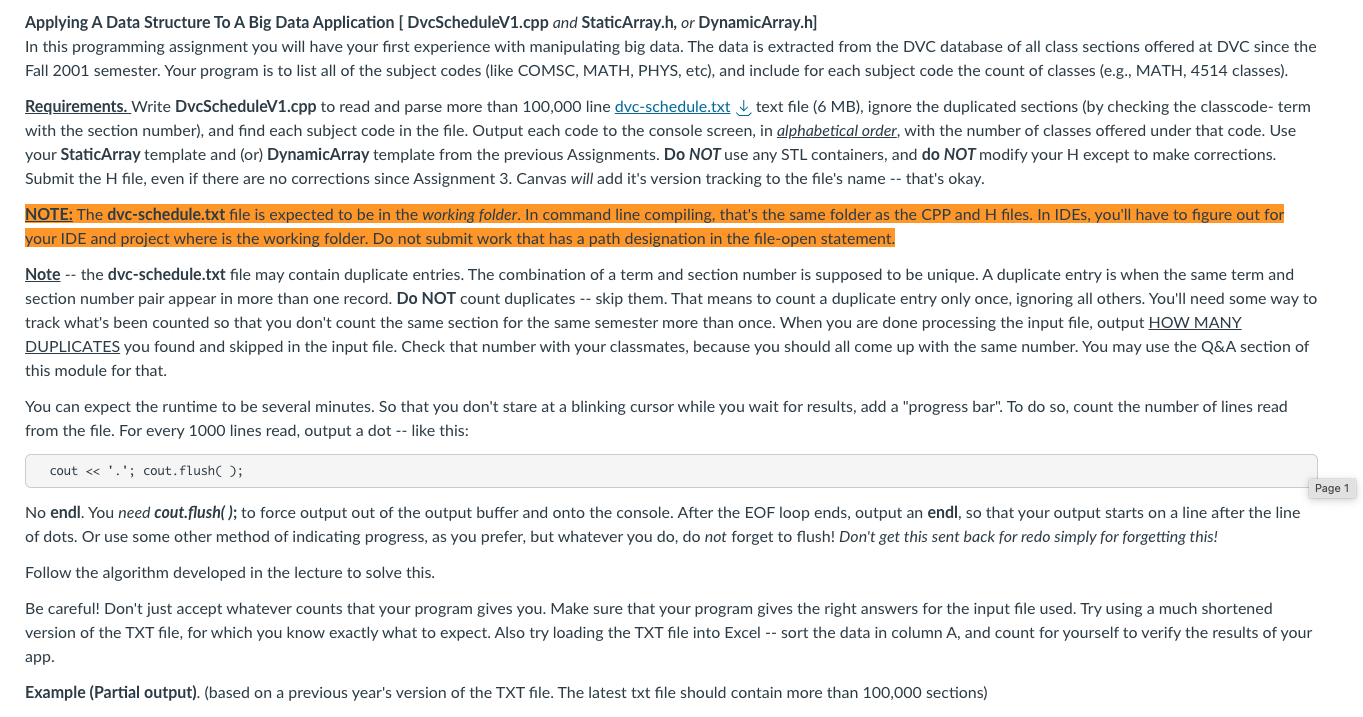
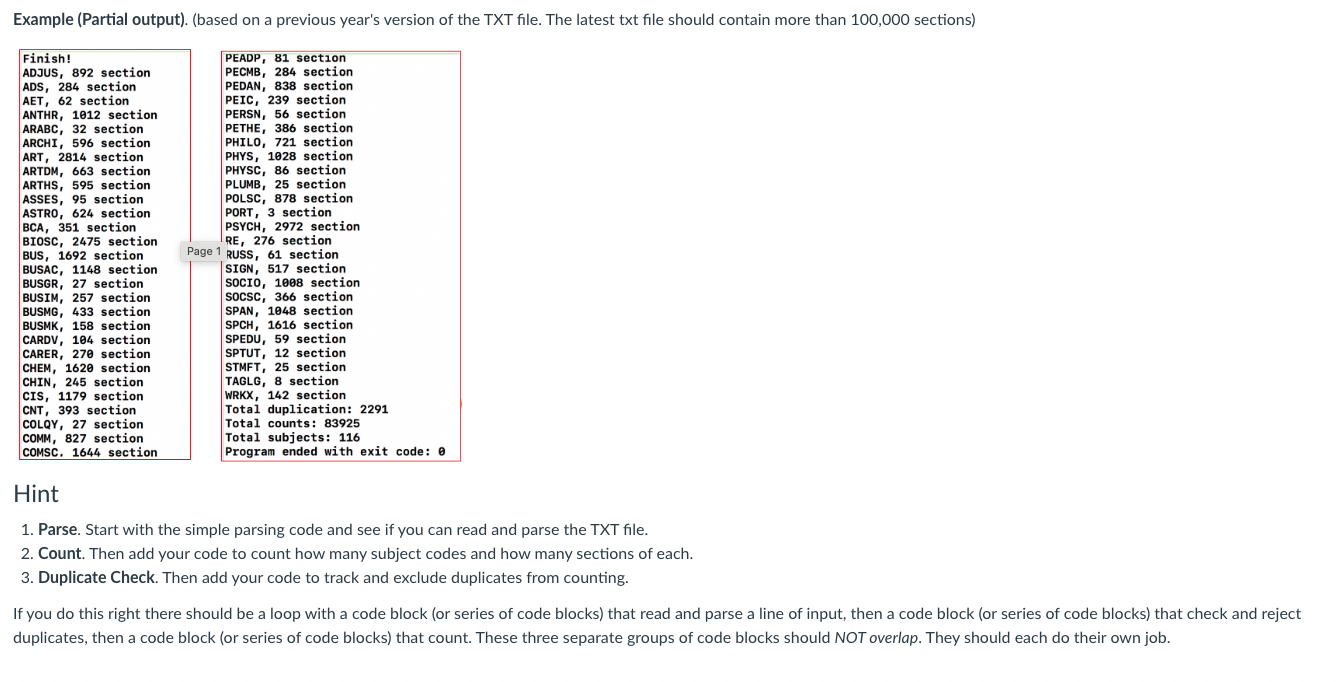
Applying A Data Structure To A Big Data Application [ DvcScheduleV1.cpp and StaticArray.h, or DynamicArray.h] In this programming assignment you will have your first experience with manipulating big data. The data is extracted from the DVC database of all class sections offered at DVC since the Fall 2001 semester. Your program is to list all of the subject codes (like COMSC, MATH, PHYS, etc), and include for each subject code the count of classes (e.g., MATH, 4514 classes). Requirements. Write DvcScheduleV1.cpp to read and parse more than 100,000 line dvc-schedule.txt text file (6 MB), ignore the duplicated sections (by checking the classcode- term with the section number), and find each subject code in the file. Output each code to the console screen, in alphabetical order, with the number of classes offered under that code. Use your StaticArray template and (or) DynamicArray template from the previous Assignments. Do NOT use any STL containers, and do NOT modify your H except to make corrections. Submit the H file, even if there are no corrections since Assignment 3 . Canvas will add it's version tracking to the file's name -- that's okay. NOTE: The dvc-schedule.txt file is expected to be in the working folder. In command line compiling, that's the same folder as the CPP and H files. In IDEs, you'll have to figure out for your IDE and project where is the working folder. Do not submit work that has a path designation in the file-open statement. Note -- the dvc-schedule.txt file may contain duplicate entries. The combination of a term and section number is supposed to be unique. A duplicate entry is when the same term and section number pair appear in more than one record. Do NOT count duplicates -- skip them. That means to count a duplicate entry only once, ignoring all others. You'll need some way to track what's been counted so that you don't count the same section for the same semester more than once. When you are done processing the input file, output HOW MANY DUPLICATES you found and skipped in the input file. Check that number with your classmates, because you should all come up with the same number. You may use the Q\&A section of this module for that. You can expect the runtime to be several minutes. So that you don't stare at a blinking cursor while you wait for results, add a "progress bar". To do so, count the number of lines read from the file. For every 1000 lines read, output a dot -- like this: cout . '; cout.flush( ); No endl. You need cout.flush(); to force output out of the output buffer and onto the console. After the EOF loop ends, output an endl, so that your output starts on a line after the line of dots. Or use some other method of indicating progress, as you prefer, but whatever you do, do not forget to flush! Don't get this sent back for redo simply for forgetting this! Follow the algorithm developed in the lecture to solve this. Be careful! Don't just accept whatever counts that your program gives you. Make sure that your program gives the right answers for the input file used. Try using a much shortened version of the TXT file, for which you know exactly what to expect. Also try loading the TXT file into Excel -- sort the data in column A, and count for yourself to verify the results of your app. Example (Partial output). (based on a previous year's version of the TXT file. The latest txt file should contain more than 100,000 sections) 1. Parse. Start with the simple parsing code and see if you can read and parse the TXT file. 2. Count. Then add your code to count how many subject codes and how many sections of each. 3. Duplicate Check. Then add your code to track and exclude duplicates from counting. If you do this right there should be a loop with a code block (or series of code blocks) that read and parse a line of input, then a code block (or series of code blocks) that check and reject duplicates, then a code block (or series of code blocks) that count. These three separate groups of code blocks should NOT overlap. They should each do their own job. Applying A Data Structure To A Big Data Application [ DvcScheduleV1.cpp and StaticArray.h, or DynamicArray.h] In this programming assignment you will have your first experience with manipulating big data. The data is extracted from the DVC database of all class sections offered at DVC since the Fall 2001 semester. Your program is to list all of the subject codes (like COMSC, MATH, PHYS, etc), and include for each subject code the count of classes (e.g., MATH, 4514 classes). Requirements. Write DvcScheduleV1.cpp to read and parse more than 100,000 line dvc-schedule.txt text file (6 MB), ignore the duplicated sections (by checking the classcode- term with the section number), and find each subject code in the file. Output each code to the console screen, in alphabetical order, with the number of classes offered under that code. Use your StaticArray template and (or) DynamicArray template from the previous Assignments. Do NOT use any STL containers, and do NOT modify your H except to make corrections. Submit the H file, even if there are no corrections since Assignment 3 . Canvas will add it's version tracking to the file's name -- that's okay. NOTE: The dvc-schedule.txt file is expected to be in the working folder. In command line compiling, that's the same folder as the CPP and H files. In IDEs, you'll have to figure out for your IDE and project where is the working folder. Do not submit work that has a path designation in the file-open statement. Note -- the dvc-schedule.txt file may contain duplicate entries. The combination of a term and section number is supposed to be unique. A duplicate entry is when the same term and section number pair appear in more than one record. Do NOT count duplicates -- skip them. That means to count a duplicate entry only once, ignoring all others. You'll need some way to track what's been counted so that you don't count the same section for the same semester more than once. When you are done processing the input file, output HOW MANY DUPLICATES you found and skipped in the input file. Check that number with your classmates, because you should all come up with the same number. You may use the Q\&A section of this module for that. You can expect the runtime to be several minutes. So that you don't stare at a blinking cursor while you wait for results, add a "progress bar". To do so, count the number of lines read from the file. For every 1000 lines read, output a dot -- like this: cout . '; cout.flush( ); No endl. You need cout.flush(); to force output out of the output buffer and onto the console. After the EOF loop ends, output an endl, so that your output starts on a line after the line of dots. Or use some other method of indicating progress, as you prefer, but whatever you do, do not forget to flush! Don't get this sent back for redo simply for forgetting this! Follow the algorithm developed in the lecture to solve this. Be careful! Don't just accept whatever counts that your program gives you. Make sure that your program gives the right answers for the input file used. Try using a much shortened version of the TXT file, for which you know exactly what to expect. Also try loading the TXT file into Excel -- sort the data in column A, and count for yourself to verify the results of your app. Example (Partial output). (based on a previous year's version of the TXT file. The latest txt file should contain more than 100,000 sections) 1. Parse. Start with the simple parsing code and see if you can read and parse the TXT file. 2. Count. Then add your code to count how many subject codes and how many sections of each. 3. Duplicate Check. Then add your code to track and exclude duplicates from counting. If you do this right there should be a loop with a code block (or series of code blocks) that read and parse a line of input, then a code block (or series of code blocks) that check and reject duplicates, then a code block (or series of code blocks) that count. These three separate groups of code blocks should NOT overlap. They should each do their own job
Step by Step Solution
There are 3 Steps involved in it

Get step-by-step solutions from verified subject matter experts
 Study Help