







Question: e.) PROGRAM: Modify the FriendlyAdd sample program to do a FriendlySubtract. Assemble and run it. Then paste the output as your answer. # When properly
e.) PROGRAM: Modify the FriendlyAdd sample program to do a "FriendlySubtract". Assemble and run it. Then paste the output as your answer.
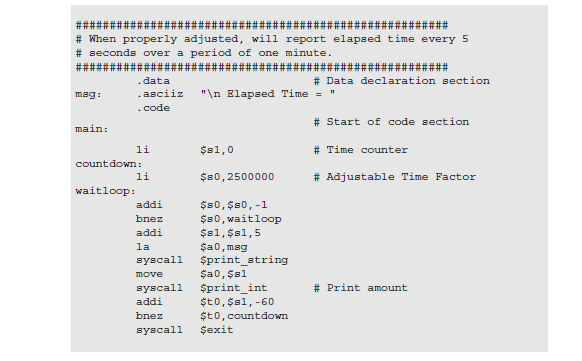
# When properly adjusted, will report elapsed time every 5 # seconds over a period of one minute data asciiz n Elapsed Time " code # Data declaration section mag: # Start of code section # Time counter # Adjustable Time Factor main: 1i $s1,0 countdown: 1i $s0,2500000 waitloop: addi bnez addi $s0,$s0,-1 $s0, waitloop $s1,$s1,5 ?ao, msg syscall $print_atring $a0, $sl # Print amount syscall Sprint_int addi bnez syscall ?exit ?to, $sl,-60 $to,countdowm # When properly adjusted, will report elapsed time every 5 # seconds over a period of one minute data asciiz n Elapsed Time " code # Data declaration section mag: # Start of code section # Time counter # Adjustable Time Factor main: 1i $s1,0 countdown: 1i $s0,2500000 waitloop: addi bnez addi $s0,$s0,-1 $s0, waitloop $s1,$s1,5 ?ao, msg syscall $print_atring $a0, $sl # Print amount syscall Sprint_int addi bnez syscall ?exit ?to, $sl,-60 $to,countdowm
Step by Step Solution
There are 3 Steps involved in it

Get step-by-step solutions from verified subject matter experts
 Study Help