







Question: Each exercise has to begin with the line Exercise# You should also mark down the parts such as (a), (b), (c), and etc. This makes
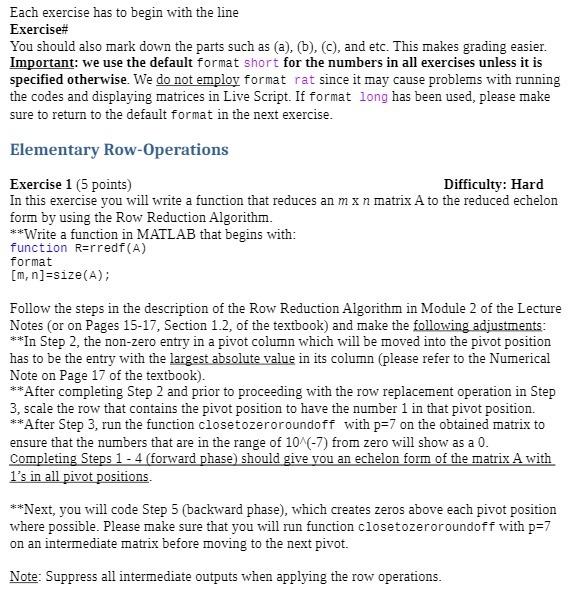
Each exercise has to begin with the line Exercise# You should also mark down the parts such as (a), (b), (c), and etc. This makes grading easier. Important: we use the default format short for the numbers in all exercises unless it is specified otherwise. We do not employ format rat since it may cause problems with running the codes and displaying matrices in Live Script. If format long has been used, please make sure to return to the default format in the next exercise. Elementary Row-Operations Exercise 1 (5 points) Difficulty: Hard In this exercise you will write a function that reduces an m x n matrix A to the reduced echelon form by using the Row Reduction Algorithm. **Write a function in MATLAB that begins with: function R=rredf(A) format [m, n]=size(A) ; Follow the steps in the description of the Row Reduction Algorithm in Module 2 of the Lecture Notes (or on Pages 15-17, Section 1.2, of the textbook) and make the following adjustments: **In Step 2, the non-zero entry in a pivot column which will be moved into the pivot position has to be the entry with the largest absolute value in its column (please refer to the Numerical Note on Page 17 of the textbook). **After completing Step 2 and prior to proceeding with the row replacement operation in Step 3, scale the row that contains the pivot position to have the number 1 in that pivot position. **After Step 3, run the function closetozeroroundoff with p=7 on the obtained matrix to ensure that the numbers that are in the range of 10^(-7) from zero will show as a 0. Completing Steps 1 - 4 (forward phase) should give you an echelon form of the matrix A with 1's in all pivot positions. **Next, you will code Step 5 (backward phase), which creates zeros above each pivot position where possible. Please make sure that you will run function closetozeroroundoff with p=7 on an intermediate matrix before moving to the next pivot. Note: Suppress all intermediate outputs when applying the row operations
Step by Step Solution
There are 3 Steps involved in it

Get step-by-step solutions from verified subject matter experts
 Study Help