







Question: Each router needs to have its own subnet, please break the 3 segments into the IP Addresses that are assigned to you in the Excel
Each router needs to have its own subnet, please break the 3 segments into the IP Addresses that are assigned to you in the Excel file. ALL SWITCHES SHOULD BE LAYER 3 SWITCHES
Each switch will require one VLAN for both hosts and inter-vlan routing will need to be enabled.
utilize static IP addresses for hosts. All routers must only use OSPF. no RIP, EIGRP, or static routes.
utilize labels to easily identify the different networks and IP Addresses for devices and interfaces Requirements will be that each device (Switch / Router) will need to be customized to yourself:
•The first configuration step on all devices must be setting the following, on the command line, in order: HOSTNAME, PASSWORD, SECRET. Failure to do this first on each device will result in ZERO grade for the assignment.
• The hostname for devices should include your first name • Banners (MOTD & Login) should include your First name in the message
• All passwords (console, telnet, enable, etc.) should be lowercase only your firstname (first 4 letters), secret should be firstname(first 4 letters)1 .
• Interface descriptions should include your first name along with a valid description .
• Turn off all unused interfaces. • Each segment (router-router, and router-switch) must be assigned a unique OSPF Area.
• Each Router must have a /28 CIDR assigned Please verify that traffic will flow between each segmenemts
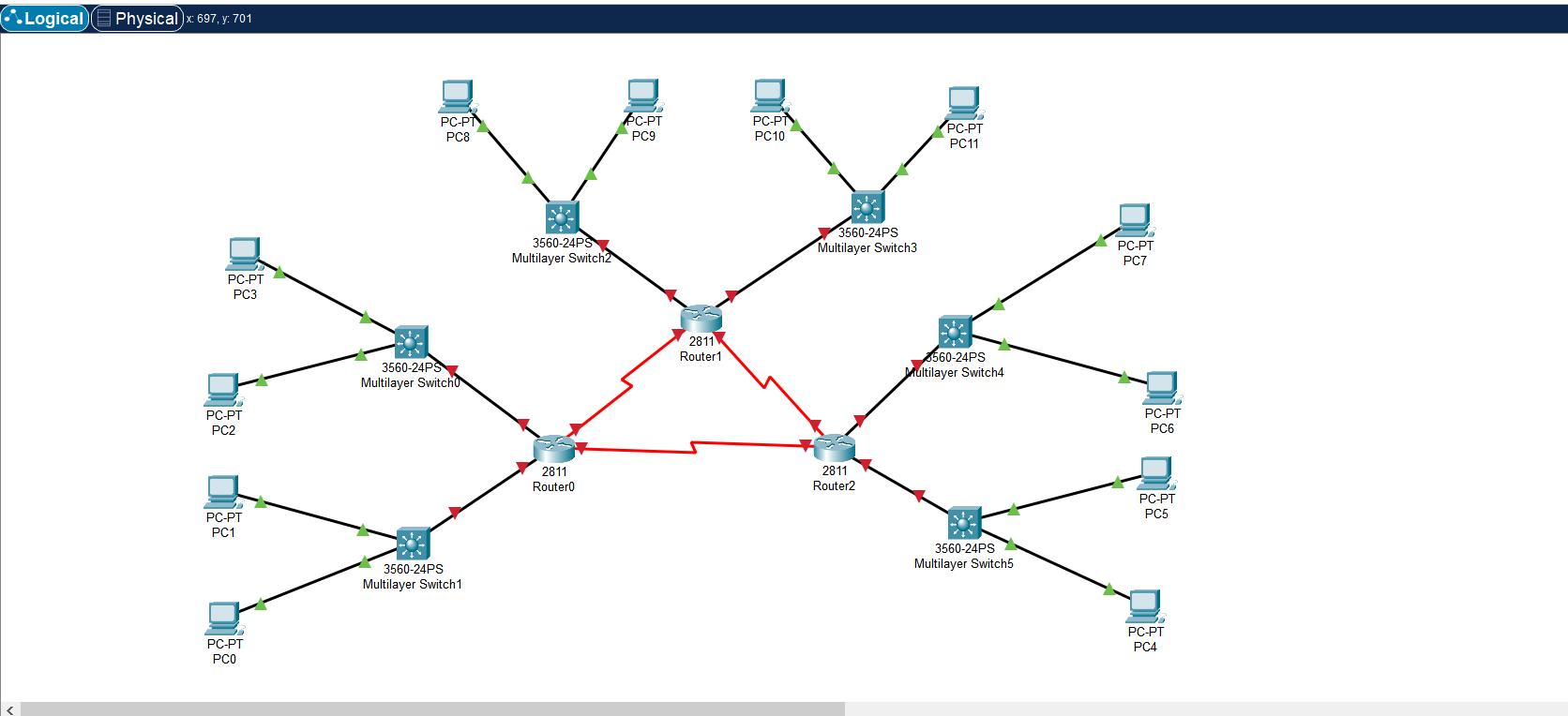
< Logical Physical)x: 697, y: 701 PC-PT PC3 PC-PT PC2 PC-PT PC1 PC-PT PC0 PC-PT PC8 3560-24PS Multilayer Switch 3560-24PS Multilayer Switch 1 3560-24PS Multilayer Switch2 2811 Router0 PC-PT PC9 2811 Router1 PC-P PC10 3560-24PS Multilayer Switch3 2811 Router2 PC-PT PC11 560-24PS Multilayer Switch4 3560-24PS Multilayer Switch5 PC-PT PC7 PC-PT PC6 PC-PT PC5 PC-PT PC4
Step by Step Solution
There are 3 Steps involved in it

Get step-by-step solutions from verified subject matter experts
 Study Help