







Question: Edit binops.asm Open the binops.asm file, and open it up in a text editor of your choice. Note that word processors ( e . g
Edit binops.asm
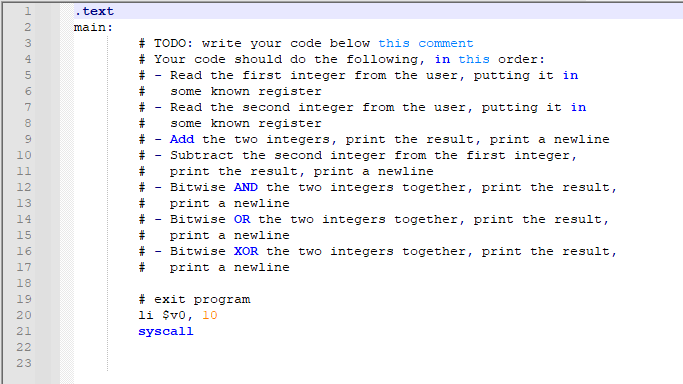
Open the binops.asm file, and open it up in a text editor of your choice. Note that word processors eg Microsoft Word, Pages, Google Docs will probably not work for this purpose, as you must save your file as plain text. You must write MIPS assembly code which will read two integers from the user hereafter referred to as A and B respectively and will then print in order:
A B on its own line
A B on its own line
A & B bitwise AND on its own line
A B bitwise OR on its own line
A B bitwise XOR on its own line
Example output of this code is shown below, which results from reading in and as the provided integers:
Step by Step Solution
There are 3 Steps involved in it
1 Expert Approved Answer
Step: 1 Unlock

Question Has Been Solved by an Expert!
Get step-by-step solutions from verified subject matter experts
Step: 2 Unlock
Step: 3 Unlock
 Study Help