







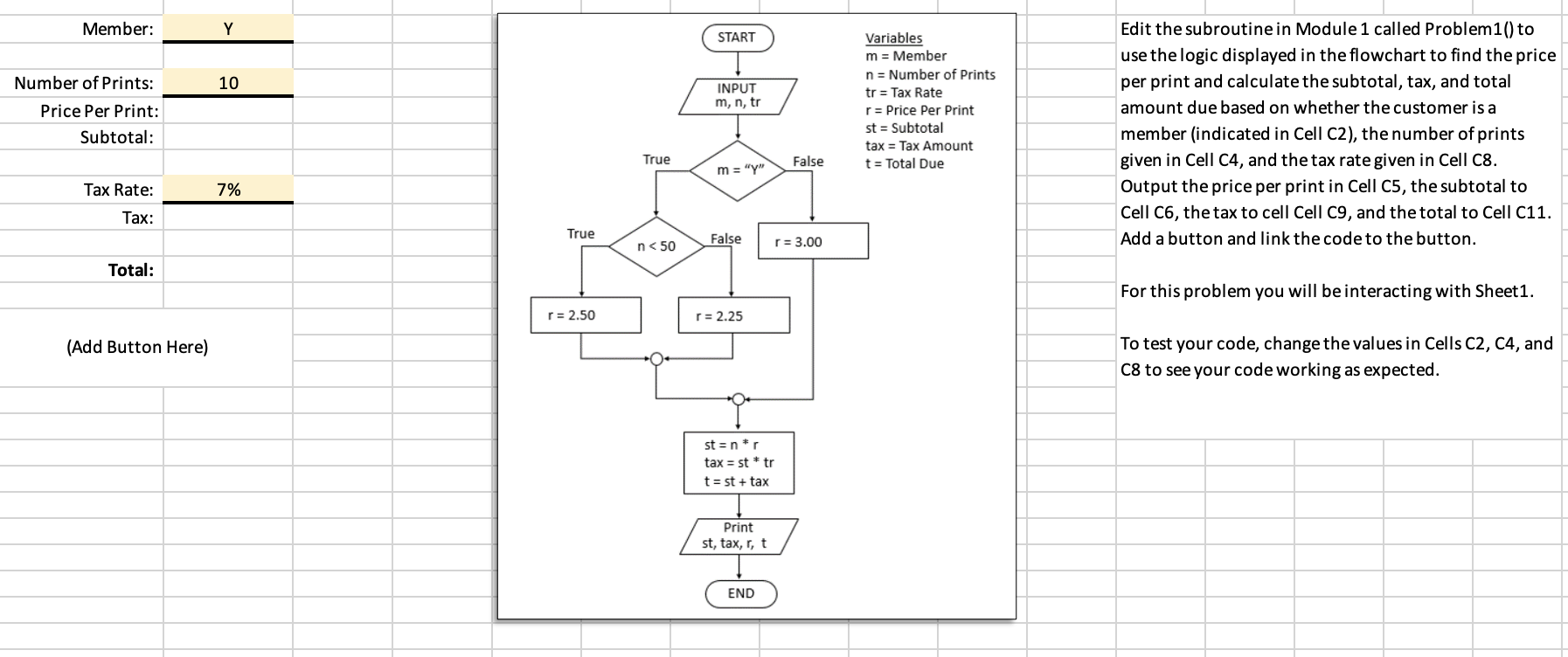
Question: Edit the subroutine in Module 1 called Problem 1 ( ) to use the logic displayed in the flowchart to find the price per print
Edit the subroutine in Module called Problem to use the logic displayed in the flowchart to find the price per print and calculate the subtotal, tax, and total amount due based on whether the customer is a member indicated in Cell C the number of prints given in Cell C and the tax rate given in Cell C Output the price per print in Cell C the subtotal to Cell C the tax to cell Cell C and the total to Cell C Add a button and link the code to the button.
For this problem you will be interacting with Sheet
To test your code, change the values in Cells C C and C to see your code working as expected.
I used the answer provided and it was incorrect, I was given the error message "Type Mismatch, error on line column Please assist me with the corret answer, thank you.
Step by Step Solution
There are 3 Steps involved in it
1 Expert Approved Answer
Step: 1 Unlock

Question Has Been Solved by an Expert!
Get step-by-step solutions from verified subject matter experts
Step: 2 Unlock
Step: 3 Unlock
 Study Help