







Question: EEC 480 Digital Communication and Networking Fall 2018 Lab 4: LAN Configuration Objectives . Create a LAN. . Use all the knowledge leaned from previous
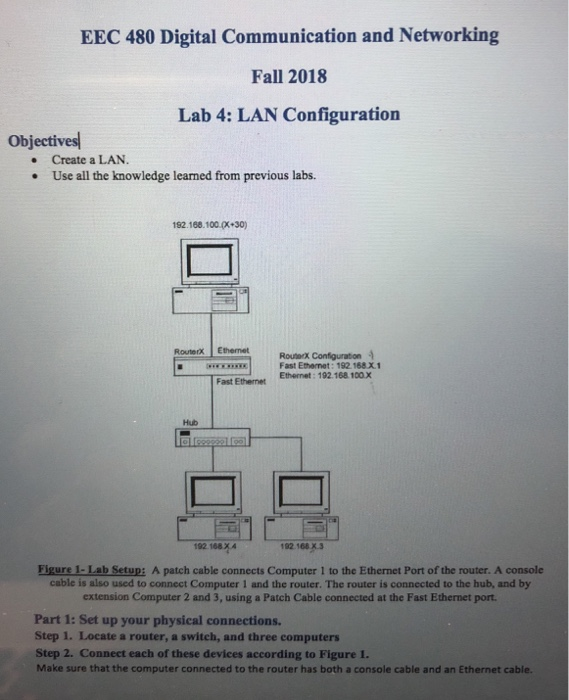
EEC 480 Digital Communication and Networking Fall 2018 Lab 4: LAN Configuration Objectives . Create a LAN. . Use all the knowledge leaned from previous labs. 192.168.100.px+30) RouterX Ethemet Routerx Configuration W Fast Ethernet: 192 168x1 Fast Ethernet Ethenet: 192.168 100.x Hub 192 168 x4 192.168 X.3 Figure 1-Lab Setup: A patch cable connects Computer 1 to the Ethernet Port of the router. A console cable is also used to connect Computer 1 and the router. The router is connected to the hub, and by extension Computer 2 and 3, using a Patch Cable connected at the Fast Ethernet port Part 1: Set up your physical connections. Step 1. Locate a router, a switch, and three computers Step 2. Connect each of these devices according to Figure 1. Make sure that the computer connected to the router has both a console cable and an Ethernet cable. EEC 480 Digital Communication and Networking Fall 2018 Lab 4: LAN Configuration Objectives . Create a LAN. . Use all the knowledge leaned from previous labs. 192.168.100.px+30) RouterX Ethemet Routerx Configuration W Fast Ethernet: 192 168x1 Fast Ethernet Ethenet: 192.168 100.x Hub 192 168 x4 192.168 X.3 Figure 1-Lab Setup: A patch cable connects Computer 1 to the Ethernet Port of the router. A console cable is also used to connect Computer 1 and the router. The router is connected to the hub, and by extension Computer 2 and 3, using a Patch Cable connected at the Fast Ethernet port Part 1: Set up your physical connections. Step 1. Locate a router, a switch, and three computers Step 2. Connect each of these devices according to Figure 1. Make sure that the computer connected to the router has both a console cable and an Ethernet cable
Step by Step Solution
There are 3 Steps involved in it

Get step-by-step solutions from verified subject matter experts
 Study Help