



Question: e.g., 25 or 3.6%1.4 ). Only 5 operations are supported: addition (+), subtraction (-), division (/), nultiplication (, or x ) and modulo (%). We
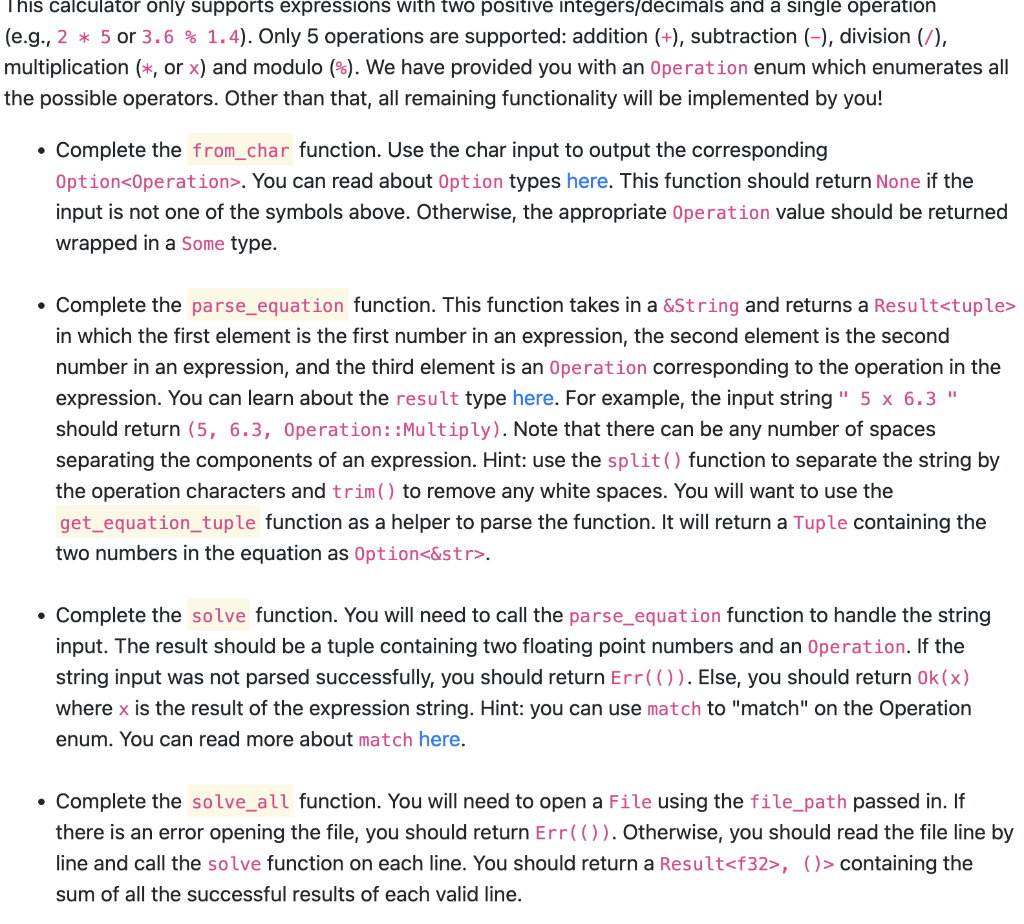
e.g., 25 or 3.6%1.4 ). Only 5 operations are supported: addition (+), subtraction (-), division (/), nultiplication (, or x ) and modulo (\%). We have provided you with an 0peration enum which enumerates all he possible operators. Other than that, all remaining functionality will be implemented by you! - Complete the from_char function. Use the char input to output the corresponding option. You can read about Option types here. This function should return None if the input is not one of the symbols above. Otherwise, the appropriate 0peration value should be returned wrapped in a Some type. - Complete the parse_equation function. This function takes in a \&String and returns a Result in which the first element is the first number in an expression, the second element is the second number in an expression, and the third element is an 0peration corresponding to the operation in the expression. You can learn about the result type here. For example, the input string " 56.3 " should return (5, 6.3, Operation: :Multiply). Note that there can be any number of spaces separating the components of an expression. Hint: use the split ( ) function to separate the string by the operation characters and trim() to remove any white spaces. You will want to use the get_equation_tuple function as a helper to parse the function. It will return a Tuple containing the two numbers in the equation as 0ption. - Complete the solve function. You will need to call the parse_equation function to handle the string input. The result should be a tuple containing two floating point numbers and an 0peration. If the string input was not parsed successfully, you should return Err(()). Else, you should return 0k(x) where x is the result of the expression string. Hint: you can use match to "match" on the Operation enum. You can read more about match here. - Complete the function. You will need to open a File using the file_path passed in. If there is an error opening the file, you should return Err(()). Otherwise, you should read the file line by line and call the solve function on each line. You should return a Result
Step by Step Solution
There are 3 Steps involved in it

Get step-by-step solutions from verified subject matter experts