







Question: ELEC2220 Computer Systems Spring 2021 Homework # 3 (Submit a single PDF file online (Canvas) before 10:50 a.m. on 2/12/21) EQU 1. Create a Code
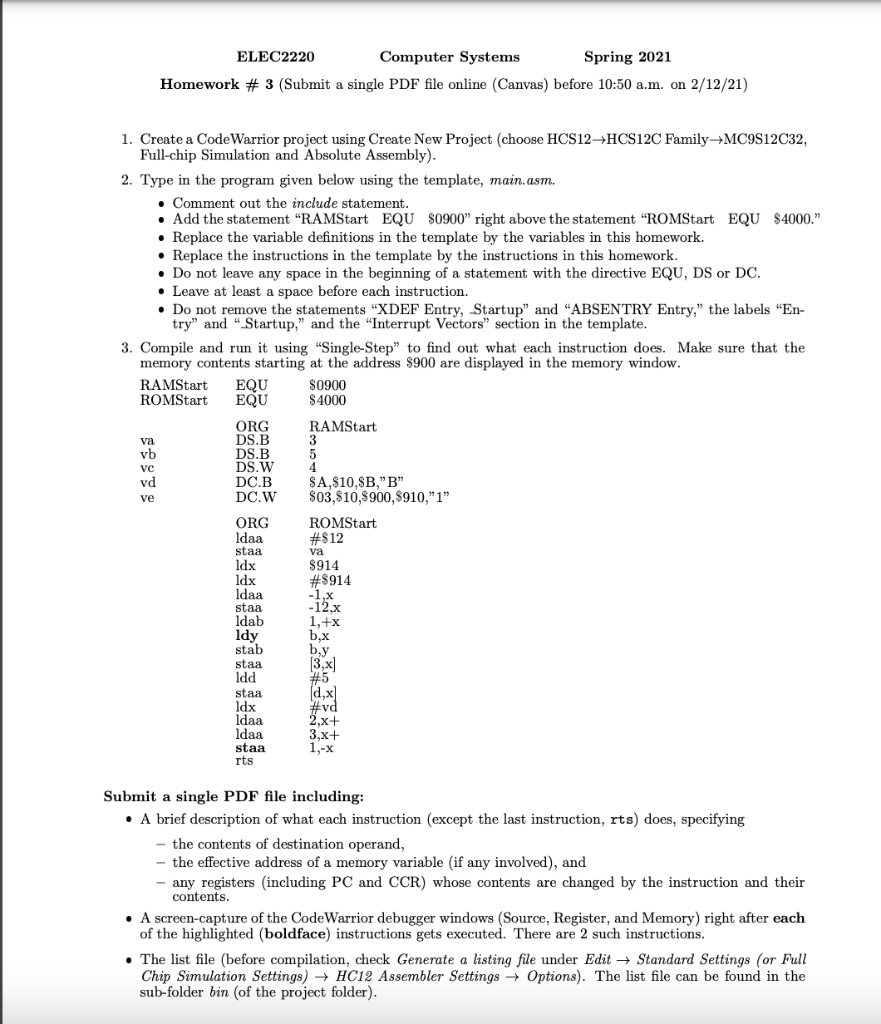
ELEC2220 Computer Systems Spring 2021 Homework # 3 (Submit a single PDF file online (Canvas) before 10:50 a.m. on 2/12/21) EQU 1. Create a Code Warrior project using Create New Project (choose HCS12HCS12C Family+MC9S12C32, Full-chip Simulation and Absolute Assembly). 2. Type in the program given below using the template, main.asm. . Comment out the include statement. Add the statement "RAMStart EQU $0900 right above the statement "ROMStart EQU $4000. Replace the variable definitions in the template by the variables in this homework. Replace the instructions in the template by the instructions in this homework. Do not leave any space in the beginning of a statement with the directive EQU, DS or DC. Leave at least a space before each instruction. Do not remove the statements "XDEF Entry, Startup" and "ABSENTRY Entry," the labels "En- try" and "Startup," and the "Interrupt Vectors" section in the template. 3. Compile and run it using "Single-Step to find out what each instruction does. Make sure that the memory contents starting at the address $900 are displayed in the memory window. RAMStart S0900 ROMStart EQU $4000 ORG RAMStart DS.B 3 DS.B DS.W 4 vd DC.B SA,$10.SB,"B" DC.W $03,$10,$900,$910,"1" ORG ROMStart ldaa #$12 staa va Idx $914 ldx #$914 Idaa -1,x staa -12x ldab 1,+x Idy b,x stab by staa [3x] ldd #5 staa Idx ldaa 2,x+ ldaa 3,x+ staa 1,-X rts va vb VC ve dx #vd Submit a single PDF file including: A brief description of what each instruction (except the last instruction, rts) does, specifying the contents of destination operand, the effective address of a memory variable (if any involved), and any registers (including PC and CCR) whose contents are changed by the instruction and their contents. A screen-capture of the CodeWarrior debugger windows (Source, Register, and Memory) right after each of the highlighted (boldface) instructions gets executed. There are 2 such instructions. The list file (before compilation, check Generate a listing file under Edit + Standard Settings (or Full Chip Simulation Settings) HC12 Assembler Settings Options). The list file can be found in the sub-folder bin (of the project folder). ELEC2220 Computer Systems Spring 2021 Homework # 3 (Submit a single PDF file online (Canvas) before 10:50 a.m. on 2/12/21) EQU 1. Create a Code Warrior project using Create New Project (choose HCS12HCS12C Family+MC9S12C32, Full-chip Simulation and Absolute Assembly). 2. Type in the program given below using the template, main.asm. . Comment out the include statement. Add the statement "RAMStart EQU $0900 right above the statement "ROMStart EQU $4000. Replace the variable definitions in the template by the variables in this homework. Replace the instructions in the template by the instructions in this homework. Do not leave any space in the beginning of a statement with the directive EQU, DS or DC. Leave at least a space before each instruction. Do not remove the statements "XDEF Entry, Startup" and "ABSENTRY Entry," the labels "En- try" and "Startup," and the "Interrupt Vectors" section in the template. 3. Compile and run it using "Single-Step to find out what each instruction does. Make sure that the memory contents starting at the address $900 are displayed in the memory window. RAMStart S0900 ROMStart EQU $4000 ORG RAMStart DS.B 3 DS.B DS.W 4 vd DC.B SA,$10.SB,"B" DC.W $03,$10,$900,$910,"1" ORG ROMStart ldaa #$12 staa va Idx $914 ldx #$914 Idaa -1,x staa -12x ldab 1,+x Idy b,x stab by staa [3x] ldd #5 staa Idx ldaa 2,x+ ldaa 3,x+ staa 1,-X rts va vb VC ve dx #vd Submit a single PDF file including: A brief description of what each instruction (except the last instruction, rts) does, specifying the contents of destination operand, the effective address of a memory variable (if any involved), and any registers (including PC and CCR) whose contents are changed by the instruction and their contents. A screen-capture of the CodeWarrior debugger windows (Source, Register, and Memory) right after each of the highlighted (boldface) instructions gets executed. There are 2 such instructions. The list file (before compilation, check Generate a listing file under Edit + Standard Settings (or Full Chip Simulation Settings) HC12 Assembler Settings Options). The list file can be found in the sub-folder bin (of the project folder)
Step by Step Solution
There are 3 Steps involved in it

Get step-by-step solutions from verified subject matter experts
 Study Help