







Question: Elena complains that the recursive newton function in Project 2 includes an extra argument for the estimate. The functions users should not have to provide
Elena complains that the recursive newton function in Project 2 includes an extra argument for the estimate. The functions users should not have to provide this value, which is always the same, when they call this function. Modify the definition of the function so that it uses a keyword argument with the appropriate default value, and call the function without a second argument to demonstrate that it solves this problem.
An example of the program input and output is shown below:
Enter a positive number or enter/return to quit: 2 The program's estimate is 1.4142135623746899 Python's estimate is 1.4142135623730951 Enter a positive number or enter/return to quit
Current Code:
def newtonSquare(x, estimate=1.0): if abs(x-estimate ** 2)
def main(): while(True): num = input('Enter a positive number or enter/return to quit: ') if num.strip() == '' or num == '/return': break
print() # note below, we are not passing estimate's value print('%-35s%s' % ('The Program\'s estimate is', str(newtonSquare(int(num))))) print('%-35s%s ' % ('Python\'s estimate is', str(int(num)**0.5)))
main()
Im getting error: 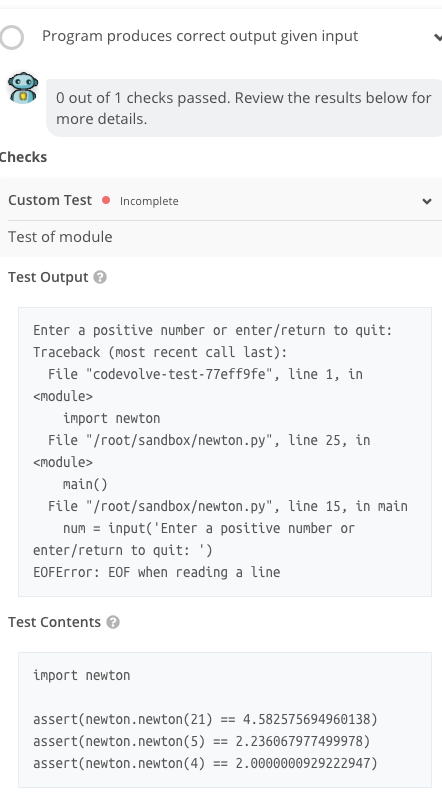
Program produces correct output given input 0 out of 1 checks passed. Review the results below for more details Checks Custom Test Incomplete Test of module Test Output Enter a positive number or enter/return to quit: Traceback (nost recent call last): File "codevolve-test-77eff9fe", line 1, in
Step by Step Solution
There are 3 Steps involved in it

Get step-by-step solutions from verified subject matter experts
 Study Help