







Question: EM3:Modifying and Formatted Vector Output (40 points) Trogram according to the following specifications. Un Command Window output After completing the program, the result of ecuting
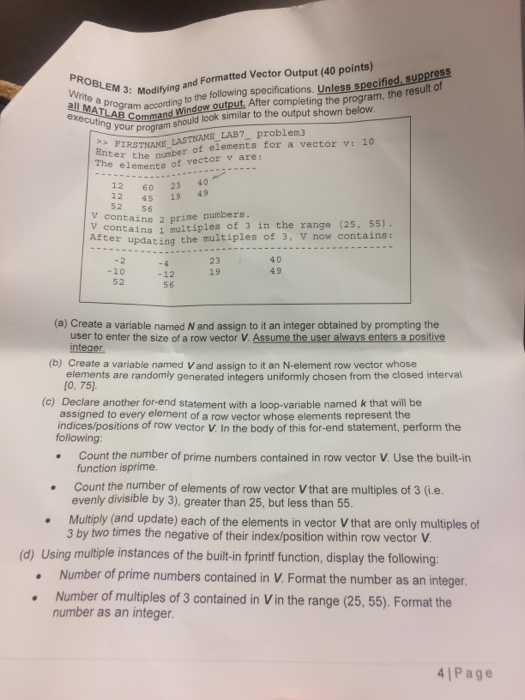
EM3:Modifying and Formatted Vector Output (40 points) Trogram according to the following specifications. Un Command Window output After completing the program, the result of ecuting oumam should look similar to the output shown below PIRSTNANE LASTNAME LAB7 problem3 Enter the number of elements for a vector v: 10 The elementa of vector v are: 60 23 40 4S 19 49 52 56 V containn 2 prine y containg 1 mutpe of 3 in the range (25, 55) After updating the multiples of 3, v now contains : 23 19 4 0 49 -20 52 12 56 (a) Create a variable named N and assign to it an integer obtained by prompting the user to enter the size of a row vector V integer (b) Create a variable named V and assign to it an N-element row vector whose elements are randomly generated integers uniformly chosen from the closed interval [0, 75] (c) Declare another for-end statement with a loop-variable named k that will be assigned to every element of a row vector whose elements represent the indices/positions of row vector V. In the body of this for-end statement, perform the following Count the number of prime numbers contained in row vector V. Use the built-in function isprime. evenly divisible by 3), greater than 25, but less than 55. Multiply (and update) each of the elements in vector V that are only multiples of Count the number of elements of row vector V that are multiples of 3 (i.e. 3 by two times the negative of their index/position within row vector V (d) Using multiple instances of the built-in fprintf function, display the following: .Number of prime numbers contained in V. Format the number as an integer .Number of multiples of 3 contained in Vin the range (25, 55). Format the number as an integer. 41Page
Step by Step Solution
There are 3 Steps involved in it

Get step-by-step solutions from verified subject matter experts
 Study Help