



Question: Employee class public class Employee extends Person { // An Employee IS A Person. It contains all of the data from Person, but a //
Employee class
public class Employee extends Person { // An Employee IS A Person. It contains all of the data from Person, but a // little bit more. private long salary; /* YOUR CODE HERE * It would make sense to record the company that this person * works for as well. Under this comment, declare a new String field called * "employer", and update the constructor below so that we can set it when * we construct a new Employee object. * * Make your new employer parameter the LAST parameter in the constructor. */ public Employee(String name, int age, long salary /* fourth param here */) { super(name, age); this.salary = salary; /* ... more code here! */ } public long getSalary() { return salary; } public void setSalary(long salary) { this.salary = salary; } // Getters and setters for the new "employer" field. public String getEmployer() { return employer; } public void setEmployer(String employer) { this.employer = employer; } /* YOUR CODE HERE * Create a new toString that prints in the following format: * " is years old. They make $ a year at ." */ //NOTE: this main will not run in zyLabs, but you can use this for testing in an IDE public static void main(String[] args) { Employee e = new Employee("Samir", 28, 120000, "Initech"); System.out.println(e.toString()); } }
Manager class:
// Just like an Employee is a specific kind of Person, a Manager is a specific // kind of Employee. public class Manager extends Employee { /* YOUR CODE HERE * At the moment, this constructor is causing errors. * What's wrong with it? Fix it by adding some code. */ public Manager(String name, int age, long salary, String employer) { /* ... fix me! */ } /* YOUR CODE HERE * This function will properly compile, but it's not very helpful. * We should be putting the name of the person, their company, their age, * etc. instead of just blank spaces and zeros. Fix this toString by * putting relevant information into the string. */ public String toString() { return " " + " is a manager at " + " " + " who is " + 0 + " and makes $" + getSalary() + " a year."; } //NOTE: this main will not run in zyLabs, but you can use this for testing in an IDE public static void main(String[] args) { Manager m = new Manager("Liang", 41, 4_000_000_000L, "Microsoft"); // Perhaps it's unusual that anyone is being paid a salary of four // billion dollars a year, but it's just an example. System.out.println(m.toString()); } }
Person class:
public class Person { // Every person needs, minimally, a name and an age. private String name; private int age; // We can build a person with a specific name and age with this constructor. public Person(String name, int age) { this.name = name; this.age = age; } // Since the fields for name and age are private, we need getters and // setters if we want people to be able to change and access them. public String getName() { return this.name; } public int getAge() { return age; } /* YOUR CODE HERE * Create setters for name and age somewhere below this comment. * Make sure they are called "setName" and "setAge". * What should they return? What should their parameters be? */ public void setName(String name) { this.name=name; } public void setAge(int age) { this.age=age; } public String toString() { return String.format("%s is %d years old.", name, age); } //NOTE: this main will not run in zyLabs, but you can use this for testing in an IDE public static void main(String[] args) { Person jim = new Person("Jim", 22); System.out.println(jim.toString()); jim.setName("John"); jim.setAge(30); System.out.println(jim.toString()); } }
Polymorphism class:
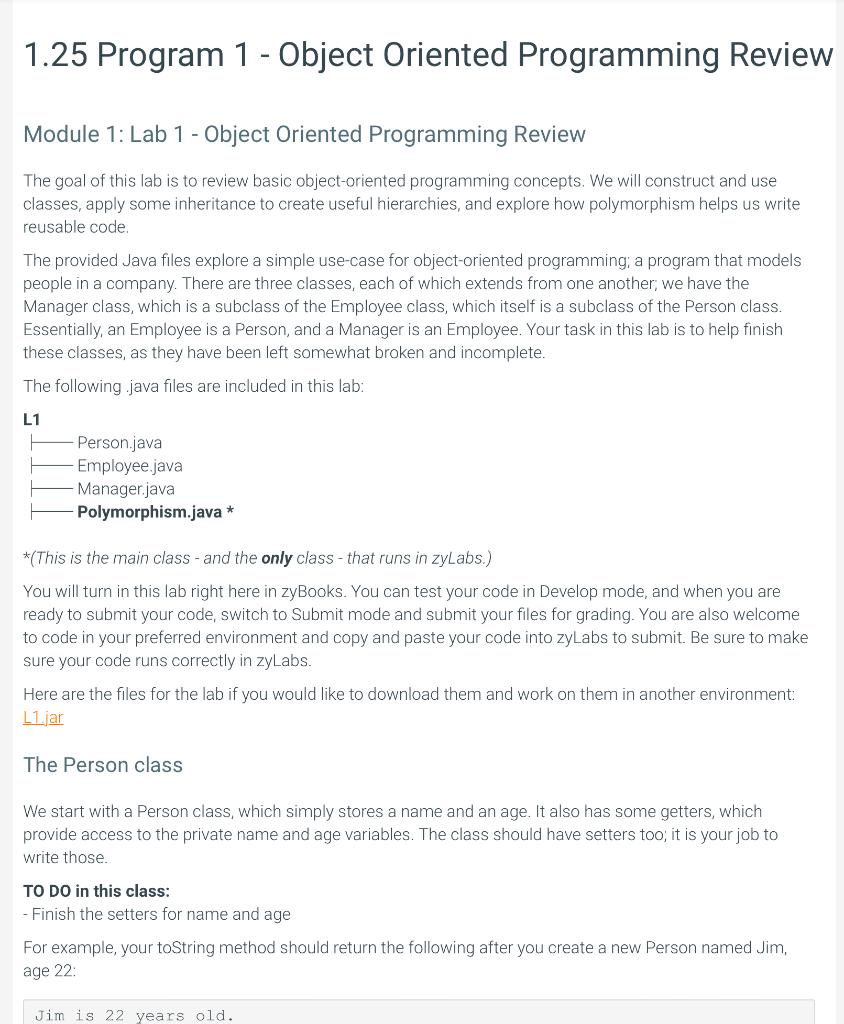
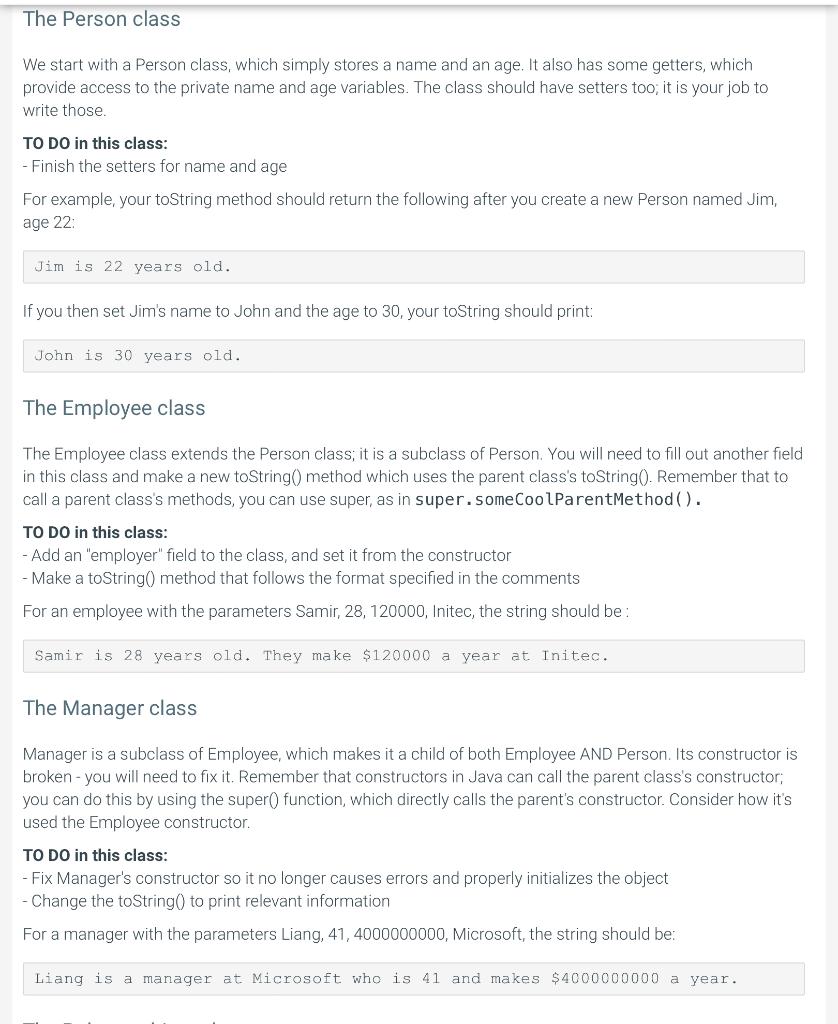
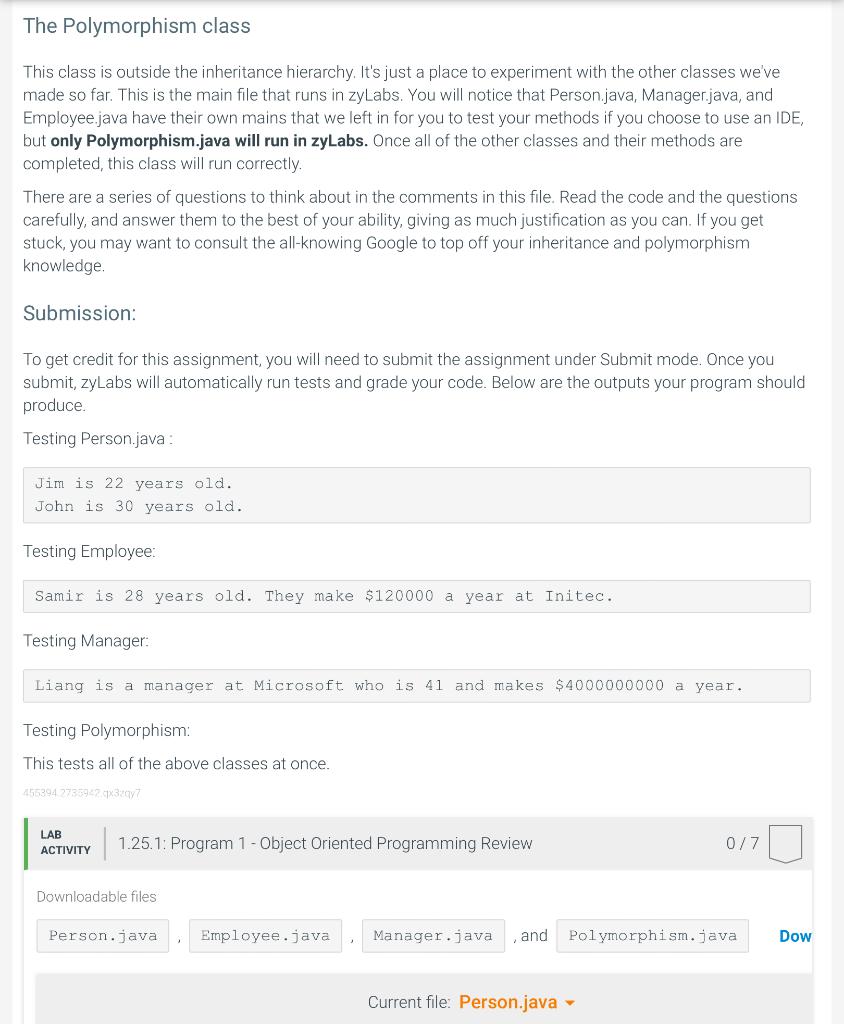
import java.util.ArrayList; public class Polymorphism { public static void main(String[] args) { ArrayList people = new ArrayList(); Person jennifer = new Person("Jennifer", 40); Person michael = new Employee("Michael", 56, 370_000, "Dunder Mifflin"); Person david = new Manager("David", 39, 13_000_000, "Dunder Mifflin"); people.add(jennifer); people.add(michael); people.add(david); for (int i = 0; i 1.25 Program 1 - Object Oriented Programming Review Module 1: Lab 1 - Object Oriented Programming Review The goal of this lab is to review basic object-oriented programming concepts. We will construct and use classes, apply some inheritance to create useful hierarchies, and explore how polymorphism helps us write reusable code. The provided Java files explore a simple use-case for object-oriented programming; a program that models people in a company. There are three classes, each of which extends from one another; we have the Manager class, which is a subclass of the Employee class, which itself is a subclass of the Person class. Essentially, an Employee is a Person, and a Manager is an Employee. Your task in this lab is to help finish these classes, as they have been left somewhat broken and incomplete. The following .java files are included in this lab: L1 Person.java Employee.java Manager.java Polymorphism.java * *(This is the main class - and the only class - that runs in zyLabs.) You will turn in this lab right here in zyBooks. You can test your code in Develop mode, and when you are ready to submit your code, switch to Submit mode and submit your files for grading. You are also welcome to code in your preferred environment and copy and paste your code into zyLabs to submit. Be sure to make sure your code runs correctly in zyLabs. Here are the files for the lab if you would like to download them and work on them in another environment: L1.jar The Person class We start with a Person class, which simply stores a name and an age. It also has some getters, which provide access to the private name and age variables. The class should have setters too; it is your job to write those. TO DO in this class: - Finish the setters for name and age For example, your toString method should return the following after you create a new Person named Jim, age 22: We start with a Person class, which simply stores a name and an age. It also has some getters, which provide access to the private name and age variables. The class should have setters too; it is your job to write those. TO DO in this class: - Finish the setters for name and age For example, your toString method should return the following after you create a new Person named Jim, age 22: Jim is 22 years old. If you then set Jim's name to John and the age to 30 , your toString should print: John is 30 years old. The Employee class The Employee class extends the Person class; it is a subclass of Person. You will need to fill out another field in this class and make a new toString() method which uses the parent class's toString(). Remember that to call a parent class's methods, you can use super, as in super. someCoolParentMethod( ). TO DO in this class: - Add an "employer" field to the class, and set it from the constructor - Make a toString() method that follows the format specified in the comments For an employee with the parameters Samir, 28, 120000, Initec, the string should be : Samir is 28 years old. They make $120000 a year at Initec. The Manager class Manager is a subclass of Employee, which makes it a child of both Employee AND Person. Its constructor is broken - you will need to fix it. Remember that constructors in Java can call the parent class's constructor; you can do this by using the super() function, which directly calls the parent's constructor. Consider how it's used the Employee constructor. TO DO in this class: - Fix Manager's constructor so it no longer causes errors and properly initializes the object - Change the toString() to print relevant information For a manager with the parameters Liang, 41, 4000000000, Microsoft, the string should be: Liang is a manager at Microsoft who is 41 and makes $4000000000 a year. The Polymorphism class This class is outside the inheritance hierarchy. It's just a place to experiment with the other classes we've made so far. This is the main file that runs in zyLabs. You will notice that Person.java, Manager.java, and Employee.java have their own mains that we left in for you to test your methods if you choose to use an IDE, but only Polymorphism.java will run in zyLabs. Once all of the other classes and their methods are completed, this class will run correctly. There are a series of questions to think about in the comments in this file. Read the code and the questions carefully, and answer them to the best of your ability, giving as much justification as you can. If you get stuck, you may want to consult the all-knowing Google to top off your inheritance and polymorphism knowledge. Submission: To get credit for this assignment, you will need to submit the assignment under Submit mode. Once you submit, zyLabs will automatically run tests and grade your code. Below are the outputs your program should produce. Testing Person.java : Jim is 22 years old. John is 30 years old. Testing Employee: Samir is 28 years old. They make $120000 a year at Initec. Testing Manager: Liang is a manager at Microsoft who is 41 and makes $4000000000 a year. Testing Polymorphism: This tests all of the above classes at once. \begin{tabular}{l|l} LAB \\ ACrivity & 1.25.1: Program 1 - Object Oriented Programming Review \end{tabular} 0/7 Downloadable files , and Dow Current file: Person.java Step by Step Solution
There are 3 Steps involved in it
1 Expert Approved Answer
Step: 1 Unlock

Question Has Been Solved by an Expert!
Get step-by-step solutions from verified subject matter experts
Step: 2 Unlock
Step: 3 Unlock