







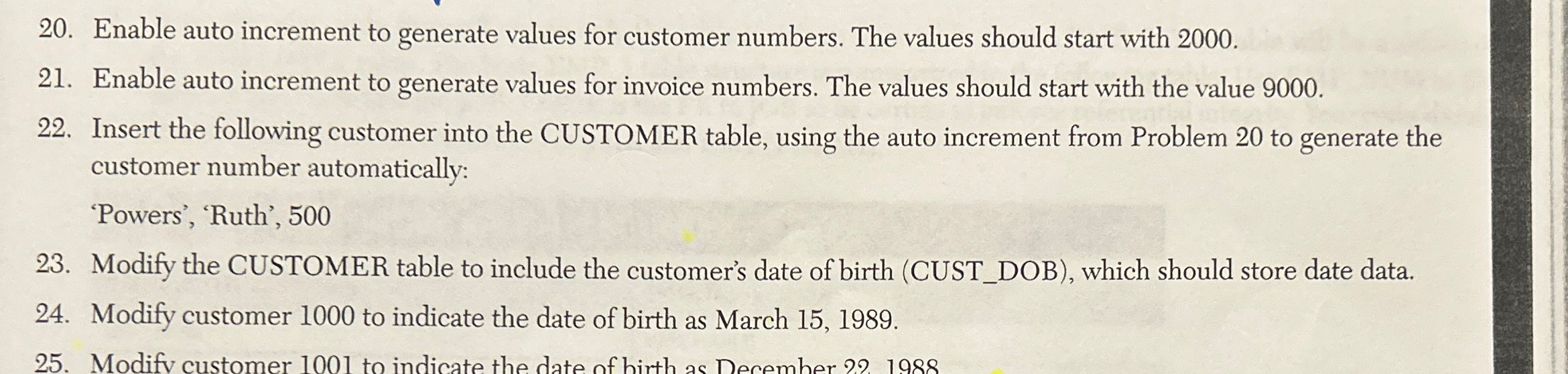
Question: Enable auto increment to generate values for customer numbers. The values should start with 2 0 0 0 . Enable auto increment to generate values
Enable auto increment to generate values for customer numbers. The values should start with
Enable auto increment to generate values for invoice numbers. The values should start with the value
Insert the following customer into the CUSTOMER table, using the auto increment from Problem to generate the customer number automatically:
'Powers', 'Ruth',
Modify the CUSTOMER table to include the customer's date of birth CUSTDOB which should store date data.
Modify customer to indicate the date of birth as March
Step by Step Solution
There are 3 Steps involved in it
1 Expert Approved Answer
Step: 1 Unlock

Question Has Been Solved by an Expert!
Get step-by-step solutions from verified subject matter experts
Step: 2 Unlock
Step: 3 Unlock
 Study Help