







Question: End Result: Console Objective The application prompts the user to enter a loan amount and an interest rate. The application calculates the interest amount and
End Result: Console 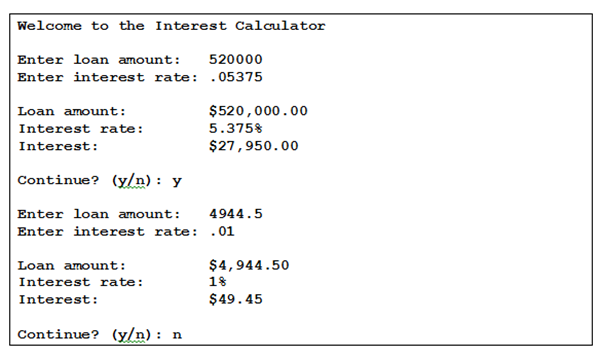
Objective
The application prompts the user to enter a loan amount and an interest rate.
The application calculates the interest amount and formats the loan amount, interest rate, and interest amount. Then, it displays the formatted results to the user.
The application prompts the user to continue.
Directions:
1. Create a new application and name it LastName_Assignment02.
2. Create the Scanner object.
3. Get the loan information from the end user by using the System class.
4. Calculate the interest amount by using the BigDecimal class to make sure that all calculations are accurate.
5. Format the interest rate, interest amount and loan amount and interest by using the NumberFormat abstract base class. It should round the interest thats calculated to two decimal places, rounding up if the third decimal place is five or greater. The value for the formatted interest rate should allow for up to 3 decimal places.
6. Display the results by using the System class.
7. Assume that the user will enter valid double values for the loan amount and interest rate.
8. The application should continue only if the user enters y or Y to continue.
Welcome to the Interest Calculator Enter loan amount: 520000 Enter interest rate: .05375 Loan amount: Interest rate: Interest: $520, 000.00 5375% $27,950.00 Continue? (y): y Enter loan amount: 4944.5 Enter interest rate: .01 Loan amount: Interest rate: Interest: $4,944.50 1% $49.45 Continue? (y): n
Step by Step Solution
There are 3 Steps involved in it

Get step-by-step solutions from verified subject matter experts
 Study Help